Do Small Businesses Need a Zoho One Implementation Partner?
- A small business does not always need a Zoho One implementation partner.
- A simple setup with a few users and basic processes may be manageable without outside help.
- A partner can become valuable when you need data migration, automation, integrations, customization, or multiple Zoho apps working together.
- The right decision depends more on your setup complexity than your company size.
- Before hiring a Zoho One implementation partner, understand exactly what work you need help with.
Not always. A small business can set up Zoho One without a partner if the requirements are simple and the team has time to learn the system. However, outside help can make sense when the setup involves multiple apps, data migration, automation, integrations, or custom business processes.
The key question isn’t “How big is my company?” - it’s “How complex is the Zoho One setup I need?
A five-person company with a simple sales process may be able to manage Zoho One on its own.
A ten-person company moving data from several systems and connecting sales, finance, and support may need much more help.
According to Zoho, Zoho One brings a large collection of business applications together under one suite.
That gives small businesses flexibility, but it also means deciding how those apps should work together.
What Is a Zoho One Implementation Partner?
A Zoho One implementation partner is a company or consultant that helps businesses plan, configure, customize, and roll out Zoho One.
The work may include:
- Understanding your business process
- Selecting the right Zoho applications
- Configuring modules and fields
- Migrating existing data
- Creating workflows and automation
- Connecting other software
- Training your employees
The level of help can vary.
Some businesses only need help with the initial setup. Others need more complete setup assistance across several departments and applications.
Can a Small Business Set Up Zoho One Without a Partner?
Yes, a small business can set up Zoho One without a partner if the requirements are simple. A basic setup with a small team, standard sales process, and limited data can often be handled internally. The need for a partner usually increases when multiple apps, automation, migration, or integrations are involved.
DIY may be a reasonable option if:
- You have a small team.
- You only need one or two core apps.
- Your business process is straightforward.
- You have clean data.
- You are comfortable learning the software.
- You have time to test the setup.
For example, imagine a four-person consulting company that only needs Zoho CRM to track leads and deals.
The company may be able to start with the standard CRM features and configure the system internally.
That is very different from a 15-person business trying to connect CRM, Books, Desk, Projects, and several third-party applications.
When Does a Small Business Need a Zoho One Implementation Partner?
A partner becomes more useful when mistakes in the setup could create bigger problems later.
You may want outside help if you need:
Data Migration
Moving contacts, customers, deals, invoices, or other business records from another system can take time.
The data may need to be cleaned, matched, and checked before it is imported.
For example, importing 500 clean contacts from a spreadsheet is very different from moving years of customer data from several disconnected systems.
Workflow Automation
Automation can save time, but poorly designed workflows can also create problems.
If your business has approval processes, automatic notifications, task assignments, or complex sales stages, an experienced professional may be useful.
Multiple Zoho Apps
Zoho One becomes more complex when several apps need to share information.
For example, your sales team may use CRM while finance uses Books and customer support uses Desk.
The question is not simply whether each app works. The question is whether they work together in a way that makes sense for your business.
Third-Party Integrations
You may need Zoho to connect with:
- Your website
- Payment gateways
- ERP software
- Marketing platforms
- Other business applications
These connections often require testing and maintenance.
Custom Business Processes
Every business does not work in the same way.
If your sales process, approval process, or customer journey is unusual, a standard setup may not be enough.
Is It Better to Start With DIY and Get Help Later?
Sometimes, yes.
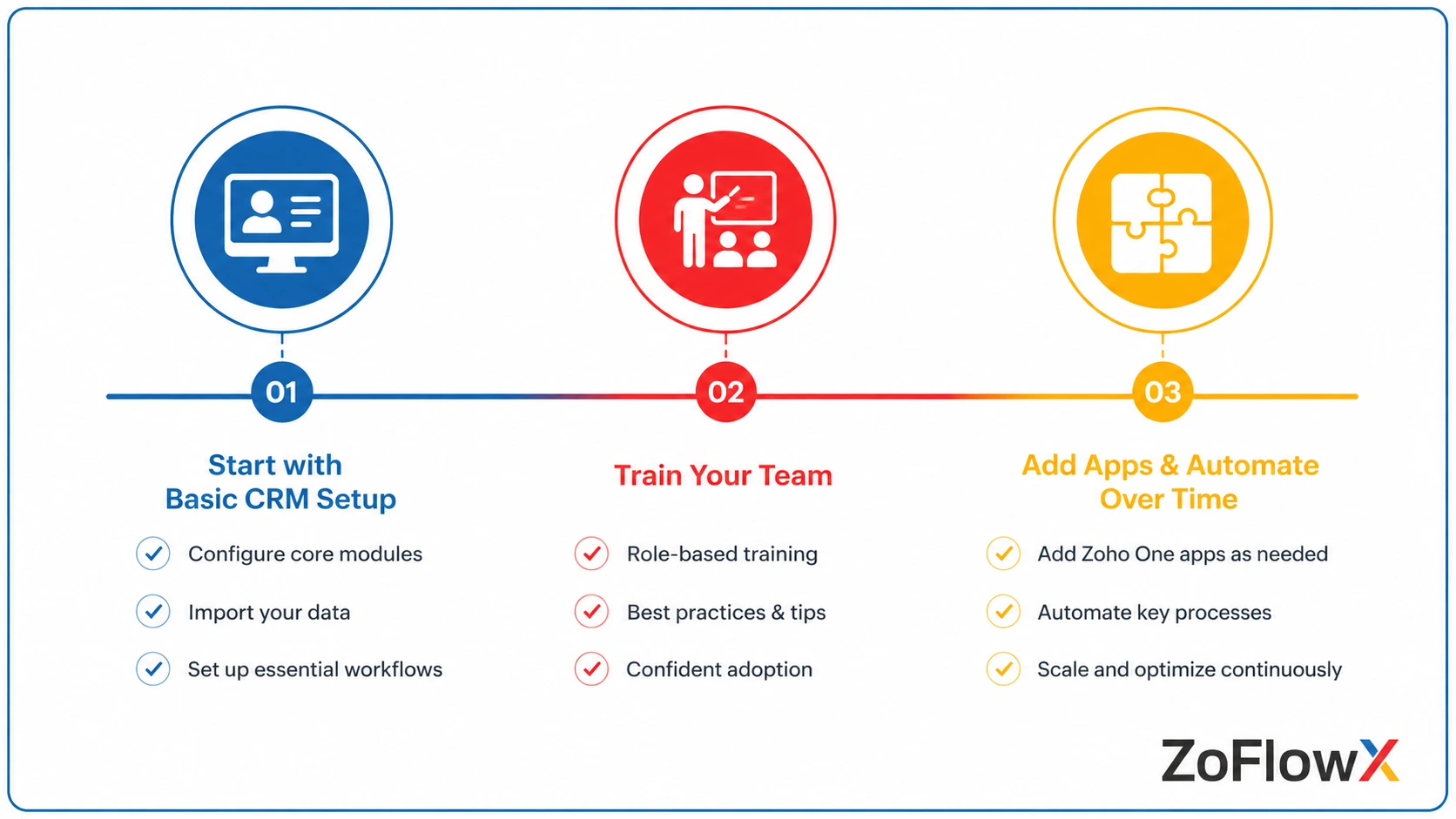
A phased approach can work well for a small business.
You might begin with one important app, learn how your team uses it, and then expand gradually.
For example:
- Start with Zoho CRM.
- Set up your basic sales process.
- Train the team.
- Identify gaps.
- Add automation or other apps later.
This approach can reduce the initial cost.
If your requirements grow later, you can compare your DIY approach with a professional option before deciding whether outside help is worth the cost.
There is one important warning, though. If the first setup is poorly planned, fixing it later can take more time than setting it up properly from the beginning.
The best approach depends on how much complexity you expect in the first phase.
What Are the Risks of Setting Up Zoho One Without Professional Help?
DIY implementation is not necessarily a bad idea.
The risk comes from building a system without thinking about how your business may need to use it in the future.
Common problems include:
- Creating too many unnecessary fields
- Building confusing sales processes
- Importing poor-quality data
- Creating automation that conflicts with other workflows
- Giving employees incorrect access
- Connecting apps without proper testing
Imagine a small business that starts with a simple CRM setup.
Six months later, it added marketing automation, customer support, and finance tools. If the original CRM structure was poorly planned, the business may need to spend time cleaning up the system.
That does not mean you should always hire a partner.
It simply means you should understand the possible consequences before deciding.
How Do You Know if Your Zoho One Setup Is Too Complex for DIY?
Your Zoho One setup may be too complex for DIY if it involves multiple connected apps, large data migration, custom automation, third-party integrations, or several departments. In these situations, outside help may reduce mistakes and save time, even if your business itself is relatively small.
Ask yourself:
- Are we moving data from another CRM or business system?
- Do several departments need to use Zoho?
- Do we need apps to share information automatically?
- Do we require custom workflows?
- Are we connecting Zoho with other software?
- Do we have someone internally who can manage the setup?
- What happens if the implementation is delayed or configured incorrectly?
If you answer "yes" to several of these questions, it may be worth discussing the project with experienced certified experts before you decide.
What Should a Small Business Look for in a Zoho One Partner?
Not every small business needs the same type of support.
Before hiring a partner, understand what you actually need.
Ask questions such as:
- Which Zoho apps do we really need?
- What work will the partner perform?
- What will be configured for us?
- How will our existing data be handled?
- Who will train our employees?
- What documentation will we receive?
- What support is available after the project?
Be careful about choosing based only on the lowest price.
A cheaper quote may simply include less work.
For example, one partner may only configure the software, while another may include process planning, data migration, automation, training, and post-launch support.
Always compare the scope, not just the number at the bottom of the quotation.
How Much Does a Zoho One Implementation Partner Cost?
The cost depends on what needs to be implemented.
A simple setup for a small team may require much less work than a multi-app rollout with migration and customization.
The main factors usually include:
- Number of Zoho apps
- Number of users
- Data migration requirements
- Automation
- Customization
- Integrations
- Training
- Ongoing support
A useful way to evaluate the cost is to compare it with the time and risk involved in doing the work internally.
For example, paying for outside help may not make sense for a very simple CRM setup.
But if your employees spend weeks trying to configure multiple systems and still need to rebuild the setup later, DIY may not actually be the cheaper option.
Is a Zoho One Partner Worth It for a Small Business?
A Zoho One implementation partner can be worth the cost when the business needs more than a basic setup.
The value is not simply in having someone install the software.
It comes from helping you structure the system properly, avoid unnecessary work, and make sure your team understands how to use it.
However, small businesses should not assume they need a large implementation project just because they are buying Zoho One.
Start by understanding the problem you want Zoho to solve.
Then decide whether your team can handle the setup internally or whether outside expertise would save time and reduce risk.
What Is the Best Way for a Small Business to Decide?
A simple way to make the decision is to look at your actual requirements.
DIY May Be Enough If:
- You have a small team.
- You only need a few basic apps.
- Your process is straightforward.
- Your data is clean.
- Someone has time to manage the setup.
Consider a Partner If:
- You are implementing several connected apps.
- You need to migrate important business data.
- Your workflows are complex.
- You need third-party integrations.
- Several departments will use the system.
- You do not have internal Zoho expertise.
Your company does not need to be large to benefit from implementation services.
Conclusion: Should Your Small Business Hire a Zoho One Implementation Partner?
A Zoho One implementation partner for a small business can be useful, but it is not always necessary.
If your setup is simple, your team has time to learn, and you only need a few basic functions, starting on your own may be a sensible choice.
If you are dealing with multiple apps, important data, automation, integrations, or custom processes, outside help may save time and prevent expensive mistakes later.
The best decision is not to choose DIY or a partner based on fear. Understand the work involved first, then choose the level of help that fits your business.
If you want to discuss your Zoho One requirements before making a decision, contact ZoFlowX at +91 8190009222 or info@zoflowx.com.
A clear plan before implementation can help you spend your budget where it matters and make a confident decision about Zoho One.
Choose the right approach before small setup mistakes become expensive problems to fix.
Don't Guess Whether You Need Expert Help
Find out what your Zoho One setup really requires before small mistakes turn into expensive rework.
DISCUSS MY ZOHO ONE SETUPFrequently Asked Questions
Do small businesses need a Zoho One implementation partner?
Not always. A small business with a simple setup may be able to configure Zoho One internally. A partner can become useful when the implementation involves multiple apps, data migration, automation, integrations, or custom processes.
Can I set up Zoho One myself?
Yes. Zoho One can be set up internally, especially for smaller and simpler requirements. The amount of outside help you need depends on your team's experience and the complexity of the setup.
When should I hire a Zoho One implementation partner?
Consider hiring a partner when you need help with data migration, automation, multiple connected apps, integrations, customization, or employee training.
Is Zoho One difficult for a small business to implement?
It depends on what you are trying to do. A basic setup can be straightforward, while a multi-app implementation across sales, finance, support, and other departments requires more planning.
Is DIY Zoho One implementation cheaper?
The upfront cost can be lower because you are not paying an implementation partner. However, internal time, mistakes, and future rework should also be considered when comparing costs.
What should I ask a Zoho One implementation partner?
Ask what work is included, how data migration will be handled, what apps will be configured, how training works, what documentation you will receive, and what support is available after launch.
Can I start Zoho One myself and hire a partner later?
Yes. Some businesses start with a simple setup and bring in outside help when their requirements become more complex.
How do I know whether my Zoho One setup needs professional help?
If your project involves multiple connected apps, large data migration, custom workflows, third-party integrations, or several departments, professional help may be worth considering.