CRM Benefits for Small Businesses: 15 Ways CRM Supports Growth
- CRM keeps customer information, conversations, and activities in one place.
- It helps small teams manage leads and follow-ups more consistently.
- CRM reduces repetitive manual work and improves team productivity.
- Better customer data helps businesses improve retention and communication.
- CRM gives business owners clearer visibility into sales and customer activity.
- A well-organized CRM can help a small business grow without losing control of its processes.
As a small business grows, managing customers can become harder. Leads may come from different channels, conversations can get scattered across emails and calls, and follow-ups can easily be missed.
A CRM gives the team one place to organize customer information, track interactions, manage follow-ups, and keep important details accessible.
Here are 15 practical CRM benefits for small businesses and how they can help with everyday work.
15 Key CRM Benefits for Small Businesses
CRM is more than a place to store contacts. It can help small businesses organize their work, improve customer relationships, reduce manual tasks, and create better processes as they grow.
1. Centralized Customer Data
A CRM keeps customer details, conversations, notes, and activity in one place. Instead of searching through spreadsheets, inboxes, and personal notes, the team can access the information they need from a shared system.
2. Better Follow-Ups and Task Management
CRM helps teams track interactions and remember when follow-ups are due. This reduces the chance of forgetting leads or customers and makes it easier to respond at the right time.
3. Improved Customer Experience
When the team can see previous conversations, requests, and customer details, they can respond with better context. Customers spend less time repeating information, which can make interactions smoother.
4. Higher Team Productivity
CRM reduces repetitive work such as manual data entry, task tracking, and routine updates. This gives teams more time to focus on sales, customer service, and other important work.
5. Clearer Sales Visibility
CRM gives business owners and sales teams a clear view of leads, deals, and pipeline activity. They can see what is moving forward, what is delayed, and where attention is needed.
6. Better Customer Retention
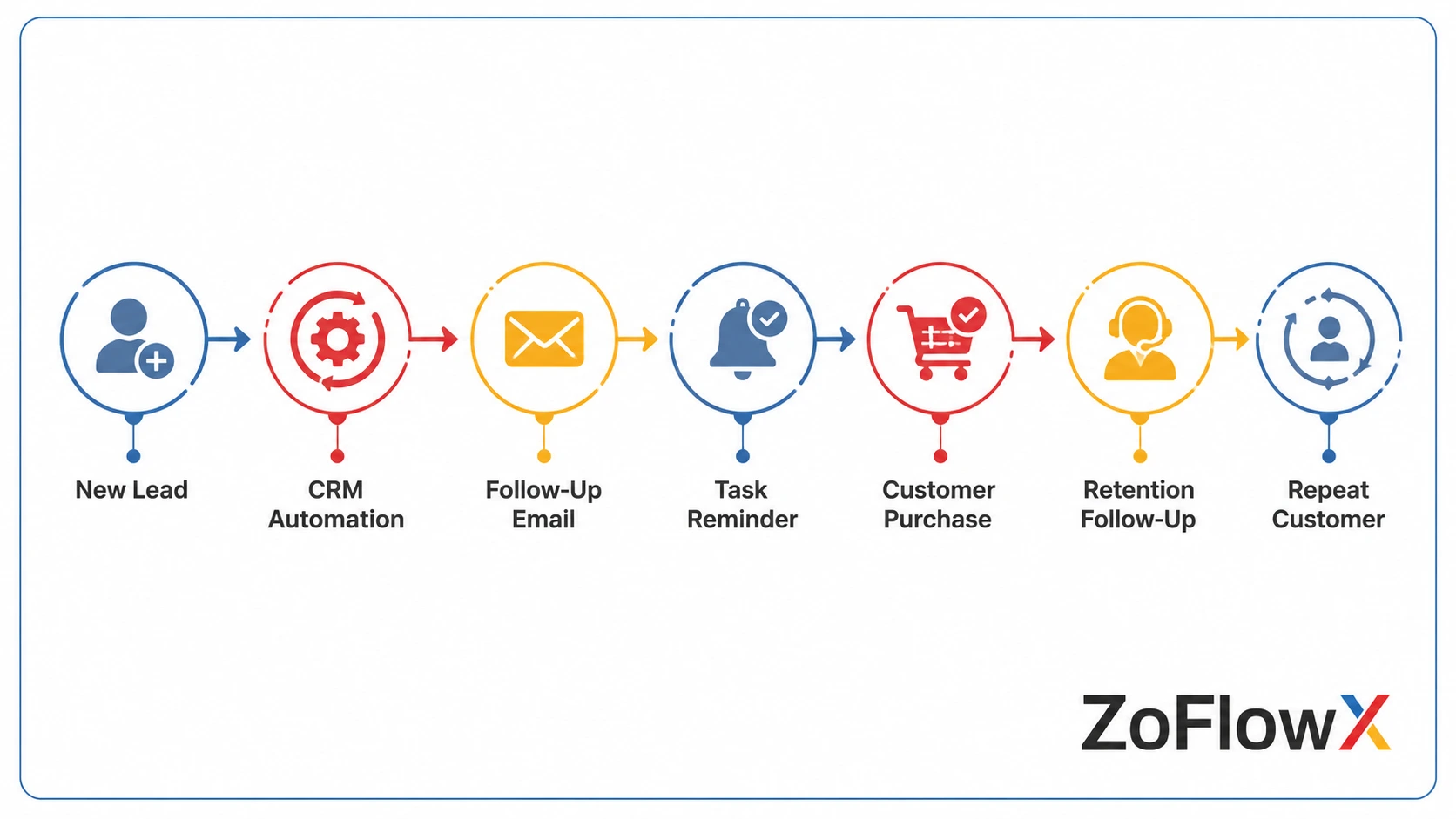
Keeping customer interactions and activity organized makes it easier to spot customers who may need attention and follow up before a relationship goes cold.
7. Smarter Customer Segmentation
Businesses can group customers based on factors such as location, behavior, customer stage, or preferences. This helps teams send more relevant messages instead of treating every customer the same way.
8. More Reliable Sales Forecasting
When sales information is recorded consistently, businesses have better data for forecasting. Owners can use pipelines and deal information to plan future revenue more confidently.
9. Better Collaboration Across Teams
Sales, marketing, and customer support teams can work from the same customer information. This reduces miscommunication and makes it easier for everyone to understand what has already happened with a customer.
10. Less Dependence on Individual Employees
Important customer information should not live only in one employee's inbox, notebook, or memory. A CRM keeps that information available to the wider team, so work can continue smoothly when responsibilities change.
11. Improved Marketing Effectiveness
CRM connects customer information with marketing activity. Businesses can use this information to understand which campaigns generate interest and which customers are more likely to engage.
12. Better Customer Lifecycle Management
CRM can track a customer from the first inquiry through sales, service, and repeat business. This gives teams a clearer view of the customer journey and helps them maintain consistent follow-up.
13. Faster, Better Decisions
CRM reports turn customer and sales data into useful information. Instead of relying only on assumptions, business owners can use actual activity and pipeline data when making decisions.
14. Easier Growth Without Losing Control
As a business gains more customers and employees, manual tracking becomes harder to manage. A CRM provides a consistent structure for handling customer information and sales activity as the business grows.
15. Greater Operational Stability
A CRM gives the team a consistent way to manage customer information, follow-ups, sales activity, and customer relationships. This makes everyday work easier to manage and reduces the chance of important tasks being missed.
Conclusion
Small businesses often start with simple tools such as spreadsheets, email, and personal notes. These methods can work at first, but they can become difficult to manage as customer numbers, sales activity, and team responsibilities increase.
A CRM brings customer information and daily customer-related work into one organized system. It can help businesses improve follow-ups, reduce manual work, strengthen customer relationships, and gain better visibility into sales activity.
If you are comparing different CRM platforms, you can explore our guide to CRM options for small businesses.
If you have decided that your business is ready for CRM, getting the system configured around your actual sales and customer processes can make adoption much easier. You can also get help with setting up a CRM from an experienced implementation team.
The right time to consider CRM depends on the business. If customer information is becoming scattered, follow-ups are being missed, or the team is spending too much time on manual tracking, CRM may provide the structure needed to work more efficiently.
Ready to Get More From Your CRM?
Get help setting up a CRM that fits your sales process, customer data, and day-to-day workflow. Build a more organized system for managing leads, follow-ups, and customer relationships as your business grows.
Get CRM Implementation HelpFrequently Asked Questions
What are CRM benefits for small businesses?
CRM helps small businesses organize customer data, improve follow-ups, boost team productivity, automate routine tasks, and create a clear foundation that supports consistent operations and scalable long-term growth.
Is CRM useful for very small teams?
Yes. CRM helps very small teams stay organized, track conversations, manage leads, and avoid dependency on memory or spreadsheets, creating structure early and preventing confusion, missed follow-ups, and process gaps as they grow.
Does CRM improve customer retention?
Yes. CRM records interactions, purchase history, and engagement patterns, helping businesses identify at-risk customers, follow up at the right time, resolve issues faster, and maintain stronger long-term relationships with less manual effort.
Can CRM replace spreadsheets?
Yes. CRM replaces spreadsheets by offering structured records, automated updates, access control, reporting, and real-time visibility, reducing data errors, duplication, version conflicts, and reliance on manual tracking methods across teams.
Is CRM expensive for small businesses?
Not necessarily. Many CRM platforms offer flexible and affordable pricing for small teams, allowing businesses to start with basic features and scale gradually without high upfront costs or the need for complex enterprise investments.
Does CRM increase productivity?
Yes. CRM increases productivity by automating repetitive tasks like follow-ups and data entry, organizing daily activities, reducing manual work, and helping teams focus more on selling, servicing customers, and decision-making tasks.
Can CRM help with sales forecasting?
Yes. CRM uses pipeline data, deal stages, and historical performance to generate more accurate sales forecasts, helping businesses plan revenue, allocate resources effectively, and identify risks or opportunities earlier in the sales cycle.
Who should use CRM in a small business?
CRM can be used by sales teams, marketing teams, customer support staff, and business owners to track interactions, manage leads, improve collaboration, and maintain visibility across customer journeys and internal workflows.
Is CRM difficult to use?
Most modern CRM systems are designed to be user-friendly. When configured properly for business workflows, teams can adopt CRM quickly, reducing confusion, improving consistency, and avoiding complexity that comes from poor setup.
When should a business start using CRM?
A business should start using CRM when lead volume increases, follow-ups become inconsistent, customer data is scattered, or teams struggle to track conversations, signaling the need for better structure and process control.