Best CRM for Small Business in 2026: 10 CRM Tools Compared
- There is no single CRM that is the best CRM for every small business.
- HubSpot is a strong choice for teams that want a simple starting point and a generous free option.
- Zoho CRM is well suited to growing businesses that need automation, customization, and room to scale.
- Pipedrive works well for sales-focused teams that want a simple visual pipeline.
- Freshsales is worth considering for teams that rely heavily on phone and email communication.
- The right CRM depends on your team size, sales process, budget, required features, and plans for growth.
- Always check current pricing and feature limits before choosing a CRM because plans can change.
Best CRM for Small Business in 2026: Which CRM Should You Choose?
There is no single best CRM for every small business.
The right choice depends on how your team sells, how many people will use the CRM, what tools you already use, and how much CRM automation you need.
For example, a two-person business may prefer a simple and affordable CRM. A growing sales team may need automation, reporting, integrations, and more customization.
Here are some of the best CRM tools for small business to consider in 2026:
- Zoho CRM - best for growing businesses that want flexibility and automation.
- HubSpot CRM - best for businesses that want a simple starting point.
- Pipedrive - best for sales-focused teams.
- Freshsales - best for teams that rely heavily on calls and email.
- Salesforce - best for businesses expecting more complex requirements as they grow.
- Monday Sales CRM - best for teams that want sales and project workflows together.
- Keap - best for businesses that need advanced marketing and sales automation.
- Insightly - best for relationship-focused B2B teams.
- Copper - best for businesses that work heavily inside Google Workspace.
- Agile CRM - best for businesses looking for a lower-cost all-in-one option.
The rest of this guide compares these options and explains how to choose the right CRM for your business. If you're still deciding whether your business needs a CRM at all, see our guide on why small businesses use CRM before comparing platforms.
How We Compare the Best CRM Software for Small Business
A CRM can have plenty of features and still be a poor fit for your small business.
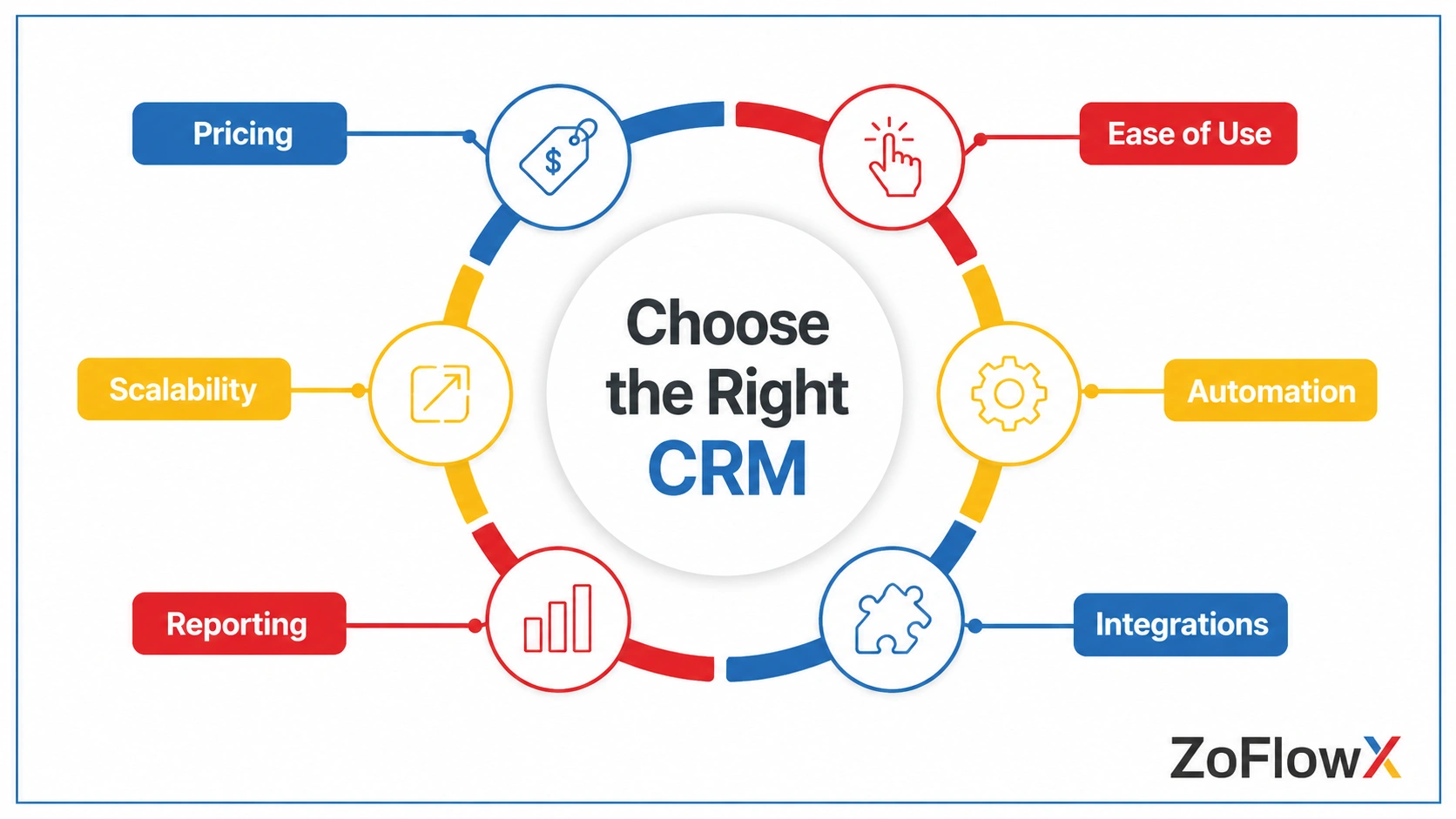
For this comparison, focus on the factors that affect day-to-day use:
1. Pricing
Look at the total cost of CRM software for small business, not only the starting price.
Check:
- price per user
- minimum number of users
- free plan limits
- important paid features
- add-ons
- annual versus monthly pricing
CRM pricing can change, so verify the current price with the vendor before purchasing.
2. Ease of Use
A CRM is only useful if your team actually uses it.
Look for:
- simple navigation
- easy data entry
- clear sales pipelines
- useful mobile access
- straightforward reporting
3. Automation
Growing small businesses often need more than contact storage, which is why CRM automation can become important as the team grows.
Check whether the CRM can automate:
- lead assignment
- follow-up reminders
- emails
- task creation
- deal updates
- repetitive workflows
4. Integrations
Your CRM should work with the tools your business already uses.
Consider integrations with:
- calendars
- accounting software
- marketing platforms
- communication tools
- customer support systems
5. Reporting
A good CRM should help you answer questions such as:
- Where are our leads coming from?
- Which deals are stuck?
- Which salesperson is converting the most leads?
- What is our pipeline worth?
- Which customers need attention?
6. Scalability
Think about where your business will be in two or three years.
Changing CRMs later can involve data migration, training, new processes, and additional costs.
Quick Comparison: Best CRM Software for Small Business
CRM | Best For | Free Option | Main Strength | Potential Drawback |
Zoho CRM | Growing small businesses | Yes | Automation and flexibility | More features can mean a longer learning curve |
HubSpot CRM | Beginners and inbound teams | Yes | Ease of adoption | Advanced features can become expensive |
Pipedrive | Sales-focused teams | Trial available | Visual sales pipeline | Less suited to broader marketing and service needs |
Freshsales | Inside sales teams | Free option available | Built-in communication features | Check integrations for your specific tools |
Salesforce | Businesses planning complex growth | Trial/options vary | Extensive ecosystem | Can require more setup and administration |
Monday Sales CRM | Sales + project teams | Plan dependent | Flexible workspace | Less CRM-focused than dedicated CRM platforms |
Keap | Automation-heavy businesses | Trial/options vary | Marketing and sales automation | Higher cost for very small teams |
Insightly | B2B relationship management | Free option available | Relationship and project management | May be more than simple sales teams need |
Copper | Google Workspace users | Trial/options vary | Google Workspace integration | Best fit is narrower than some competitors |
Agile CRM | Budget-conscious teams | Free option available | Low-cost all-in-one features | Interface and ecosystem may not suit every team |
Note: CRM pricing, user limits, free plans, and features can change. Check the vendor's current pricing page before making a purchase.
Best CRM for Small Business by Use Case
Don’t just ask, “Which CRM is the best?” Ask, “Which CRM is best for my small business?”
That makes it easier to narrow down your options.
Best CRM for Growing Businesses: Zoho CRM
Zoho CRM can be a strong option for small businesses that expect their sales process to become more structured over time.
It offers:
- lead and contact management
- sales pipelines
- workflow automation
- reporting
- customization
- integrations
- mobile access
- room to expand as the business grows
It is particularly useful when a business has moved beyond spreadsheets and needs more control over its sales process.
The main consideration is complexity. Zoho CRM offers many capabilities, so teams should configure only what they actually need.
Best CRM for Beginners: HubSpot CRM
HubSpot is a good starting point for businesses that want a simple interface and an easy way to organize contacts, deals, and sales activity.
It can be a good fit for:
- startups
- small marketing teams
- businesses moving away from spreadsheets
- teams already using HubSpot's marketing tools
The main point to watch is the future cost. Some advanced features are available only in paid products, so check what your team will need as it grows.
It can be a good fit for startups, small marketing teams, and businesses moving away from spreadsheets. If you're specifically comparing CRM choices for startups, you can look at the options in more detail here.
Best CRM for Sales Teams: Pipedrive
Pipedrive is built around the sales pipeline. It can be a good fit for teams focused mainly on sales execution. If your priority is comparing CRM options for sales teams, see our dedicated guide for a broader comparison.
It works well for teams that mainly need to:
- manage leads
- track deals
- schedule activities
- monitor sales stages
- keep salespeople focused on their pipeline
It may not be the best fit if you need extensive marketing automation or customer service functionality.
Best CRM for Inside Sales: Freshsales
Freshsales is worth considering when your sales team spends much of its day communicating with prospects.
Its strengths include sales management and communication features.
Before choosing it, check whether the integrations your business depends on are available and included in the plan you need.
Best CRM for Complex Growth: Salesforce
Salesforce can make sense for businesses expecting more complex sales processes, larger teams, or extensive customization.
It offers a broad ecosystem and many advanced capabilities.
However, smaller businesses should consider whether they actually need that level of complexity before choosing it.
Best Free CRM Software for Small Business
A free CRM can be useful when your small business is still growing and your requirements are simple.
But “free” does not mean unlimited.
Check:
- number of users
- contact or record limits
- automation limits
- reporting features
- integrations
- storage
- upgrade costs
HubSpot CRM
HubSpot offers free CRM functionality, but user, contact, and feature limits depend on the current plan. Always check the vendor's current pricing and plan limits before choosing a CRM.
Zoho CRM Free
Zoho currently offers a free CRM edition for up to three users. It includes core CRM capabilities and provides an upgrade path if the business needs more features later.
Other Free Options
Freshsales, Insightly, Agile CRM, and other platforms may also offer free plans or trials. A free plan is useful only if it covers what your team needs. Check the limits before you commit.
Choosing a CRM for Small Business by Team Size
1–3 Users
If you are a solo founder or very small team, keep things simple.
Look for:
- contact management
- basic pipeline management
- email integration
- follow-up reminders
- easy setup
You probably do not need a large number of advanced automation features yet.
4–10 Users
This is where small business CRM requirements often start becoming more serious.
You may need:
- lead assignment
- workflow automation
- sales reporting
- multiple pipelines
- user permissions
- integrations
Zoho CRM, HubSpot, Pipedrive, and Freshsales can all be worth considering at this stage.
10–25 Users
At this point, the CRM becomes more important to your sales process.
Look closely at:
- automation
- reporting
- permissions
- integrations
- customization
- total cost per user
Do not choose only on the monthly price. Consider the cost of staying with the platform as your team grows.
25+ Users
Larger teams should pay more attention to:
- administration
- data security
- advanced permissions
- automation
- integrations
- reporting
- scalability
- implementation requirements
At this point, switching CRM platforms later can become much more disruptive.
Essential CRM Features for Small Business in 2026
You do not need every CRM feature available for your small business.
Focus on the CRM features your small business team will actually use.
Contact and Lead Management
Store customer information, track leads, and view previous interactions.
Sales Pipeline
You should be able to see where every active deal stands.
Follow-Up Management
The CRM should help your team remember calls, emails, meetings, and other follow-up activities.
Automation
Automation can reduce repetitive work such as assigning leads, creating tasks, updating fields, and sending notifications.
Reporting
Business owners should be able to understand sales activity without manually combining data in spreadsheets.
Integrations
Make sure the CRM works with the tools your team already depends on.
Mobile Access
If your salespeople travel or work away from their desks, a useful mobile app can make CRM adoption easier.
User Permissions
Even a small team may need different access levels for salespeople, managers, and administrators.
Small Business CRM Comparison: Zoho CRM vs HubSpot vs Pipedrive vs Freshsales
These four platforms are often considered by small businesses for different reasons.
How to Choose the Best CRM for Small Business
Use this five-step process when choosing a CRM for small business.
Step 1: Define Your Team Size
How many people will actually use the CRM?
Do not pay for a large platform simply because it has more features.
Step 2: List Your Current Problems
Write down what is not working today.
For example:
- missed follow-ups
- scattered customer information
- poor sales visibility
- duplicate records
- manual reporting
- difficult lead tracking
Your CRM should solve these problems and support the way your small business operates.
Step 3: List Your Must-Have Integrations
Write down the tools you already use.
Then check whether each CRM connects with them directly or requires another integration service.
Step 4: Compare the Total Cost
Look beyond the advertised starting price.
Consider:
- users
- required plans
- add-ons
- integrations
- implementation
- training
- future upgrades
If you choose Zoho CRM and need help with setup, you can also review our CRM setup and implementation support.
Step 5: Test Before You Commit
Whenever possible, use a free plan or trial.
Give the CRM to the people who will actually use it.
Ask them:
- Is it easy to enter information?
- Can you find customer details quickly?
- Is the pipeline easy to understand?
- Can you complete your normal tasks without confusion?
A CRM that looks impressive to management but frustrates salespeople is not the right CRM.
Common Mistakes When Choosing a CRM for Small Business
Choosing Based Only on Price
The cheapest CRM is not necessarily the least expensive option over time.
Buying Too Many Features
More features can also mean more complexity.
Ignoring User Adoption
If employees avoid the CRM, the system will not provide much value.
Forgetting Future Needs
Think about where your business will be in the next two or three years.
Comparing Only the Free Plan
A free plan may look attractive until you need automation, reporting, integrations, or additional users.
Final Thoughts
The best CRM for small business is the one your team can use consistently and affordably. Compare the features you actually need, test the platforms you shortlist, and check the current pricing before you decide.
Not Sure Which CRM Fits Your Business?
Choosing between CRM platforms can be difficult when every vendor highlights different features. Talk to our CRM experts and get a practical recommendation based on your team size, sales process, integrations, and growth plans.
Get Your CRM RecommendationFrequently asked Questions
What Is the Best CRM for Small Business in 2026?
There is no single best CRM for every small business, but comparing the best CRM software for small business can help you find the right fit. Zoho CRM, HubSpot, Pipedrive, and Freshsales are strong options, but the right choice depends on team size, sales process, budget, integrations, and growth plans.
What Is the Best Free CRM Software for Small Business?
HubSpot and Zoho CRM both offer free CRM software options, while other providers offer free plans or trials. Compare user limits, contacts, automation, reporting, and upgrade costs before choosing one.
Is Zoho CRM Good for Small Business?
Yes. Zoho CRM can be a strong choice for small businesses that need sales management, automation, customization, and room to grow. Businesses with very simple requirements may prefer a simpler CRM.
Is HubSpot Better Than Zoho CRM for Small Business?
Not necessarily. HubSpot may be easier for beginners, while Zoho CRM can be a better fit for businesses that want greater flexibility and automation. The better choice depends on your requirements.
What Is the Best Sales CRM for Small Business?
Pipedrive is a strong option for teams focused mainly on sales pipeline management. Zoho CRM and Freshsales are also worth considering when automation, communication, and broader CRM capabilities are important.
How much does a CRM cost for a small business?
CRM costs vary widely depending on the provider, plan, number of users, and features. Some platforms offer free plans, while paid plans can range from relatively low-cost options to much more expensive packages. Always check the vendor's current pricing before purchasing.
Can a small business start with a free CRM?
Yes. A free CRM can be a good starting point when your team is small and your requirements are simple. However, check the plan's user, contact, automation, and reporting limits before committing your data to it.
When should a small business start using a CRM?
Consider a CRM when customer information becomes scattered, follow-ups are being missed, sales activity is difficult to track, or your team is spending too much time managing customer information manually.