Best CRM for Sales Teams & Reps in 2026: 20 CRMs Compared
- The best CRM for a sales team depends on team size, sales process, budget, and workflow.
- Sales teams should compare pipeline management, follow-ups, automation, reporting, integrations, and ease of use.
- Small teams often need a simple CRM that reps can adopt quickly.
- Growing sales teams may need stronger automation, reporting, customization, and team controls.
- No single CRM is best for every sales team.
- The right choice is the CRM that your sales reps can use consistently without creating unnecessary work.
Choosing the best CRM for a sales team depends on how your team sells, how many reps use the system, and how much automation you need. We compared 20 CRM platforms across pipeline management, automation, reporting, integrations, usability, scalability, and pricing to help you narrow down the right options.
Best CRM for Sales Teams in 2026: Quick Comparison
Choosing the right CRM depends on your sales process, team size, budget, and the level of automation and reporting you need. The table below provides a quick comparison of popular CRM platforms for sales teams.
CRM | Best For | Sales Pipeline | Automation | Reporting | Ease of Use |
Zoho CRM | Growing sales teams and sales reps | ✓ | ✓ | ✓ | High |
HubSpot Sales Hub | Sales reps and sales + marketing teams | ✓ | ✓ | ✓ | High |
Salesforce Sales Cloud | Enterprise sales teams | ✓ | ✓ | ✓ | Medium |
Pipedrive | Sales reps focused on visual pipelines | ✓ | ✓ | ✓ | High |
Freshsales | Sales reps needing communication and automation | ✓ | ✓ | ✓ | High |
Monday Sales CRM | Teams combining sales and work management | ✓ | ✓ | ✓ | High |
Close CRM | Outbound sales teams | ✓ | ✓ | ✓ | High |
Copper CRM | Teams using Google Workspace | ✓ | ✓ | ✓ | High |
Insightly | Businesses combining CRM and project management | ✓ | ✓ | ✓ | Medium |
Keap | Small businesses needing CRM and marketing automation | ✓ | ✓ | ✓ | Medium |
This comparison is a starting point. The right CRM depends on your team's sales process, number of users, required integrations, automation needs, reporting requirements, and budget.
Best CRM for Sales Reps in 2026
The best CRM for sales reps should make it easier to manage leads, track deals, schedule follow-ups, update customer information, and stay focused on selling. The right choice depends on your sales process, team size, automation needs, reporting requirements, and budget.
Which CRM Is Best for Sales Reps?
Different CRM platforms can suit different sales teams and workflows. Zoho CRM is suited to businesses that need flexible sales processes, automation, reporting, customization, and integrations. HubSpot Sales Hub can suit teams looking for a user-friendly CRM with sales and marketing integration. Pipedrive focuses on visual pipeline management, while Freshsales provides sales automation and built-in communication capabilities.
The right CRM for sales reps depends on how your team manages leads, deals, follow-ups, customer communication, and sales activities.
What Should You Look for in a Sales CRM?
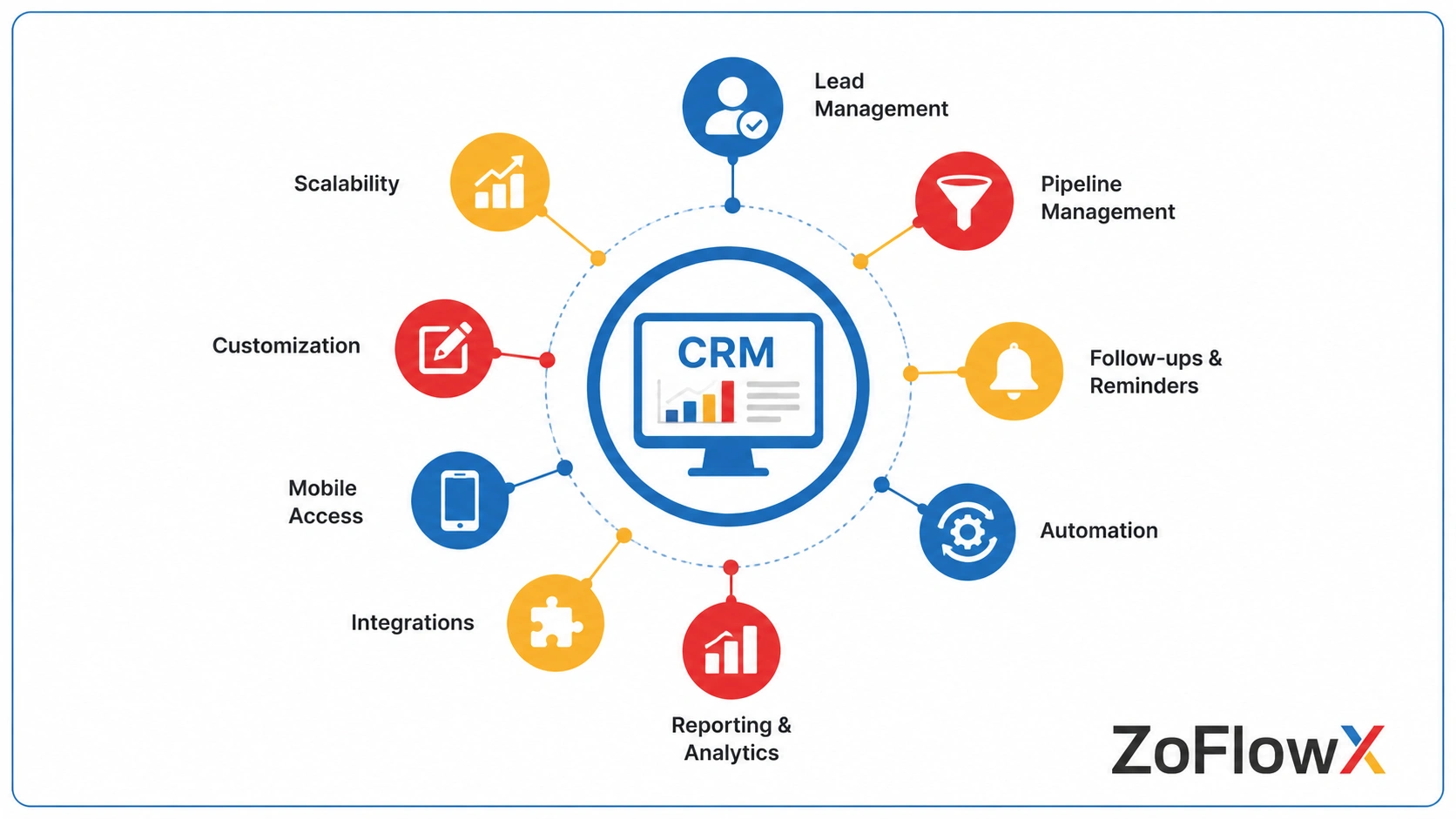
A good sales CRM should make everyday sales work easier rather than create another system that reps have to maintain.
The most important areas to compare are:
- Lead and contact management
- Sales pipeline management
- Follow-up reminders
- Task automation
- Email integration
- Reporting and dashboards
- Mobile access
- Integrations
- Customization
- Ease of use
- Scalability
- Pricing and user limits
Even a strong feature set does not matter if your sales team finds the CRM difficult to use.
How Do We Compare the Best CRM Options for Sales Teams?
We compare CRM platforms based on the areas that directly affect daily sales work.
Sales pipeline
Can reps easily see which deals are new, active, delayed, or close to conversion?
Lead management
Can the team capture, organize, assign, and follow up with leads?
Automation
Can the CRM automate reminders, tasks, notifications, and routine sales activities?
Reporting
Can sales managers understand pipeline health, team activity, conversion rates, and performance?
Ease of use
Can sales reps learn the system quickly and update records without slowing down their work?
Integrations
Can the CRM connect with the tools your sales team already uses?
Scalability
Can the system continue to support the team as the number of users, leads, and deals increases?
Which CRM Options Are Best for Sales Teams in 2026?
There is no single CRM that works for every sales team. The following options are worth considering based on different sales needs.
1. Zoho CRM
Best for: Flexible sales processes and growing businesses.
Key strengths:
- Sales pipeline management
- Workflow automation
- Customization
- Reporting
- Integrations
- Scalability
Potential limitation: Teams with very simple requirements may need time to configure the platform properly.
2. HubSpot Sales Hub
Best for: Teams that want an easy starting point and strong marketing integration.
Key strengths:
- User-friendly interface
- Sales pipelines
- Contact management
- Marketing integration
- Automation
Potential limitation: Costs can increase as teams add users and more advanced features.
3. Salesforce Sales Cloud
Best for: Larger organizations with complex sales operations.
Key strengths:
- Advanced customization
- Reporting
- Automation
- Large integration ecosystem
- Enterprise capabilities
Potential limitation: Setup and administration can require more time and expertise than simpler CRM platforms.
4. Pipedrive
Best for: Sales teams that prefer a visual pipeline.
Key strengths:
- Visual deal management
- Activity tracking
- Sales pipeline
- Follow-up management
- Easy-to-understand interface
Potential limitation: Teams needing extensive customization may need to evaluate whether the available features fit their process.
5. Freshsales
Best for: Teams looking for sales automation and built-in communication tools.
Key strengths:
- Lead management
- Sales pipeline
- Email and communication tools
- Automation
- Reporting
Potential limitation: Teams with highly complex processes may need to compare its customization options carefully.
6. Monday Sales CRM
Best for: Teams that want sales tracking alongside broader work management.
Key strengths:
- Custom workflows
- Sales pipelines
- Task management
- Team collaboration
- Visual dashboards
Potential limitation: Teams looking for a dedicated sales CRM may prefer a platform built primarily around sales operations.
7. Close CRM
Best for: Sales teams focused heavily on outbound selling.
Key strengths:
- Calling
- Lead management
- Sales pipelines
- Activity tracking
Potential limitation: Teams with broader business-management requirements may need additional tools.
8. Copper CRM
Best for: Teams that work heavily with Google Workspace.
Key strengths:
- Google Workspace integration
- Contact management
- Sales pipelines
- Task management
- Relationship tracking
Potential limitation: Businesses outside the Google ecosystem may not benefit from all of its strengths.
9. Insightly
Best for: Businesses that want CRM and project management capabilities together.
Key strengths:
- Contact management
- Sales pipeline
- Project tracking
- Workflow management
- Reporting
Potential limitation: Compare its sales features carefully if your team needs a highly specialized sales system.
10. Keap
Best for: Small businesses that need CRM and marketing automation.
Key strengths:
- Contact management
- Automation
- Follow-ups
- Marketing tools
- Customer management
Potential limitation: It may offer more functionality than a very small sales team needs.
11. Agile CRM
Best for: Small teams looking for CRM, sales, and marketing features in one platform.
Key strengths:
- Contact management
- Sales pipeline
- Marketing automation
- Reporting
Potential limitation: Compare its current features and plan limits with newer alternatives before choosing it.
12. Salesflare
Best for: Small B2B teams that want less manual data entry.
Key strengths:
- Automated data collection
- Contact management
- Sales pipeline
- Email tracking
Potential limitation: Teams with more complex sales operations may need a broader CRM platform.
13. Nutshell CRM
Best for: Small and mid-sized sales teams that want a straightforward CRM.
Key strengths:
- Pipeline management
- Contact management
- Sales reporting
- Email tools
- Team collaboration
Potential limitation: Larger organizations may need more advanced customization and administration.
14. Zendesk Sell
Best for: Teams already working within the Zendesk ecosystem.
Key strengths:
- Sales management
- Contact management
- Pipeline tracking
- Reporting
- Customer-service ecosystem integration
Potential limitation: Teams should consider the wider Zendesk ecosystem when evaluating the platform.
15. Bitrix24
Best for: Businesses looking for CRM combined with collaboration tools.
Key strengths:
- CRM
- Sales management
- Collaboration
- Task management
- Communication tools
Potential limitation: The wide range of features may feel complex for teams that only need basic sales CRM functions.
16. Less Annoying CRM
Best for: Small teams that want a simple CRM.
Key strengths:
- Contact management
- Sales pipeline
- Task management
- Simple interface
Potential limitation: Businesses that need advanced automation and reporting should compare it with more feature-rich platforms.
17. Capsule CRM
Best for: Small businesses focused on relationship management.
Key strengths:
- Contact management
- Sales pipeline
- Task tracking
- Relationship history
Potential limitation: Larger sales teams may need more advanced sales automation and reporting.
18. Creatio
Best for: Businesses that need highly customizable workflows.
Key strengths:
- Workflow automation
- CRM
- Custom processes
- Sales management
- No-code capabilities
Potential limitation: More flexible platforms can require more planning and configuration.
19. SugarCRM
Best for: Businesses looking for customizable CRM capabilities.
Key strengths:
- Sales management
- Reporting
- Customization
- Customer data management
Potential limitation: Businesses should evaluate implementation and administration requirements before choosing it.
20. Nimble
Best for: Relationship-focused sales teams.
Key strengths:
- Contact management
- Relationship tracking
- Social information
- Email integration
Potential limitation: Teams needing advanced sales automation may require a more specialized platform.
Which CRM Is Best for Different Sales Teams?
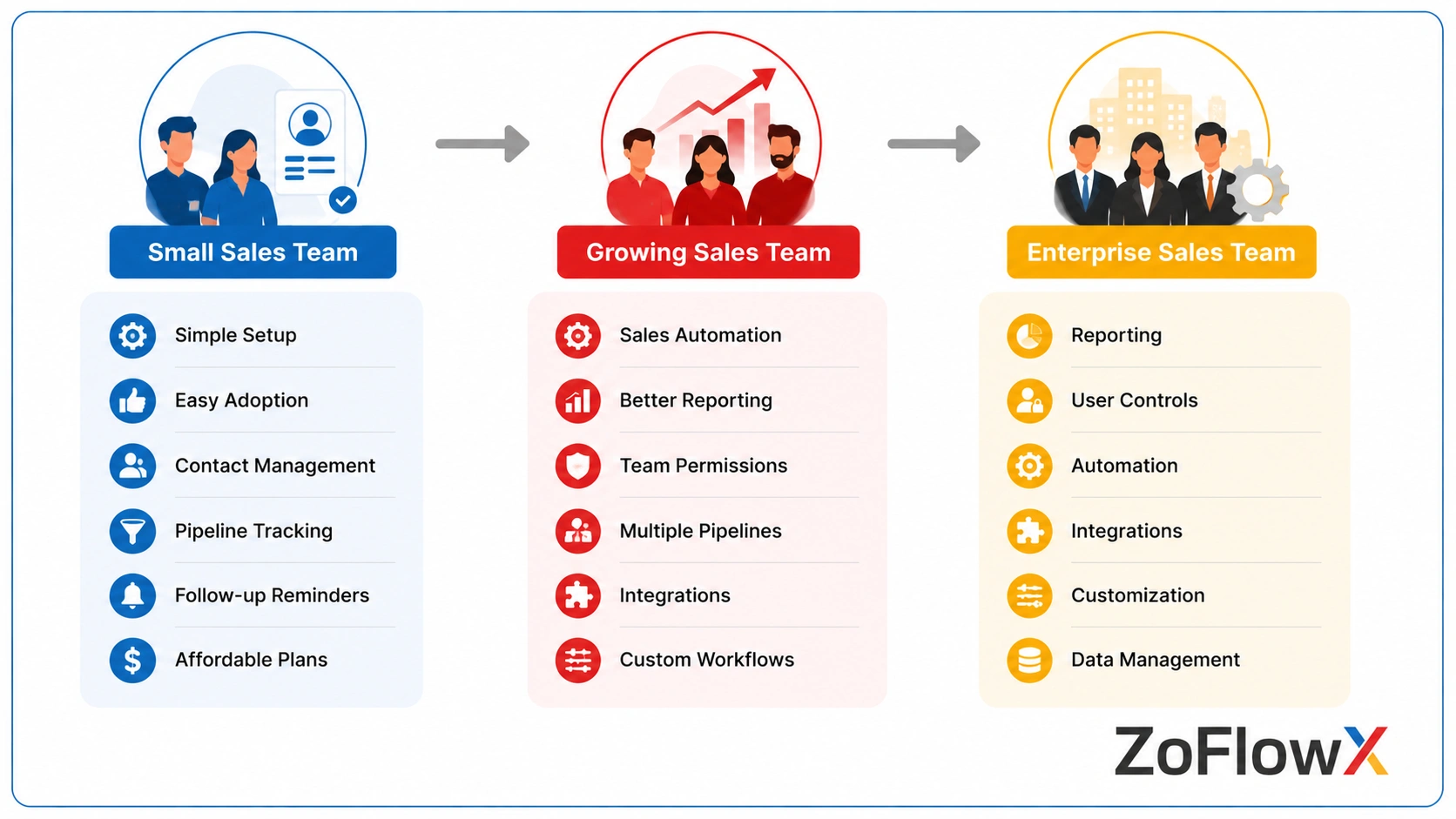
The best CRM depends on how your sales team works, how many people use the system, and the level of automation, reporting, customization, and integrations you need. Instead of choosing a CRM based only on its feature list, compare each platform against your team's actual sales process.
Sales Team Type | CRM Options to Consider | What to Prioritize |
Small sales teams | Zoho CRM, HubSpot Sales Hub, Pipedrive | Ease of use, contact management, pipeline tracking, follow-ups, and affordability |
Growing sales teams | Zoho CRM, HubSpot Sales Hub, Freshsales, Pipedrive | Automation, reporting, integrations, multiple pipelines, and scalability |
Enterprise sales teams | Salesforce Sales Cloud, Zoho CRM, Creatio | Customization, advanced reporting, automation, integrations, user controls, and scalability |
Sales reps focused on pipeline management | Pipedrive, Zoho CRM, Freshsales | Pipeline visibility, activity tracking, follow-ups, and ease of use |
Outbound sales teams | Close CRM, Zoho CRM, Freshsales | Calling, email, lead management, activity tracking, and sales automation |
Sales and marketing teams | HubSpot Sales Hub, Zoho CRM | CRM integration, lead management, marketing integration, automation, and reporting |
Teams using Google Workspace | Copper CRM, Zoho CRM | Google Workspace integration, contact management, sales pipelines, and task management |
Best CRM for Small Sales Teams
Small sales teams should prioritize simplicity and quick adoption. A CRM should make it easy to manage contacts, track opportunities, schedule follow-ups, and maintain customer information without creating unnecessary administrative work.
Zoho CRM, HubSpot Sales Hub, and Pipedrive are options worth comparing based on the team's required features, budget, and sales workflow.
Best CRM for Growing Sales Teams
Growing sales teams often need more than basic contact and pipeline management. Automation, reporting, integrations, multiple pipelines, and scalability become increasingly important as the number of leads, deals, and users increases.
Zoho CRM, HubSpot Sales Hub, Freshsales, and Pipedrive can be compared based on the team's sales process and automation requirements.
Best CRM for Enterprise Sales Teams
Enterprise sales teams typically need stronger customization, reporting, automation, integrations, user controls, and data management capabilities.
Salesforce Sales Cloud, Zoho CRM, and Creatio are options to evaluate when a sales organization requires more complex workflows and greater control over its CRM environment.
Best CRM for Sales Reps
Sales reps need a CRM that allows them to quickly manage leads, update deals, schedule follow-ups, track activities, and access customer information.
Zoho CRM, Pipedrive, and Freshsales can be compared based on pipeline visibility, automation, communication tools, ease of use, and the specific workflow followed by the sales team.
Best CRM for Outbound Sales Teams
Outbound sales teams typically need efficient lead management, calling and email capabilities, activity tracking, follow-up management, and sales automation.
Close CRM, Zoho CRM, and Freshsales are options to compare based on the team's outbound workflow and communication requirements.
What CRM Features Matter Most for Sales Managers?
Sales managers usually need more visibility than individual reps.
Important features include:
- Pipeline dashboards
- Sales forecasts
- Team activity reports
- Conversion tracking
- Deal visibility
- Performance reports
- User permissions
- Workflow automation
Managers should be able to see where deals are moving, where they are getting stuck, and which opportunities need attention.
How Can a CRM Improve Sales Team Performance?
A CRM can help sales teams create a more consistent sales process. CRM automation for sales teams can also reduce repetitive follow-ups, reminders, and routine tasks.
Instead of relying on memory, spreadsheets, or separate notes, reps can work from shared customers and deal information. For teams that also need to improve how they capture and organize new prospects, using CRM for lead generation can help connect lead activity with the sales process.
This can help teams:
- Respond to leads faster
- Track follow-ups
- Reduce missed tasks
- Keep deal information organized
- Improve pipeline visibility
- Share customer information
- Make better sales decisions
The actual benefit depends on how well the CRM fits the sales process and how consistently people use it.
How Do You Choose the Best CRM for a Sales Team?
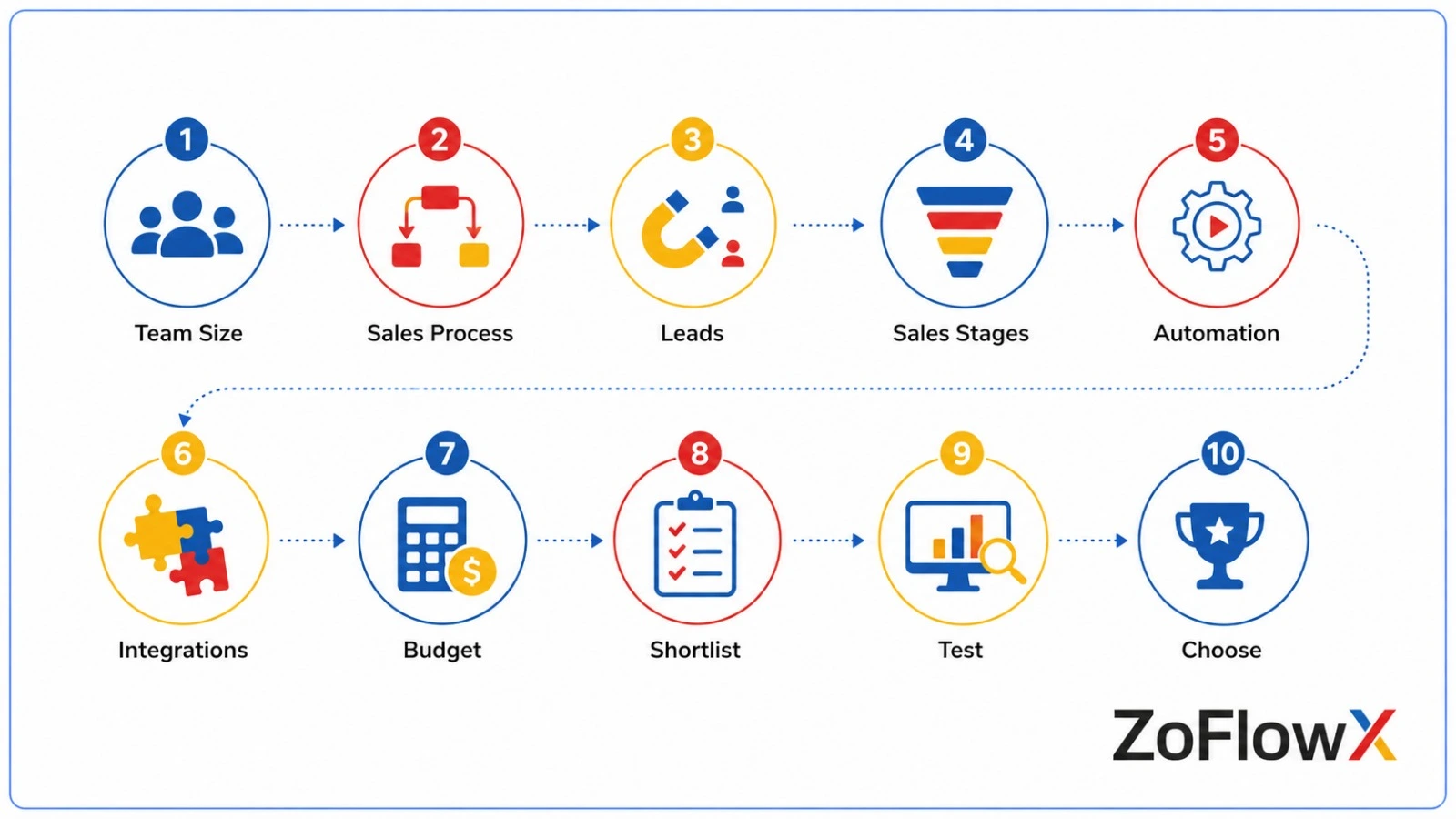
Start with the sales process rather than the feature list.
Ask these questions:
- How many people will use the CRM?
- How many leads does the team manage?
- How long is the typical sales cycle?
- How many sales stages do you need?
- Do reps need mobile access?
- Which tools need to be connected?
- What reports do managers need?
- How much automation is required?
- How much customization is necessary?
- What can the business comfortably spend?
Then shortlist two or three platforms and test them using real sales workflows.
What Should You Check Before Choosing a Sales CRM?
Before making a purchase, ask your sales team to test the actual process.
For example:
- Add a new lead.
- Assign the lead to a rep.
- Move the lead through the pipeline.
- Schedule a follow-up.
- Send an email.
- Update a deal.
- Create a report.
- Find an old customer record.
If the process feels difficult during testing, it may become even harder after the CRM is rolled out to the entire team.
Once you have selected a platform, the next step is making sure it fits your actual sales process. Proper setting up CRM for a sales team can make adoption easier and prevent unnecessary workflow problems later.
Conclusion
The best CRM for sales teams is not necessarily the platform with the longest feature list. It is the one that fits your sales process, is easy for your reps to use, and gives managers the information they need.
Small teams may value simplicity and quick adoption, while growing and enterprise teams may need stronger automation, reporting, customization, and integrations.
Before choosing, compare your actual sales workflow against two or three CRM options and test how easily your team can use each one.
If you need help evaluating your requirements, contact ZoFlowX at +91 8190009222 or info@zoflowx.com. We can help you understand your CRM requirements and choose a setup that fits your sales process. Make the right CRM decision before your sales process becomes harder to manage.
Ready to Find the Right CRM for Your Sales Team?
A poor CRM choice can create more work instead of reducing it. Get clear on your sales requirements before you commit.
Talk to Our CRM ExpertsFrequently Asked Questions
What is the best CRM for sales team productivity?
The best CRM for sales team productivity is one that makes lead management, follow-ups, deal tracking, and reporting easier without creating unnecessary work for sales reps.
Which CRM is best for sales reps?
The best CRM for sales reps should be easy to use, provide a clear pipeline, make follow-ups simple, and allow reps to update customer information quickly.
Is CRM necessary for small sales teams?
A CRM can be useful even for a small sales team when leads, customers, and follow-ups are becoming difficult to manage with spreadsheets or personal notes.
What features matter most in a sales CRM?
Pipeline management, contact management, follow-up automation, reporting, integrations, mobile access, and ease of use are some of the most important features for sales teams.
Can CRM improve sales forecasting?
Yes. CRM systems can organize pipelines and deal information, giving sales managers better data for forecasting and planning.
Is Zoho CRM good for sales teams?
Zoho CRM can be a strong option for sales teams that need sales pipelines, automation, customization, reporting, and integrations. The right fit still depends on the team's requirements.
How do I choose the best CRM for sales?
Compare CRM platforms based on your team size, sales process, required features, ease of adoption, integrations, budget, and future growth.
Do sales teams actually use CRM?
Sales teams are more likely to use a CRM when it saves time, is easy to update, and fits naturally into their daily sales process.
Is CRM expensive for sales teams?
CRM pricing varies by provider, plan, users, and features. Compare the total cost against the value the system provides rather than looking only at the starting price.
When should a sales team switch CRM?
Consider switching when the current CRM has poor adoption, unreliable reporting, limited integrations, or no longer supports the team's sales process.