Zoho Inventory vs Odoo: Which Inventory Software Wins?
- In the Zoho Inventory vs Odoo debate, Zoho Inventory wins for businesses that want stock control running in weeks, not months.
- Odoo wins when you need manufacturing, MRP, field service and accounting all sitting inside one system.
- Zoho Inventory is priced per organisation. Odoo is priced per user, so your bill grows every time you add a team member.
- Odoo needs more technical help. Most businesses end up hiring a developer or a partner to keep it running.
- For a Zoho Inventory vs Odoo which is better for a small business decision, Zoho Inventory usually costs less and takes far less time to go live.
- Neither tool is "better" in a vacuum. The right answer depends on whether you manufacture goods or simply buy, store and sell them.
Zoho Inventory is cloud-based stock and order management software that monitors items, warehouses, purchase orders and sales orders for expanding businesses. Odoo is a complete open-source ERP system, and inventory is just one of the dozens of modules. In a head-to-head comparison of Zoho Inventory vs Odoo, Zoho Inventory is the better option for stock and order management, whereas Odoo is the better option if you also need manufacturing, accounting and HR within the same platform.
That single line answers the question for about 80% of the businesses that ask us. The rest of this guide is for the other 20%, where the details actually matter.
We have moved businesses to both platforms. Here are some things we've seen work and some things we've seen go wrong.
What Is the Real Difference Between Zoho Inventory and Odoo?
Quick answer: Zoho Inventory is a niche stock and order management application designed to excel at a single task. Odoo is a modular ERP that enables inventory along with sales, accounting, manufacturing, HR and more. Zoho is simpler to get going with. Odoo is more comprehensive, but requires more time to set up, more money, and more technical expertise.
Imagine you are purchasing a car. Zoho Inventory is a dependable delivery van that is prepared to drive today. Odoo is a truck chassis that you can equip with any body you want, but it's a powerful truck and it takes time in the workshop.
Both are good products. They are simply designed for different problems.
What does Zoho Inventory actually do?
Zoho Inventory manages the daily flow of inventory. Items, SKUs, batches, serial numbers, bin locations, purchase orders, sales orders, packing, shipping and returns.
It integrates directly with Zoho Books for accounting and Zoho CRM for sales. The pieces fit together seamlessly if you already have something in the Zoho family.
Suppose you are a small electronics distributor with 900 SKUs in two warehouses. That can be live in a couple of weeks, and barcode scanning and low-stock alerts will be working from day one with Zoho Inventory.
What does Odoo actually do?
Odoo is an ERP framework that allows you to install apps. Inventory, Manufacturing, Accounting, CRM, Website, Point of Sale, HR, Field Service and more than 80 others.
The inventory module is really good. It enables double entry stock moves, complex routing rules, multi-step receipts and putaway strategies.
But you rarely use Odoo Inventory alone. Most of the businesses that choose Odoo are purchasing the entire suite, and that's exactly what they're doing.
How Do the Two Platforms Compare Side by Side?
Here is the honest Zoho Inventory vs Odoo inventory comparison on the points that decide most projects.
What matters | Zoho Inventory | Odoo |
Core focus | Stock and order management | Full ERP suite |
Pricing model | Per organisation, per month | Per user, per month |
Free plan | Yes, 50 orders and 1 user | Yes, one app only |
Setup time | 2 to 6 weeks typically | 2 to 6 months typically |
Learning curve | Gentle, non-technical friendly | Steep, technical background helps |
Manufacturing / MRP | Basic assemblies only | Full MRP, work orders, routings |
Accounting | Via Zoho Books | Built in |
Customisation | Custom fields, functions, workflows | Deep code-level control |
Hosting | Cloud only | Cloud, Odoo.sh or self-hosted |
Who maintains it | Zoho | You, or your partner |
According to ZoFlowX, the single biggest predictor of which platform a client should choose is not company size. It is whether they manufacture anything. Businesses that buy and resell almost always land on Zoho. Businesses that build things from raw materials almost always land on Odoo.
Which One Is Easier to Set Up and Learn?
Quick answer: Zoho Inventory is significantly easier. A non-technical business owner can import items, set up warehouses and start raising purchase orders in a single afternoon. Before Odoo acts the way you want, you need someone who knows what ERP means, such as stock routes, operation types and product costing methods.
Zoho Inventory uses plain language. "Sales Order", "Package", "Shipment". Your warehouse supervisor will follow it without training.
Odoo uses ERP language. "Operation Types", "Procurement Rules", "Reordering Rules with Routes". Powerful, but your team will need proper training.
Here is a scenario we see often. A garment trader signs up for Odoo, imports products, then cannot understand why stock will not reduce after a sale. The reason is that the delivery order was never validated. Small thing, but it stalls the whole rollout for a week.
That kind of friction is normal with Odoo. Budget for it.
How Much Will Each One Cost You?
Cost is where the Zoho vs Odoo inventory management comparison gets interesting, because the two use completely different billing logic.
Zoho Inventory charges per organization. According to Zoho Inventory Pricing, the published plans start at $29/month for Standard, $79/month for Premium, $129/month for Plus, and $249/month for Enterprise (billed annually). It also offers a free plan that supports up to 50 orders per month and one user.
Odoo charges per user. Odoo's published pricing has three tiers: One App Free, Standard and Custom. Rates vary a lot by country, so an Indian business pays far less per user than a US business for the same plan.
Now do the maths on a 10-person team.
- Zoho Inventory Premium: One flat organisation fee, 5 users included, additional users at a low cost.
- Odoo Standard: 10 user licences per month, forever.
For a small team, Odoo can look cheaper on the surface. Add users and the gap closes fast, then reverses.
Where do the hidden costs show up?
Licence fees are the smallest part of an Odoo project. The real spend sits elsewhere.
- Implementation and configuration by a partner
- Custom module development if standard Odoo does not fit
- Hosting on Odoo.sh or your own server
- Version upgrades, which can break custom code
- Ongoing developer retainer
With Zoho Inventory, most of that disappears because Zoho maintains, hosts and upgrades the platform for you. Our Zoho specialists at ZoFlowX usually deliver a full Zoho Inventory rollout for a fraction of what an equivalent Odoo build costs, simply because there is far less to build.
That said, if you genuinely need what Odoo does, paying for it is money well spent. Do not choose Zoho just because it is cheaper if it cannot do the job.
Which Platform Handles Warehouses and Stock Better?
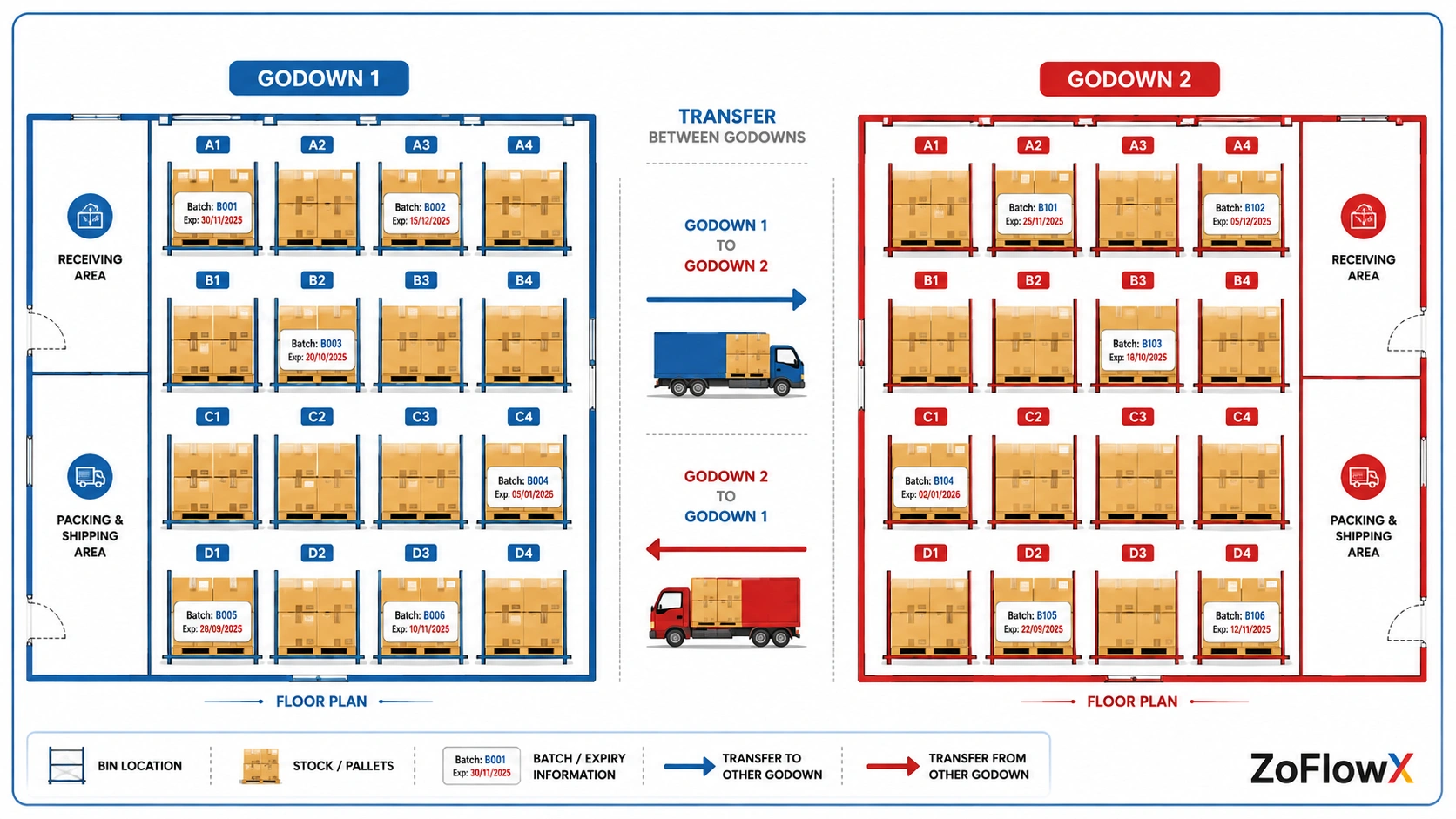
Both are good for multi-warehouse operations. Zoho Inventory supports stock counting, batch and serial tracking, transfer orders, bin locations, and warehouses. Odoo takes it one step further with multi-step receiving, putaway strategies, removal strategies such as FEFO, and cross-docking. Only use Odoo if your warehouse operations are really that complicated.
Most small and mid-sized businesses do not use the advanced features of the Odoo warehouse. They are present but unused.
A practical example. A pharma distributor with expiry dated stock requires FEFO picking, which is a real advantage for Odoo. If a furniture retailer is transporting finished goods from one godown to another, then Zoho Inventory is more than enough.
Ask yourself honestly what your warehouse actually does today, not what it might do in five years.
Do You Need Manufacturing Features or Just Stock Control?
This is the one question that gets most people to agree on the Zoho Inventory vs Odoo inventory management comparison.
Zoho Inventory supports composite items and simple assemblies. Components can be combined into a complete product and the stock impact can be monitored.
What it does not do is proper manufacturing. No work orders, no routings, no work centre capacity planning, no multi-level bill of materials with subassemblies.
Odoo does all that and more. It has an MRP module that manages work orders, quality checks, maintenance and shop floor control.
If you are creating gift hampers, Zoho Inventory is okay. For a fabrication business with three production stages and a shop floor team, Odoo is the logical choice.
How Well Does Each One Connect With Your Other Tools?
Zoho Inventory integrates seamlessly with Amazon, eBay, Shopify, Etsy, WooCommerce, Zoho Commerce, Xero, QuickBooks, Stripe, PayPal, FedEx, UPS and the entire Zoho ecosystem.
Odoo would rather you replace those tools than integrate with them. It's philosophy is that everything should be in Odoo.
That difference is more significant than people realize. If you're comfortable with Zoho CRM for sales and Zoho Books for accounts, Zoho Inventory sits on top of that stack without any integration effort.
If you are looking to merge five different systems into one and are ready to adapt your team's workflow, then Odoo's solution is the right one.
According to ZoFlowX, integration effort is the most underestimated line item in ERP projects. We have seen businesses spend more on connecting Odoo to their existing e-commerce platform than they spent on the Odoo licences themselves.
Zoho Inventory vs Odoo: Which Is Better for Small Business?
Zoho Inventory is the preferred option for most small businesses. It is less expensive per organisation, can be up and running in weeks, requires no developer and includes stock, warehouses, purchasing and order fulfilment without additional modules. Odoo is only suitable for small businesses if they are producing products or require an all-in-one ERP solution from the start.
Small businesses are often underestimating the time it will take to implement and overestimating the number of features they will use.
Imagine a 12-person home decor company selling on Shopify and Amazon. They require accurate stock, purchase orders to suppliers and clean invoices. Zoho Inventory does all of that out of the box.
Now imagine a 12-person spice processing unit that purchases raw material, processes it, packs it and sells it under its own brand. They require batch traceability and production costing. There, Odoo is paid for its services.
Same headcount, completely different answer. That is why the best inventory management software for small business is never a single product name.
When Should You Pick Odoo Instead?
Odoo is the right call in these situations.
- You manufacture, assemble or process goods with real production stages.
- You want a single system for inventory, accounting, HR, projects and website.
- You have in-house technical capability or a long-term partner budget.
- You need to self-host for compliance or data residency reasons.
- Your workflows are so unique that no standard software exists.
If you have 3 or more of those, then stop comparing and go with Odoo.
If none of the above, Odoo will be a costly solution to a problem you don't have.
What Do Business Owners Get Wrong When Choosing?
The most frequent error is purchasing for a business that you are not operating.
Owners envision 100 crore turnover and choose the platform that will support that future company. Then they spend six months implementing something that their current 15-person team can't use.
The second error is to compare licence prices alone. An Odoo licence at a low per user price seems great until you factor in the partner fees, hosting and developer retainer.
The third error is not considering who will operate the system once it goes live. Zoho Inventory can be managed by your operations manager. Odoo usually cannot.
One of the first things we tell our clients: if your team doesn't even use or understand concepts like a Bill of Materials (BOM), then you probably don't need an advanced manufacturing system like Odoo yet. A simpler solution may be a better fit for your current business.
How Do You Make the Final Call?
Work through these five questions honestly.
- Are you a manufacturer or reseller? Odoo is the answer for manufacturing.
- How many people need logins? More than 15 makes Odoo's per-user pricing expensive.
- Do you already use Zoho apps? If yes, Zoho Inventory is nearly free of integration work.
- Have technical resources? No developer means Zoho Inventory.
- How fast do you need to go live? Under two months means Zoho Inventory.
If you score 4 out of 5 towards one platform, you have your answer.
If the score is split, get a proper scoping session before you sign anything. A two-hour conversation with someone who has implemented both will save you months.
Final Thoughts on Choosing Your Inventory Platform
The Zoho Inventory vs Odoo decision comes down to scope. Zoho Inventory is a brilliant solution to stock and order management without a lot of hassle and expense. Odoo is your solution to all your business needs, but it requires time, budget and technical expertise in return.
Buy for the business you run today, not the one in your five-year plan. You can always migrate later, and migrating a working system is far easier than rescuing a failed implementation.
If you want a straight answer for your specific setup, talk to us. Our team has delivered both types of projects and we will tell you honestly which one fits, even if the answer is not the one we sell. Call +91 8190009222 or email info@zoflowx.com and we will map your requirements to the right platform in one conversation.
No sales pitch, just a clear recommendation you can act on.
Don't Waste Six Months on the Wrong Inventory System
Get a free 30-minute fit assessment before you commit your budget.
Book My Free ConsultationFrequently Asked Questions
Is Zoho Inventory cheaper than Odoo?
Yes, for most teams. Zoho Inventory has a flat fee per organisation from $29 per month, and Odoo charges per user per month. 10 people on Odoo pay 10 licences. On Zoho Inventory, you pay a single organisation fee and small add-ons. For very small teams in low cost areas, Odoo may be more affordable, but the implementation and developer fees typically drive up the overall cost.
Can Zoho Inventory handle manufacturing?
Only in a basic way. Zoho Inventory supports composite items and simple assemblies, which works fine for kitting, bundling and light assembly. It does not offer work orders, routings, work centres or multi-level bills of materials. For those who are running real production stages with a shop floor team, Odoo's MRP module or a custom build of Zoho Creator is more suitable than the standard Zoho Inventory.
Which is easier to learn for a non-technical team?
Zoho Inventory, by a clear margin. Its screens use everyday business language and most warehouse staff pick it up within a day or two. Odoo uses ERP terminology like operation types, procurement rules and removal strategies, which usually needs formal training. If your team has no ERP background, Zoho Inventory will get you productive far faster with much less resistance.
Does Odoo have a free version?
Yes, two of them. Odoo has a One App Free plan on its cloud, which provides unlimited users with access to one app. It also offers Odoo Community, a free open-source version that you host yourself. Most businesses eventually upgrade to the paid Enterprise tiers, as Community does not have Studio, the official mobile app, and some accounting reports and official support.
How long does each implementation take?
Zoho Inventory typically goes live in two to six weeks including data migration and training. Odoo projects usually run two to six months, sometimes longer with custom modules. The gap comes down to configuration depth. Zoho Inventory works well with defaults, while Odoo expects you to design your stock routes, operation types and costing methods before anything behaves correctly.
Can I migrate from Odoo to Zoho Inventory later?
Yes, and it happens more often than you would expect. Items, contacts, opening stock, open purchase orders and open sales orders can all be exported from Odoo and imported into Zoho Inventory. Historical transactions are trickier and are usually kept as read-only records in the old system. Plan for a clean cut-over date rather than running both platforms together.
Which one works better with e-commerce channels?
Zoho Inventory has stronger out-of-the-box marketplace connections, including Amazon, eBay, Etsy, Shopify and WooCommerce, with stock syncing across channels automatically. Odoo prefers you to run its own e-commerce module rather than connect to external platforms, so third-party marketplace integration often needs custom work. If you sell across multiple external channels, Zoho Inventory saves considerable setup effort.
Do I need a partner to implement either platform?
Odoo almost always needs one. Zoho Inventory often does not, though a partner shortens the timeline and prevents costly setup mistakes around opening stock, tax settings and warehouse structure. If your setup is straightforward, you can self-implement Zoho Inventory. Once you add multiple warehouses, batch tracking or CRM and Books integration, expert help pays for itself quickly.