Serial and Batch Tracking in Zoho Books: How It Works and When to Use Each
- Serial and batch tracking in Zoho Books are two different ways of following stock. Serial follows one single unit. Batch follows a group of units that arrived or were made together.
- One item uses one method only. You pick it when the item is created, and changing your mind later is genuinely painful.
- Serial number tracking in Zoho Books creates real work for your team every single day. Batch tracking in Zoho Books is far lighter to live with.
- Both options sit in the higher Zoho Books plans, so check your plan before you promise anything to your warehouse.
- Finalise your opening stock before you switch tracking on. This is the step that quietly breaks stock accuracy after a migration.
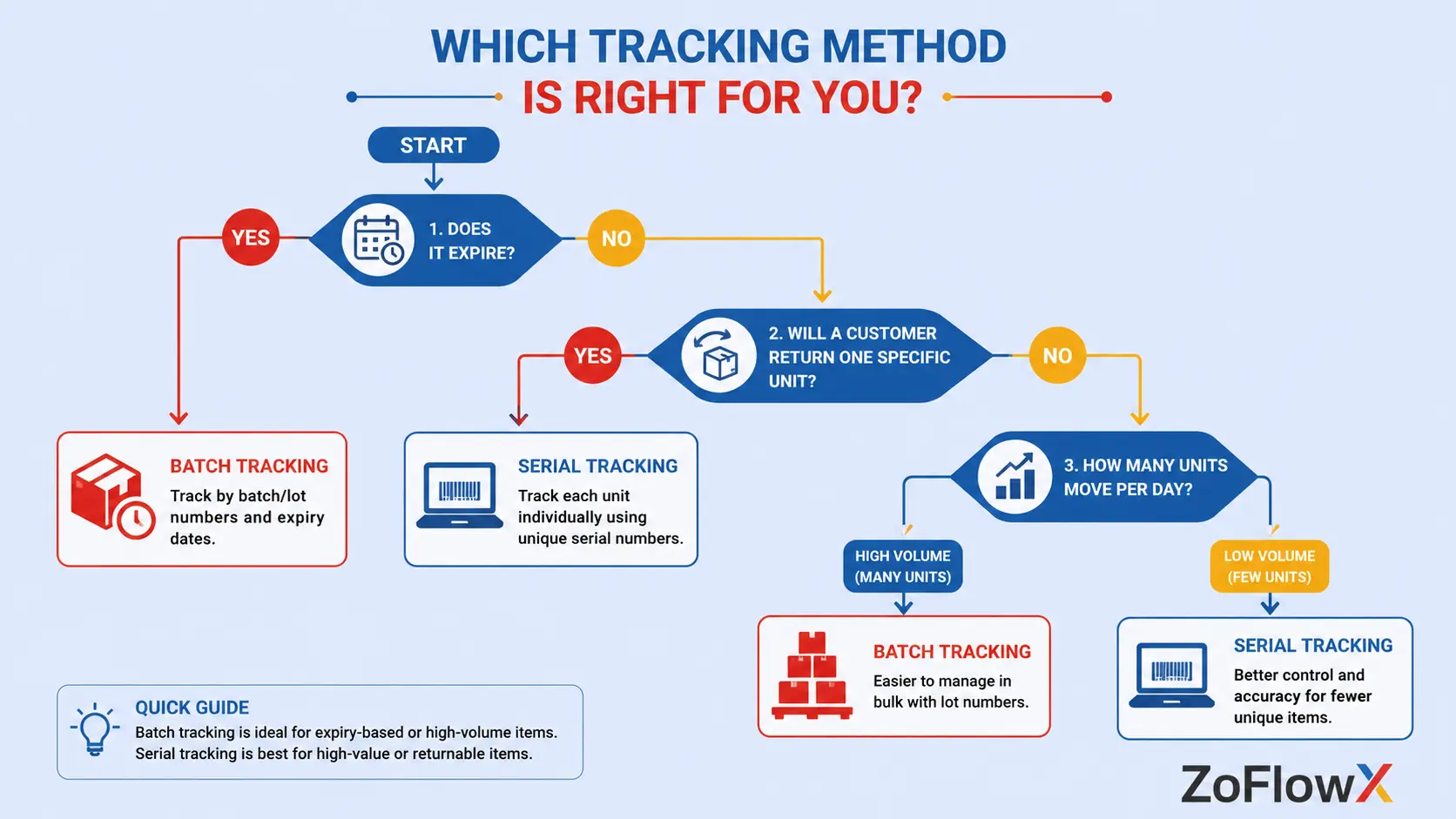
- If you sell things that expire, the batch wins. If customers come back holding one specific unit, serial wins.
What is serial and batch tracking in Zoho Books?
Serial and batch tracking in Zoho Books is a feature that allows you to track your stock more effectively than a standard quantity count. You not only know that you have 300 units, but you know you have a specific 300 units and their origin.
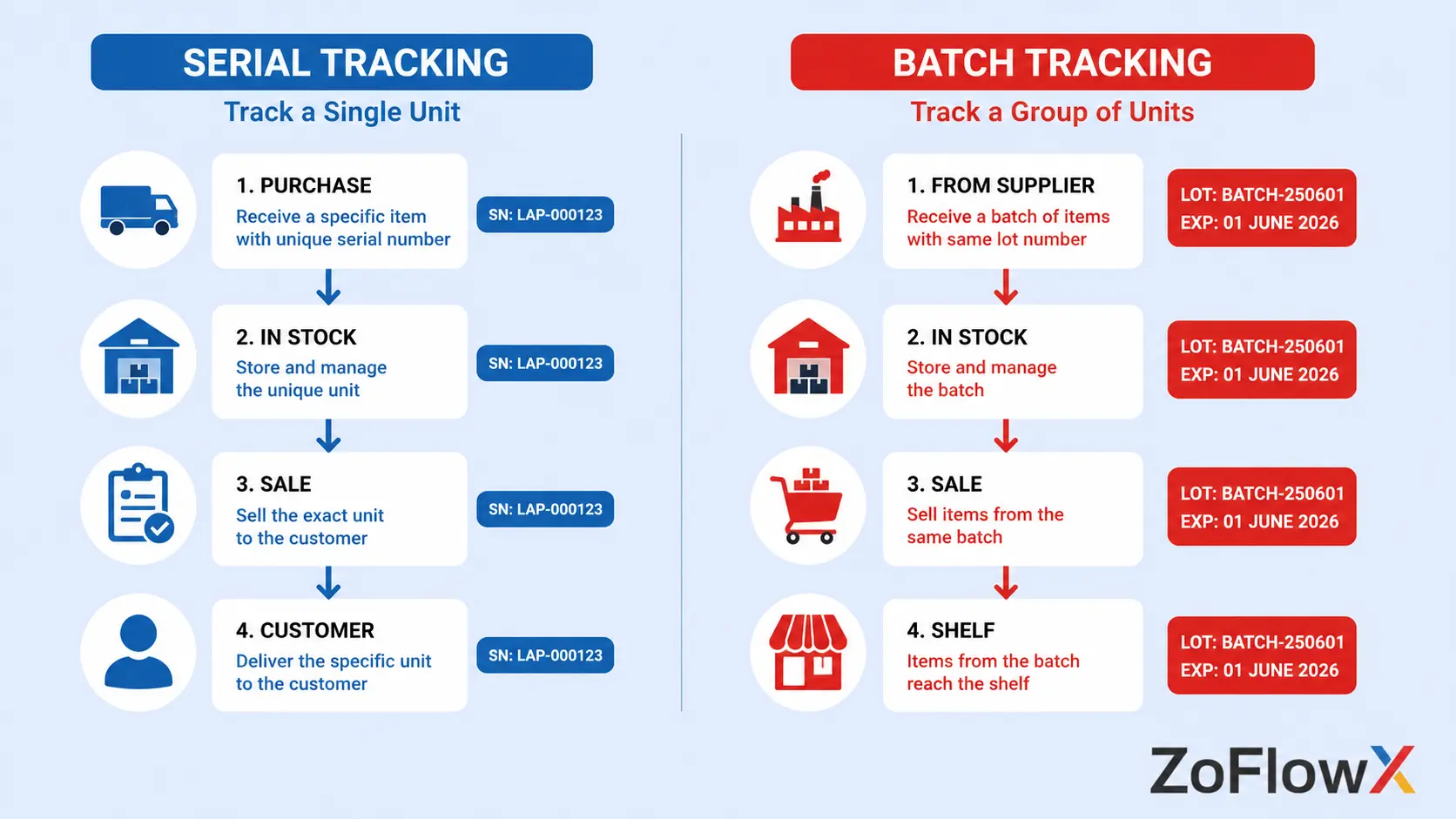
Each individual unit has a unique number in serial tracking. Batch tracking assigns a single number to an entire batch of units, typically with a manufacturing date and an expiry date.
That much is easy. The difficult part is deciding which to use and what you can't fix when it's finished. This is what the remainder of this guide is about.
How does each tracking method actually work?
Serial number tracking: one number, one unit
Imagine a shop that sells laptops. Each laptop has a unique number and if a customer comes in six months later with a laptop that has died, you can use every other laptop number to see when the laptop was sold, at what price and on which invoice.
Well, that's what serial number tracking is all about. Every unit is a record of events from its arrival to its departure.
When you receive stock, you write in numbers; when you sell them, you select numbers. No one without a number moves.
Batch tracking: one number, one group
Now imagine another distributor gets 400 cartons of cooking oil. No one wants to read carton number 217. Everyone's interested in this lot is that it was made in June and expires next March.
This is what batch tracking is. This number is shared by the entire group, and can even be the manufacturer's batch number, as well as the manufacturing date and expiry date associated with it.
On sale, you select the batch the products were manufactured from. This is sufficient to trace back to the supplier or to retrieve the correct stock from the shelf.
Quick answer: Serial tracking is one identifier and has a unique number, is suitable for warranties, repairs, and high value items. Batch tracking is applied to a series of units, all of which share a manufacturing date and expiry date (or recall risk) and is useful for food, medicine, chemicals and anything that has a shelf life or recall risk.
Which Zoho Books plan do you need for advanced inventory tracking?
You must have one of the top two plans. Advanced inventory tracking options (such as serial numbers and batches) are also listed on Zoho's own plan comparison, which include Advanced Inventory, in the Elite and Ultimate plans, in addition to warehouses, barcode scanning, composite items and bin locations.
This is because plain stock tracking begins as early as the Professional plan. That's only about quantity, though. It won't provide you with batch tracked items or serial tracked items.
However, if you are sitting on Zoho Inventory, these are added features of Zoho Inventory that are available in the Premium plan and upwards. Access Zoho's real-time pricing page to make sure your plans don't differ from their stated contents.
According to ZoFlowX, this is the most common surprise on a new build. Everyone agrees to full traceability in the kick-off call, then somebody discovers in week three that the current plan does not include it.
How do you decide between serial and batch tracking in Zoho Books?
Use this table. It settles most of the argument in about thirty seconds.
What you're weighing up | Go with serial tracking | Go with batch tracking |
Value per unit | High. Laptops, machines, phones, generators, medical devices | Low to medium. Bottles, cartons, packets, spares, fabric rolls |
Expiry dates | Not supported. Serial does not handle expiry | Essential. Batch expiry tracking is the whole reason batch exists |
Recall obligations | You need the exact customer holding one unit | You need to pull an entire production lot off every shelf at once |
Daily admin load | Heavy. Every unit is entered or scanned at every movement | Light. One number covers hundreds of units |
Volume you move daily | Low volume, high value | High volume, low value |
Typical industries | Electronics, automobiles, machinery, IT hardware | Food, pharma, cosmetics, chemicals, textiles, FMCG |
What customers ask you | "My unit is faulty, here is the number" | "Which lot is this from, and when does it expire?" |
The plain version of serial vs batch tracking: if a customer will ever come back holding one specific unit, use serial. If you will ever need to pull a whole lot off the shelf in one go, use batch.
What does the daily workflow really cost your team?
This is the part setup guides skip, and it decides whether your project survives.
Serial number tracking means somebody enters or scans a number for every unit at every stage. Goods received, invoice raised, delivery packed, item returned.
Picture a wholesaler invoicing 180 units of a serial tracked product on a busy Tuesday. That is 180 individual entries on one invoice. Without a barcode scanner, that invoice takes an hour instead of four minutes.
Batch tracking feels completely different. The same 180 units come out of two or three batches, so your team picks two or three numbers and moves on.
According to ZoFlowX, warehouse teams never complain in week one. They complain in week three, once the novelty wears off and the backlog builds. Then somebody starts guessing numbers to clear the queue, and your traceability quietly becomes fiction.
So before you enable serial number tracking, ask one blunt question. Who is physically typing these numbers, and how many will they type on your busiest day?
Which tracking choices can you not undo later?
Three things are much harder to reverse than people expect.
One item cannot use both methods. An item is either serial tracked or batch tracked, never both, and the method is chosen while the item is being created. So this is a decision you make before the item exists, not after.
Turning tracking off on an item is not a switch. Zoho requires you to delete every transaction linked to that item and clear its opening stock first. If you want to keep that history, the documented alternative is to mark the item inactive and create a fresh item in its place.
Read that again, because it matters. Keeping your history and removing tracking are mutually exclusive.
Retiring and recreating an item splits your reporting. The old item holds the old sales, the new one starts at zero. Any year-on-year comparison for that product now needs manual stitching.
There is also an organisation-level setting that needs to be turned on before these show on an item. This is not dangerous and can be fixed. The one that gets bitten on the item level choice.
What happens to items that already have stock?
Short answer: your traceability begins from the date of switch, NOT from the time the device was manufactured.
Zoho cannot invent batch numbers for stock you received last year. Therefore, at all times you are tracking, you will need to state what your current stock is, as well as what batches or serial numbers it is included in.
The clean way to turn on or turn off tracking around an existing transaction is typically to close the transaction and reopen a new item with the correct opening stock number.
This is where the money comes in. One of the clients enabled batch tracking on several dozens of items, which had six months of invoices already on them. All of the following stock reports contained two kinds of reality: untracked quantity and quantity from batch. Setting up the recon took longer than the original setup.
The safe rule is to enable tracking at a clean cut-off. Start of a financial year, or the go-live date of a fresh migration.
How do you bring batch and serial history across from Tally or spreadsheets?
Typically, batch data is available in Tally already. The serial-level data is more likely to not exist, or not reside in a single place, and instead be stored in a warehouse spreadsheet or a WhatsApp group.
We did this with over 1,900 SKUs and a Tally migration. That build was a brief lesson that is brief. Opening stock with batch details needs to be reconciled at go live, not after go live.
Here is the order that works:
- Pull batch-wise closing stock out of Tally as at your cut-off date, not just item-wise totals
- Decide your batch numbering conventions before importing anything, and write them down
- Match total stock value against Tally's stock summary, item by item, before anyone raises a live invoice
- Match batch-wise quantity separately, because item totals can tie while the batch split underneath is wrong
- For serial tracked items, count physically. Do not trust the spreadsheet
- Get the client's own accountant to sign off both numbers before day one
The issue that we had on our build was expiry dates. Tally kept some batches and some other batches, and the differences only became apparent when they attempted to sell from one of the batches that had no expiry date. Now, when data is cleaned, it is required and validated for expiry dates, before importing.
Which mistakes break stock accuracy most often?
These five turn up on almost every project.
Enabling serial tracking on low-value consumables. Someone turns it on when they're putting it on when they're screwing it on or packing it into something, because it sounds safer to have more detail. No one ever scans a screw. The data expires within a month.
Batch numbers that do not match supplier paperwork. Your team invents an internal number, the supplier's invoice shows a different one, and now nothing traces back. Keep the supplier's number in the manufacturer batch number field and your own reference separate.
Switching tracking on before opening stock is finalised. Tracking is switched on before opening stocks – finalised. The most harmful and the most prevalent. Complete inventory of stock first, anytime.
No expiry discipline. If the batch is made with no expiration date, inventory tracking is of no value when it is needed the most, in a recall.
Nobody owns the numbers. A "no one" is responsible for entry accuracy will not be accurate in the first few weeks.
What should you check before switching tracking on?
Run this list before you touch the setting.
- Check your plan is set up to track the inventory in advance.
- Check and validate what is really necessary to track and what is not.
- Provide serial/batch per item (in writing),
- Confirm the cut-off date
- Check that opening stock is reconciled and signed off on
- Confirm who enters numbers daily, and whether they have a scanner
- Ensure that your batch numbering system is documented.
If any line is unconfirmed, wait. Waiting a week is far cheaper than unwinding a wrong tracking choice across live transactions.
Conclusion
The setup takes minutes. The decision takes judgement.
This feature will work great if you get three things right. Choose the right approach on a case-by-case basis, be realistic about the amount of data you need to enter daily, and complete opening stock before you turn on the machine. If you mess up any of these, you will end up spending more time fixing stock reports than reading them.
If you are weighing this up for your own business and want a second opinion from a working Zoho implementation expert, we are happy to look at your item master and tell you plainly which items deserve tracking and which do not. Call +91 8190009222 or write to info@zoflowx.com, and we will point you in the right direction whether or not you end up working with us.
Need Help Choosing the Right Tracking Method?
Not sure whether serial or batch tracking is right for your business? We'll help you make the right decision before you go live.
Book a Free ConsultationFrequently asked questions
Can you enable serial and batch tracking in Zoho Books on an existing item?
Not cleanly. Tracking is selected at the time of creation and if it is deleted or changed upon that, then all the transactions for that item are deleted and all of the opening stock is removed. If you have already got an item that has invoices attached, the easiest way to do this is to deactivate the item and add a new tracked item in its place. Track plans before they are put live.
Can you switch from serial to batch tracking later?
No, not on the same item. An item cannot be serial tracked and batch tracked at the same time and can't be freely swapped after transactions have been made. The item would have to be retired and replaced according to the proper method. That is why it is important to have a meaningful discussion on the serial vs batch tracking decision before you create your item master.
Does Zoho Books support expiry dates?
Yes, using batch tracking. The batch number, the manufacturers' batch number, manufacturing date and expiry date can be recorded when creating a batch. This makes the batch expiry tracking feasible for food, pharma, cosmetics and chemicals. If shelf life is important to your business, then you will want to use batch rather than serial number tracking, as it does not include the ability to track expiry.
How do you import batch details from Tally?
You need to export the closing stock of the batch in Tally as on the cut-off day, clean it and import it as opening stock with batch wise details instead of quantity. Before importing, fill all the missing expiry dates as gaps will only become apparent during sales later. Compare the Stock Value and items with Tally, Total and Batch wise wise before anyone takes a live transaction.
What happens to existing stock when you turn on tracking?
The transactions made prior to your switch date are still not tracked, as of result, traceability starts from your switch date. If a quantity has been previously issued it needs to be reissued as opening stock to specific batches or serial numbers. Repeat this half way through the year and you will have two versions of stock history in your reports. No such mess when the tracking starts at a clean break – at a Financial Year start or a new go live.
Do you need Zoho Inventory for serial tracking?
Not necessarily. On the top plans, you can track serial numbers within Zoho Books itself, therefore a Books-only setup can be beneficial. You'll be moving to Zoho Inventory when you require more intensive warehouse activities, greater order volumes or greater fulfilment capabilities. Before making a decision on which product's plan to sit on; compare the current plan pages with the actual volume of products ordered.
Can you track both serial and batch on the same item?
No. Zoho allows you to use both tracking methods across your organization, but each item can have only one tracking method enabled. For example, you can batch-track consumables and serial-track laptops within the same account. However, you cannot track the same item using both serial numbers and batch numbers.
How do you handle batch numbers that do not match supplier records?
Use two fields instead of one. Enter the supplier number in the manufacturer batch number section and record your internal number as the batch number. Your warehouse can then search by either, and a recall dialogue with your supplier is quick. The secret killer of stock traceability is the invention of a number and discarding of the supplier's number.