How to Migrate from Tally to Zoho Books: A Complete Guide for Indian Businesses
- Plan before migrating: Choose a cut-off date, back up your Tally data, and decide which financial years and transactions you need to transfer.
- Prepare your data: Clean your ledgers, customer and vendor records, inventory, tax details, and transaction files before importing them.
- Map your accounts correctly: Match Tally ledgers with the appropriate Zoho Books accounts to maintain accurate financial reporting.
- Handle GST carefully: Verify GSTINs, tax rates, place of supply, historical transactions, and relevant tax balances.
- Import data in a controlled sequence: Set up accounts and contacts before importing linked transactions, wherever the selected import method requires it.
- Reconcile before going live: Compare the Trial Balance, Profit and Loss statement, Balance Sheet, receivables, payables, inventory, and bank balances.
- Keep a record of the migration: Retain your Tally backup, import files, reconciliation reports, and details of any adjustments.
Moving accounting data is not just about transferring figures. A successful Tally to Zoho Books migration must preserve the financial information your business needs and leave you with reliable books for everyday accounting and compliance.
If your business has been using Tally for years, you may be considering a cloud-based accounting system that makes financial information easier to access, share, and manage. Learning how to migrate from Tally to Zoho Books can help you plan this transition without overlooking important accounting details.
Zoho Books offers online accounting workflows, reporting, automation, and integration options that can support businesses looking to modernise their financial operations. However, moving from Tally Prime or Tally ERP 9 involves more than exporting a few Excel files. Your ledgers, customer and vendor records, invoices, purchase bills, opening balances, inventory, and GST details must be handled appropriately.
The right migration method depends on your business size, transaction volume, accounting history, inventory requirements, and the data you want to retain in Zoho Books. Some records can be imported using supported files, while others may need conversion, manual handling, or specialist assistance.
This guide explains the migration process step by step, including data preparation, GST mapping, common errors, reconciliation, costs, and post-migration checks. By the end, you will know how to plan your migration and decide whether to manage it internally or work with a migration specialist.
Why Migrate from Tally to Zoho Books?
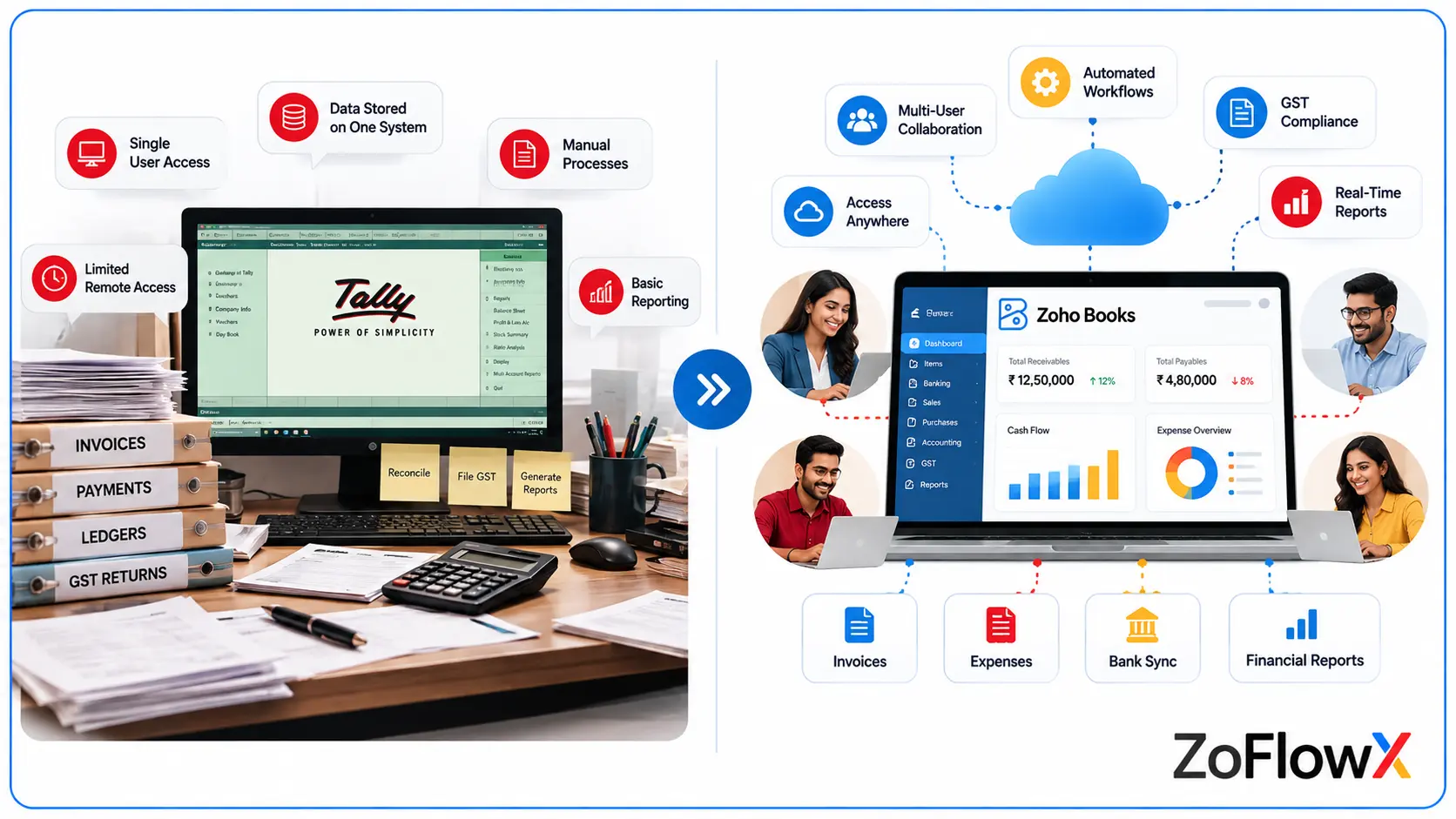
Businesses often migrate from Tally to Zoho Books when they want more flexible access to accounting data, easier collaboration, automated workflows, and better integration with their existing business applications.
If you want to understand how Zoho Books can support your business, explore our complete guide to Zoho Books for Small Businesses, covering its features, pricing, GST, setup, and automation.
The right choice depends on your current accounting process and the features your business needs. Moving to Zoho Books should solve specific operational problems rather than simply replace one accounting application with another.
1. Access Your Accounting Data Online
Zoho Books provides cloud-based access to accounting information, allowing authorised users to work from different locations without depending on access to a single office computer.
This can be helpful for business owners, finance teams, accountants, and external consultants who need to review financial information remotely.
2. Improve Team Collaboration
Businesses with multiple employees handling invoices, expenses, approvals, and payments may benefit from a more connected accounting workflow.
Zoho Books provides user permissions and workflow options that can help teams manage responsibilities. The available features depend on the subscription plan and configuration.
3. Automate Routine Accounting Tasks
Recurring invoices, payment reminders, transaction matching, and other supported workflows can reduce repetitive work.
When you shift to Zoho Books, review which activities can be automated and configure them only after the migrated data has been verified.
4. Improve Financial Reporting
Zoho Books provides financial reports that help businesses monitor income, expenses, receivables, payables, and other accounting information.
Accurate migration is essential to getting meaningful reports. Incorrect opening balances or account mapping can produce misleading figures even when the software itself is configured correctly.
5. Connect Accounting with Other Business Applications
Businesses already using compatible Zoho applications or third-party tools may benefit from integration opportunities.
Before migrating, identify your existing applications, payment systems, inventory workflows, and reporting requirements. Confirm that the required integrations are supported by your intended Zoho Books edition.
Tally vs Zoho Books: What Should You Consider?
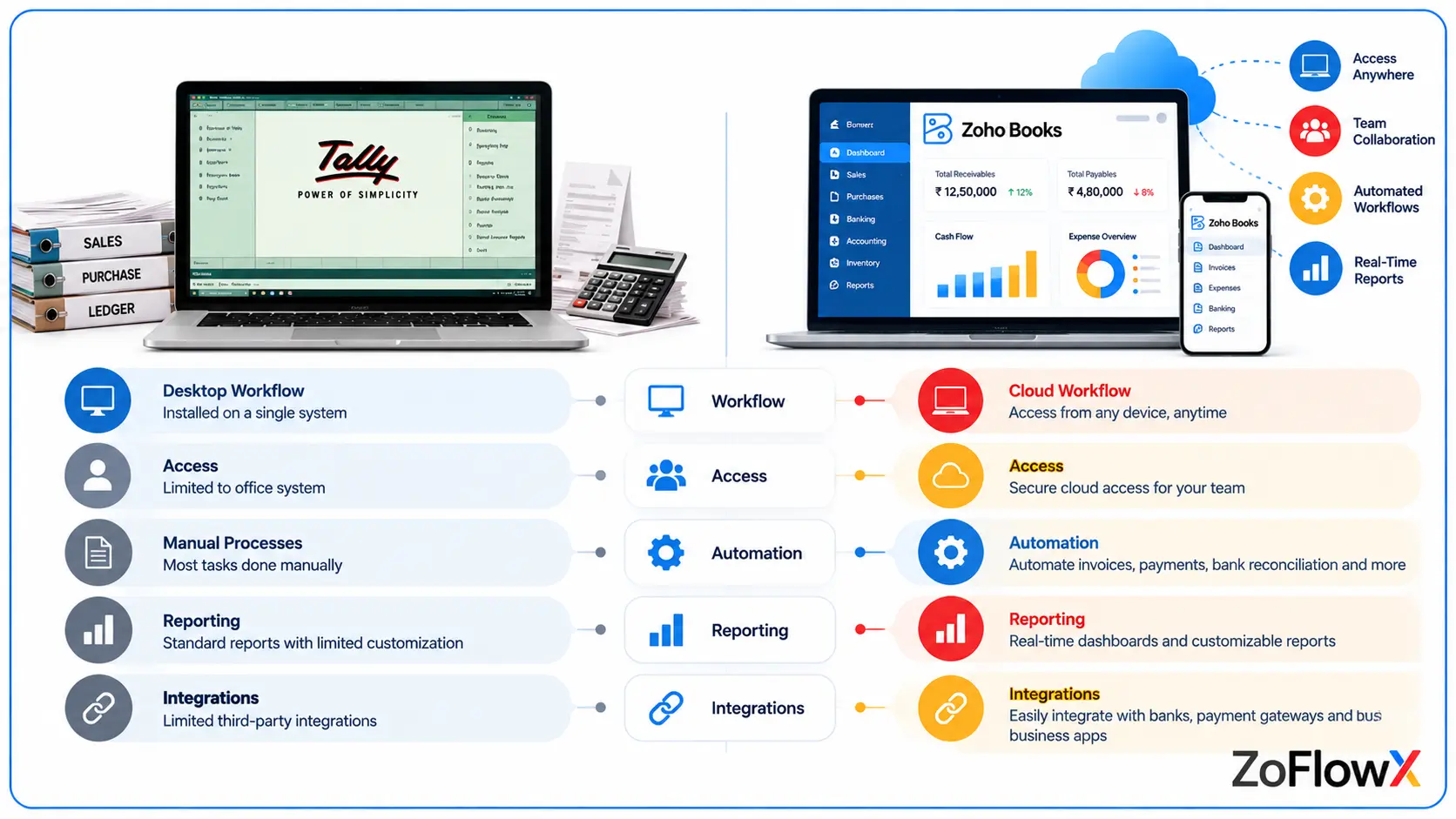
Business requirement | What to evaluate |
Accounting access | Desktop-based workflows versus cloud access |
Collaboration | User permissions, approvals, and remote working |
Reporting | Required financial, operational, and management reports |
Automation | Recurring transactions and supported automated workflows |
Integrations | Compatibility with your CRM, inventory, banking, and other systems |
GST compliance | Tax configuration, reporting, and current compliance requirements |
Migration | Data compatibility, historical records, and reconciliation effort |
Migrating from Tally to Zoho Books can be beneficial when its cloud access, workflows, and integrations match your business requirements. Before deciding, businesses can also evaluate Zoho Books compared with QuickBooks and Xero to understand which accounting platform best fits their needs. Evaluate the accounting processes first, then plan the migration around them.
Can You Migrate Data from Tally to Zoho Books Directly?
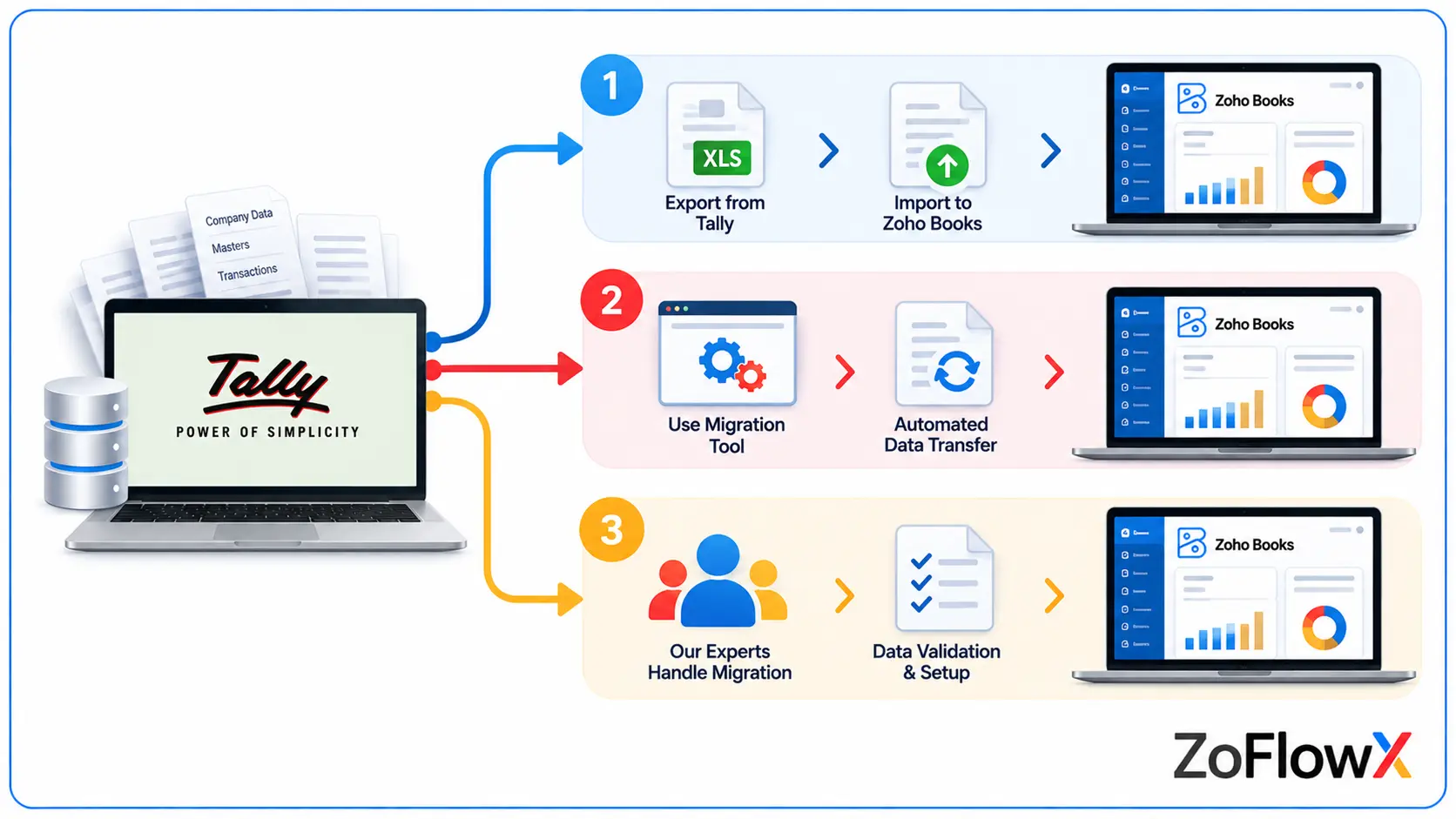
Yes, you can migrate supported data from Tally to Zoho Books, but the process depends on the data type and the import method available for your organisation. Zoho Books supports importing various records through formats such as CSV, TSV, and XLS, while the availability and requirements of specific migration options should be verified before starting.
Zoho's official India help documentation explains how to prepare data from Tally, import records, configure opening balances, and verify the resulting accounts. You can refer to the official Tally-to-Zoho Books migration guide.
There are three common approaches to Tally data import to Zoho Books.
Method 1: Manual Export and Import
This method involves exporting records from Tally, preparing the files, and importing supported data into the corresponding Zoho Books modules.
It may be suitable for businesses with straightforward accounting records and manageable transaction volumes.
Advantages: Greater control over individual files and lower dependence on specialised migration software.
Limitations: Data cleaning, field mapping, transaction linking, and reconciliation can require substantial manual effort.
Method 2: Automated or Third-Party Migration Tools
A Tally to Zoho Books migration tool may help convert and transfer data between the systems.
Before selecting one, verify:
- Whether it supports your Tally version and required Zoho Books edition.
- Which masters, vouchers, transactions, and historical records it can transfer.
- Whether GST information, opening balances, and transaction references are preserved.
- How it handles duplicates, rejected records, and linked payments.
- Whether it provides import logs and reconciliation reports.
Automation can reduce repetitive work, but it does not eliminate the need to validate accounting data.
Method 3: Professional Tally Migration Services
Professional migration services can be useful when your business has multiple financial years, complex inventory, numerous GST-related transactions, multiple entities, or previous migration failures.
A migration specialist can help with data extraction, conversion, account mapping, import sequencing, GST checks, and financial reconciliation.
Important: Do not assume that every Tally voucher or historical field can be transferred automatically. Confirm the supported data scope and test the migration method before committing to a full transfer.
What Data Can You Migrate from Tally to Zoho Books?
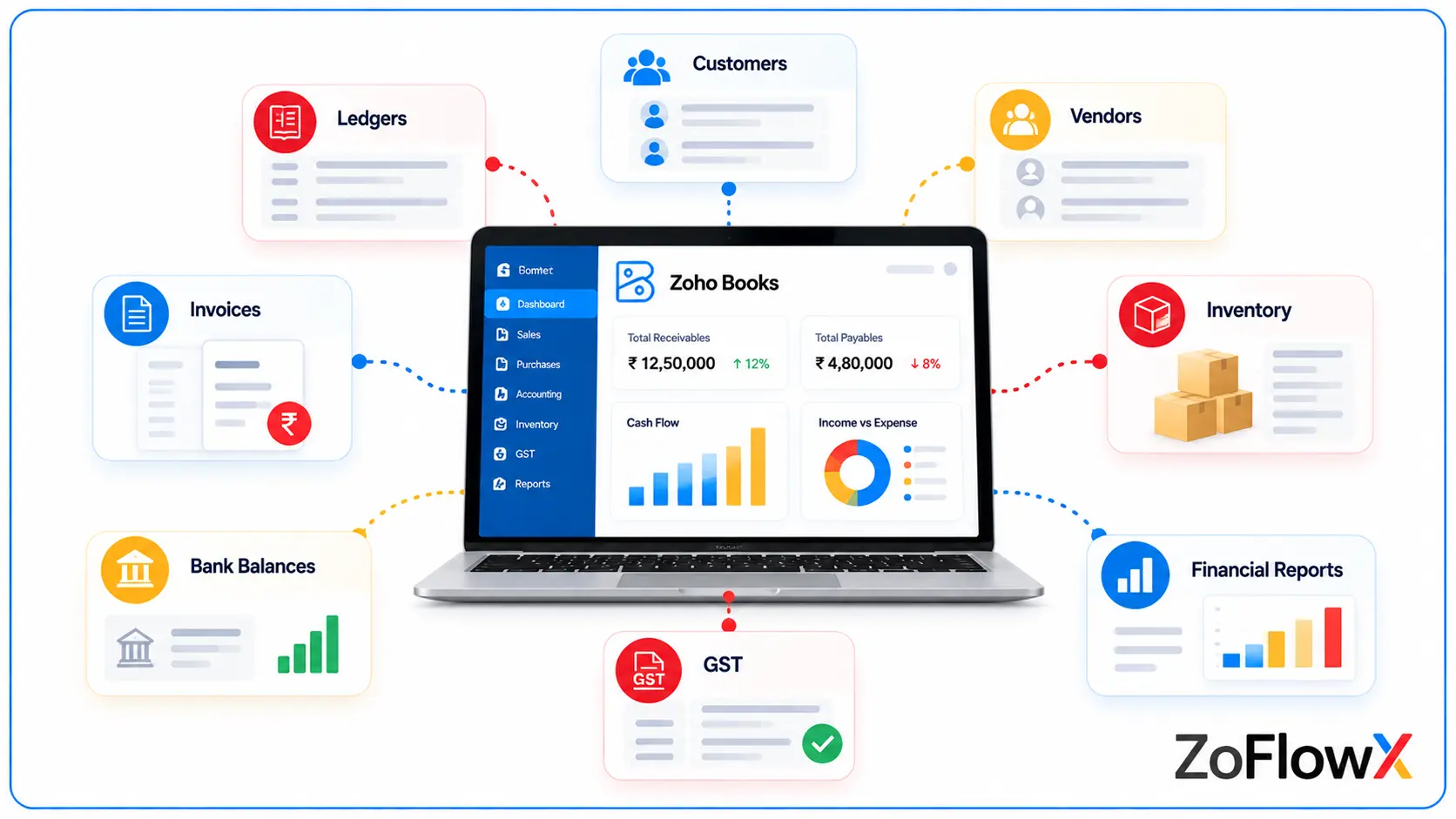
The records you can transfer depend on the supported import options, your source data, and the migration method you choose. Before migrating, prepare an inventory of the records your business needs in Zoho Books.
Data category | What needs to be checked |
Ledgers and accounts | Account names, account types, groups, and opening balances |
Customers and vendors | Contact information, GSTINs, duplicate records, and outstanding balances |
Sales invoices | Invoice numbers, dates, customers, item details, taxes, and outstanding amounts |
Purchase bills | Vendor details, bill dates, expenses, tax amounts, and outstanding balances |
Receipts and payments | Payment dates, amounts, linked invoices or bills, and unapplied amounts |
Items and inventory | Item names, units, opening stock, valuation, and inventory accounts |
GST data | GSTINs, tax rates, tax treatment, place of supply, and historical tax records |
Journals | Debit and credit entries, account mapping, dates, and narration |
Credit notes and vendor credits | Original transaction references, tax treatment, and remaining balances |
Historical records | Financial-year coverage, transaction detail, and audit or reporting requirements |
Bank balances | Account balances, outstanding entries, and reconciliation status |
Fixed assets and liabilities | Account balances, supporting schedules, and any depreciation or adjustment requirements |
A category appearing in this table does not guarantee that every related field can be imported directly. Check the current Zoho Books import options for each module and decide whether any information needs separate treatment.
For example, importing an item master is different from importing complete stock movement history. Similarly, entering an opening receivable balance is different from transferring every historical invoice and receipt.
Pre-Migration Checklist: What to Do Before Moving from Tally
Before you begin moving from Tally to Zoho Books, establish a clear migration scope and prepare a clean, verifiable copy of your accounting data.
Use the following checklist to organise your work.
- Back up Tally: Create a complete backup of the company data and confirm that it can be accessed.
- Choose a cut-off date: Decide when Tally entries will stop and Zoho Books entries will begin.
- Select the historical period: Decide whether you need complete transaction history, selected financial years, or opening balances and outstanding transactions.
- Export accounting reports: Save the Trial Balance, Balance Sheet, Profit and Loss statement, receivables, payables, and stock summary as applicable.
- Clean your ledgers: Review duplicate names, inactive accounts, incorrect groups, and unusual balances.
- Review contacts: Standardise customer and vendor names, addresses, GSTINs, and other important details.
- Check outstanding invoices and bills: Confirm that open transactions agree with the source records.
- Review GST records: Check tax rates, GST treatment, place of supply, and relevant tax balances.
- Review inventory: Confirm item names, units, stock quantities, and valuation at the cut-off date.
- Prepare account mapping: Document how each Tally ledger will correspond to a Zoho Books account.
- Identify special cases: Flag foreign-currency transactions, TDS entries, cost centres, credit notes, advances, and unusual journals.
- Prepare a reconciliation baseline: Save the source reports against which the migrated data will be compared.
- Test the import: Import a small sample where practical and inspect the results before processing the full dataset.
Download the Tally to Zoho Books Migration Checklist
Use our Excel migration checklist to track your preparation, data exports, account mapping, imports, and reconciliation tasks in one place.
Download the Excel checklist: [Tally to Zoho Books Migration Checklist]
Save a copy for your team and mark each task as complete. This makes it easier to identify missing records and assign responsibility before the migration begins.
How to Migrate from Tally to Zoho Books Step by Step
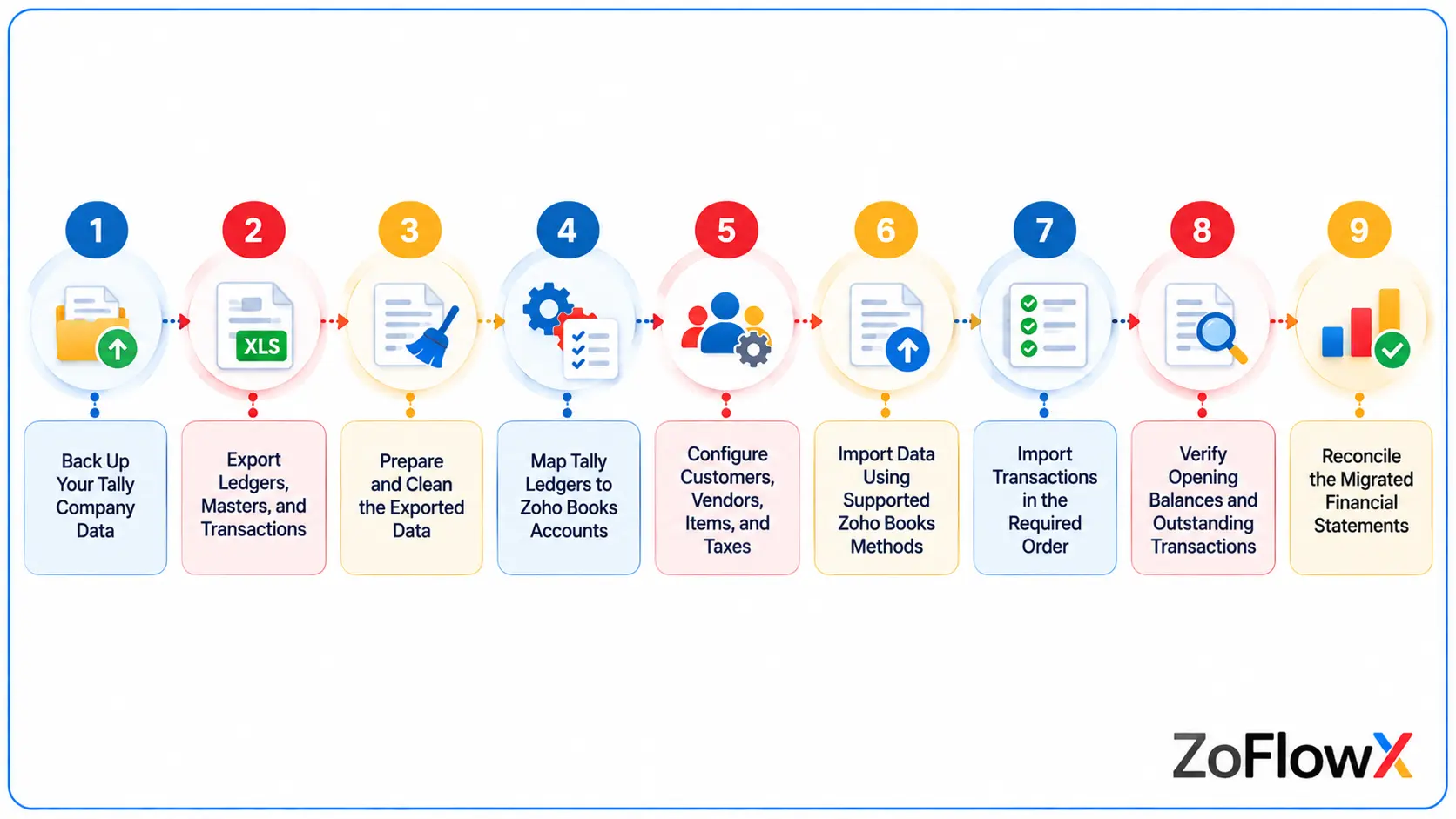
The most reliable way to migrate from Tally to Zoho Books is to work in a controlled sequence: back up the source data, prepare the Zoho organisation, export and clean the records, import the required data, and reconcile the results before going live.
The exact import sequence may vary by module and migration method. The following process provides a practical framework for Indian businesses.
Step 1 — Back Up Your Tally Company Data
Create a complete backup before making any changes to your source data or preparing exports.
Keep the backup in a secure location with access restricted to authorised personnel. Record the backup date and confirm that the company data can be opened.
Also save copies of key financial reports as of your migration cut-off date. These reports provide the reference figures you will use to validate the migrated accounts.
Why this matters: If a file is incomplete, a conversion fails, or the imported data requires correction, you will still have a reliable source for comparison.
Step 2 — Export Ledgers, Masters, and Transactions
Export the records required for your migration from Tally.
Depending on your Tally version and reporting requirements, you may need to export:
- Ledger and group masters.
- Customer and vendor details.
- Item masters and stock summaries.
- Sales invoices and purchase bills.
- Receipts, payments, credit notes, and vendor credits.
- Journal entries and other relevant vouchers.
- Trial Balance and financial statements.
- Outstanding receivables and payables.
Tally's available export options and report paths may differ by version, so verify the correct method for your installation.
Keep each export clearly named by company, financial year, and record type. For example, CompanyName_Sales_FY2025-26.csv is easier to identify than a generic file named Export.csv.
Practical tip: Export the Trial Balance for the exact cut-off date and save a copy of the source reports before proceeding.
Step 3 — Prepare and Clean the Exported Data
Raw exports often require preparation before they can be imported into Zoho Books.
Review the files for:
- Duplicate customers, vendors, and items.
- Missing mandatory fields.
- Inconsistent date formats.
- Incorrect debit and credit signs.
- Blank or invalid tax identifiers.
- Unrecognised account names.
- Duplicate transaction numbers.
- Incorrect field alignment or extra columns.
- Missing references between payments and invoices.
Also check the character encoding and delimiter. Zoho Books provides import configuration options for supported files, so the file settings must match the exported data. Refer to the Zoho Books data import documentation.
Do not delete a record simply because it resembles another record. For example, two entries with the same bill number may represent separate allocations or legitimate split entries. Investigate the source transaction before removing anything.
Why this matters: Clean files reduce import failures and help preserve the relationships between your accounting records.
Step 4 — Map Tally Ledgers to Zoho Books Accounts
Account mapping determines where each Tally ledger will appear in Zoho Books.
Create a mapping sheet that records the original ledger name, its Tally group, the intended Zoho Books account, and any required action.
Tally ledger or group | Possible Zoho Books mapping |
Sundry Debtors | Accounts Receivable |
Sundry Creditors | Accounts Payable |
Bank Accounts | Appropriate bank account |
Cash-in-Hand | Cash account |
Sales Accounts | Appropriate income account |
Purchase Accounts | Appropriate purchase or cost account |
Direct Expenses | Appropriate direct expense or cost account |
Indirect Expenses | Appropriate expense account |
Fixed Assets | Appropriate fixed asset account |
Duties and Taxes | Appropriate tax-related asset or liability accounts, as applicable |
These are examples, not universal one-to-one mappings. Your actual mapping must reflect the nature of each account, your accounting policies, and the available Zoho Books account types.
Pay special attention to accounts that have unusual debit or credit balances. An incorrect mapping can affect the Trial Balance, Profit and Loss statement, or Balance Sheet even if the totals initially appear to agree.
Step 5 — Configure Customers, Vendors, Items, and Taxes
Set up the organisation in Zoho Books before importing the records that depend on it.
Confirm the following:
- Legal business name and address.
- Financial year and base currency.
- GST registration details and applicable tax settings.
- Customer and vendor records.
- Item names, units, sales rates, and purchase rates.
- Required accounts and tax codes.
- Inventory tracking settings, if applicable.
- Custom fields or reporting tags that your business needs.
For contacts, check whether the same party appears in Tally as both a customer and a vendor. Zoho Books supports contact records with customer and vendor roles, but the correct handling depends on your import structure and configuration.
For items, confirm whether each record represents a good or service and whether stock tracking is required.
Important: Set the inventory start date and opening stock consistently with your chosen migration date. An incorrect cut-off can cause stock quantities or valuation reports to become inaccurate.
Step 6 — Import Data Using Supported Zoho Books Methods
Use the import option available in the relevant Zoho Books module.
The general process is:
- Open the appropriate module.
- Select the relevant import option.
- Upload the supported file.
- Configure the character encoding and delimiter.
- Map your source columns to the corresponding Zoho Books fields.
- Review the preview for missing or incorrectly mapped information.
- Import the data and review the import results.
Zoho Books supports CSV, TSV, and XLS imports for various modules, although individual modules may have different requirements and file-size limits. Always refer to the current instructions for the specific module.
Start with a small test file when possible. Check whether records are created correctly and whether any rows are rejected before importing the remaining data.
Do not assume that a successful import means that the financial migration is complete. It confirms only that the selected records were processed, not that every account balance and transaction relationship is correct.
Step 7 — Import Transactions in the Required Order
Import dependent records in an order that allows Zoho Books to identify the required accounts, contacts, and transactions.
A practical planning sequence is:
- Chart of accounts and other required account masters.
- Customers and vendors.
- Items and tax configuration.
- Opening balances, where appropriate for the chosen approach.
- Required historical invoices, bills, and other transactions.
- Receipts, payments, credit notes, vendor credits, and linked entries.
- Journals and any remaining supported records.
This is a planning framework rather than a universal import sequence. The correct order depends on the modules being imported, the selected migration method, and the relationships supported by Zoho Books.
For example, if you need payments linked to specific invoices, verify that the relevant invoices exist and that the import method supports the intended linkage before importing the payments.
Also avoid duplicating balances. If historical transactions are imported, you must understand how those transactions interact with the opening balances and migration date.
Step 8 — Verify Opening Balances and Outstanding Transactions
Opening balances represent the financial position of your business as of the migration date.
Compare the balances in Tally with those entered or imported into Zoho Books. Verify bank accounts, cash, assets, liabilities, equity, and other relevant accounts.
Receivables and payables require particular care. Decide whether your migration approach will retain individual outstanding invoices and bills or use an alternative opening-balance method supported by your configuration.
If individual open invoices and bills are required, verify their original amounts, payments already received or made, and remaining balances.
Check that:
- Total debit and credit balances agree.
- Customer balances match the source records.
- Vendor balances match the source records.
- Opening stock matches the stock summary at the cut-off date.
- Opening Balance Adjustments do not contain unexplained differences.
If the opening balances do not agree, investigate the account mapping, migration date, duplicate entries, and transactions dated on or before the cut-off date.
Step 9 — Reconcile the Migrated Financial Statements
Reconciliation is the final accounting validation before you begin using Zoho Books for live transactions.
Compare the source and migrated reports for the same company and cut-off date.
Review:
- Trial Balance.
- Profit and Loss statement.
- Balance Sheet.
- Accounts Receivable.
- Accounts Payable.
- Inventory quantities and valuation.
- Bank and cash balances.
- GST-related balances and relevant tax reports.
Record each difference in a reconciliation worksheet. Identify whether it comes from missing data, incorrect mapping, duplicated transactions, unapplied payments, rounding, or a genuine accounting adjustment.
Do not post a balancing journal simply to force the reports to match. Every adjustment should have an identifiable cause, supporting evidence, and appropriate approval.
Migration is complete only when the required data has been transferred, the differences have been investigated, and the financial results have been reviewed and signed off.
Need Help with Your Tally to Zoho Books Migration?
Get support with data preparation, account mapping, GST configuration, imports, and reconciliation so your team can move to Zoho Books with greater confidence.
Book a Migration AssessmentTally to Zoho Books GST Migration: What Businesses Must Check
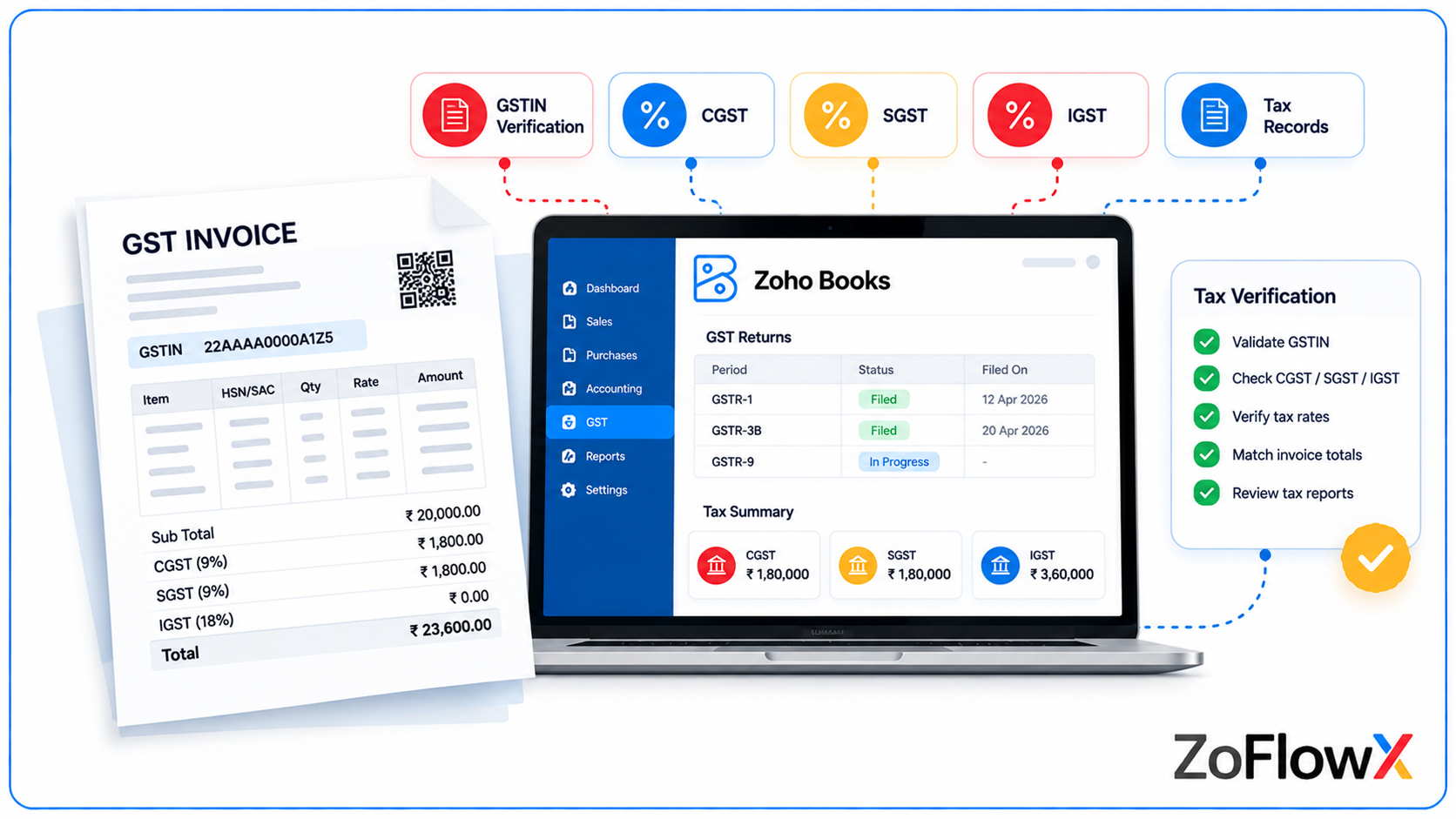
For Indian businesses, Tally to Zoho Books GST migration requires careful handling of tax-related records. Importing the invoice amounts alone is not enough; the relevant GST details must also be configured and verified.
1. Verify GSTINs and Contact Details
Check that each registered customer and vendor has the correct GSTIN and relevant state information.
Review the GST treatment assigned to each contact and verify the details against your source records. Incorrect or missing information can affect the accuracy of tax reporting.
2. Validate GST Rates and Tax Treatment
Review the tax rates applied to products, services, sales invoices, and purchase bills.
Confirm that the appropriate tax treatment is configured for each transaction. Do not automatically apply today's tax configuration to historical transactions without checking the rules applicable when those transactions occurred.
3. Check Intra-State and Inter-State Transactions
GST treatment can differ depending on the transaction's place of supply and the relevant registration details.
Verify the source transaction, customer or vendor information, and tax components. Where applicable, confirm whether CGST and SGST or IGST have been recorded correctly.
4. Handle Pre-GST and Historical Transactions Carefully
If your Tally records contain transactions from before GST implementation, preserve their historical accounting treatment.
Do not assign GST to a historical transaction merely because the current system requires tax settings for newer transactions. The appropriate treatment depends on the transaction date and its nature.
5. Review Input Tax Credit and Tax Liabilities
Compare relevant GST-related ledger balances in Tally with the corresponding balances in Zoho Books.
Investigate differences in input tax credit, output tax, tax payments, and outstanding liabilities. These balances should not be treated as ordinary cash or expense accounts without understanding their accounting purpose.
6. Verify E-Invoice and Other Compliance Records
If your business uses e-invoicing, e-way bills, or other GST-related processes, identify which historical records must be retained and which integrations or workflows must be configured in Zoho Books.
Do not assume that importing an old invoice automatically transfers its external compliance status, acknowledgement details, or related documents. Verify the fields and functionality supported by your migration method.
GST migration best practice: Reconcile tax amounts and relevant GST reports against the source data, and have a qualified accounting professional review material differences before going live.
Common Tally to Zoho Books Migration Errors and How to Fix Them
Most migration errors can be investigated systematically. Start with the rejected import rows or the specific accounts that do not agree, then trace the problem back to the source data or configuration.
Potential issue | What to investigate | Recommended action |
CSV import failure | Incorrect headers, encoding, delimiter, date format, or missing fields | Compare the file with the current sample import template and correct the mapping |
Duplicate contacts | Different spellings, repeated records, or customers also listed as vendors | Review the matching records and define a consistent contact-handling rule |
Missing transactions | Export date range, rejected rows, unsupported fields, or omitted vouchers | Compare source transaction counts with import results and investigate missing records |
Incorrect opening balances | Wrong cut-off date, account mapping, or duplicated transactions | Recheck the Trial Balance and confirm how imported transactions interact with opening balances |
GST mismatch | Incorrect GSTIN, tax code, place of supply, or historical tax treatment | Trace the affected transaction and compare the source tax calculation with the imported record |
Receivables or payables mismatch | Missing invoices, duplicate bills, unapplied payments, or incorrect opening balances | Reconcile outstanding transactions party by party |
Inventory differences | Wrong opening stock, units, valuation, or migration date | Compare item-level quantities and valuation against the source stock summary |
Financial statement differences | Missing journals, incorrect account classification, or duplicate entries | Compare the Trial Balance and investigate each affected account |
Payments not linked to invoices | Missing references or incorrect import sequence | Verify invoice and payment references and use a supported application or linking method |
Duplicate transaction numbers | Existing records or repeated source identifiers | Check transaction identity and import history before removing or reimporting records |
What If the Import Succeeds but the Balances Do Not Match?
A successful import does not guarantee a successful migration.
For example, a payment may exist in Zoho Books without being applied to the intended invoice. The payment amount may be present, but the receivable ageing report can still differ from Tally.
Likewise, a ledger may be mapped to the wrong account type, causing a difference in the financial statements even though the transaction itself has been imported.
Investigate the underlying cause before making adjustments. Correct the affected records, rerun the relevant reports, and document the resolution.
Avoid relying on generic fixes or deleting transactions simply because the final totals are different.
How to Reconcile Tally and Zoho Books After Migration
Reconciliation confirms whether your migrated accounting data produces the expected financial results.
Start with the Trial Balance, then investigate the individual accounts and supporting transactions responsible for any differences.
1. Compare the Trial Balance
Generate the Trial Balance in both systems for the same date and accounting period.
Compare each account's debit or credit balance. Confirm that the total debits and credits agree and investigate differences at the account level.
2. Compare the Profit and Loss Statement
Check revenue, direct costs, operating expenses, and other relevant income and expense accounts.
Confirm that transactions have been mapped to the appropriate accounts and that historical transactions are included consistently in both reports.
3. Compare the Balance Sheet
Review assets, liabilities, and equity. Pay particular attention to bank balances, receivables, payables, inventory, tax balances, loans, and retained earnings or other relevant equity accounts.
4. Reconcile Receivables and Payables
Compare outstanding customer invoices and vendor bills individually.
Verify the original amounts, payments, credits, and remaining balances. Investigate any differences caused by unapplied receipts, advances, missing transactions, or incorrect contact mapping.
5. Verify Inventory and GST Balances
Compare item quantities and inventory valuation with the source stock summary.
For GST, review the relevant tax ledgers and reports, ensuring that the comparison uses consistent dates and appropriate historical treatment.
6. Review Bank Balances and Outstanding Entries
Compare bank balances with the source accounting records and relevant bank statements. Investigate unreconciled entries, duplicate payments, and transactions recorded in the wrong period.
7. Document and Sign Off
Maintain a reconciliation worksheet showing:
- The account or report being checked.
- The Tally balance.
- The Zoho Books balance.
- The difference.
- The reason for the difference.
- The corrective action.
- The reviewer and approval status.
You can use the Excel migration checklist provided earlier to track these tasks. If you create a separate reconciliation worksheet, link it here once the file is ready.
The goal is not merely to make the reports match. It is to establish why they match and retain enough evidence for future reviews and audits.
Tally to Zoho Books Migration Cost and Timeline
The cost and duration of a Tally to Zoho Books migration depend on the amount of data, the complexity of your accounting records, and the level of support required.
There is no single price or timeline that applies to every business.
Factors That Affect Migration Cost
- Transaction volume: More invoices, bills, vouchers, and journals generally require more preparation and validation.
- Historical coverage: Migrating several financial years usually requires more work than transferring opening balances and outstanding transactions.
- Number of companies: Multiple entities may require separate mapping, imports, and reconciliation.
- Inventory complexity: Item variants, units, stock valuation, and historical movements can increase the work involved.
- GST requirements: Multiple registrations, historical tax records, and complex tax treatment require additional verification.
- Custom fields and reporting: Special fields, cost centres, and reporting requirements may need separate mapping or configuration.
- Data quality: Duplicate records, inconsistent formats, and incomplete source data increase preparation time.
- Reconciliation requirements: Transaction-level validation and detailed documentation require additional effort.
How Long Does Migration Take?
A straightforward migration with clean data and limited historical requirements will generally take less effort than a multi-year migration involving complex inventory, GST records, or numerous entities.
The actual duration should be estimated after reviewing the source data, selected migration scope, import requirements, and reconciliation expectations.
At Zoflowx, the practical first step is to assess what needs to move, identify potential issues, and agree on the expected deliverables before work begins.
Manual vs Automated vs Professional Migration
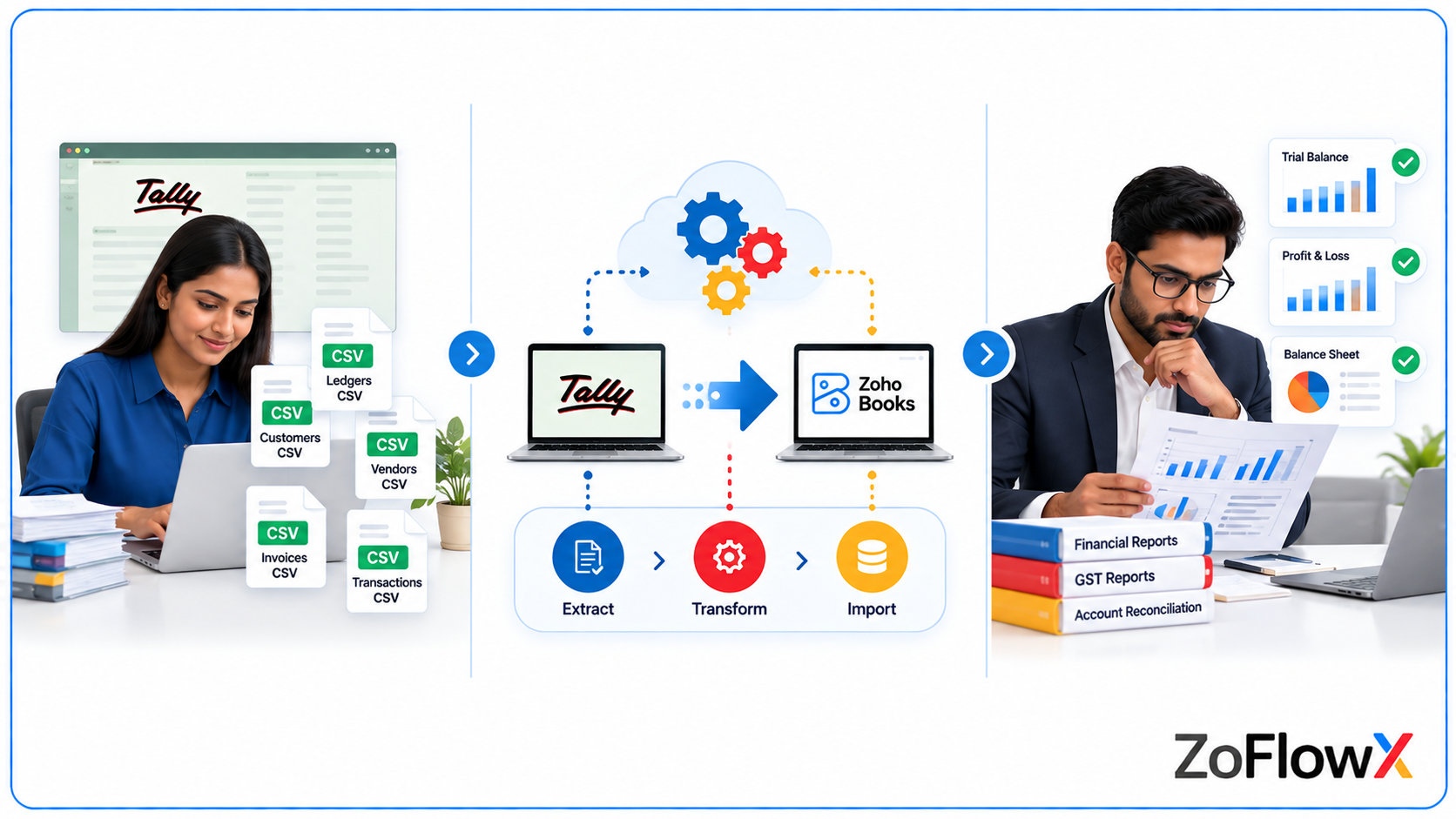
Choosing the right method depends on the complexity of your records, the time available to your team, and the level of accounting validation you need.
Factor | Manual migration | Automated migration tool | Professional migration service |
Best suited for | Small, straightforward datasets | Repeatable imports and compatible data structures | Complex, multi-year, or business-critical migrations |
Cost considerations | Staff time and internal effort | Tool fees, configuration, and validation | Service scope and specialist effort |
Data preparation | Mostly handled internally | Often requires structured source files | Can include data review and preparation |
Error handling | Depends on team experience | Depends on tool capabilities and exception reporting | Can include investigation and corrective action |
Reconciliation | Must be planned and performed internally | Still required after import | Can be included in the agreed scope |
Support | Internal team | Tool provider, if available | Migration team under the agreed engagement |
When Can You Migrate Internally?
A DIY migration may be practical if your business has relatively clean records, a limited number of transactions, straightforward inventory requirements, and someone on your team who understands accounting and reconciliation.
When Should You Consider Professional Assistance?
Consider specialist support if:
- You need to migrate multiple financial years.
- Your business has a large volume of transactions.
- You manage multiple entities or GST registrations.
- You need to preserve complex inventory information.
- Your previous import attempts produced errors or mismatched balances.
- Your team cannot dedicate sufficient time to testing and reconciliation.
- You need a documented handover and clear accountability.
A migration tool can automate parts of the process, but professional oversight may still be necessary when accounting accuracy, historical reporting, and transaction relationships are important.
What You Get at the End of a Well-Planned Migration
The outcome of a Tally to Zoho Books migration should be a usable accounting environment, not simply a collection of imported records.
Depending on the agreed scope, a completed migration should provide:
- Prepared accounting data: Relevant ledgers, contacts, items, and transactions imported or handled through the agreed process.
- Mapped accounts: A documented relationship between Tally ledgers and Zoho Books accounts.
- Configured GST details: Tax settings and relevant records reviewed against the source information.
- Verified opening balances: Balances entered using an agreed cut-off date and checked against the source reports.
- Reviewed outstanding transactions: Receivables and payables checked for missing, duplicated, or incorrectly linked entries.
- Inventory checks: Opening stock and valuation reviewed where inventory migration is included.
- Reconciliation records: Differences investigated and corrections documented.
- A migration handover: Notes covering the data transferred, limitations, outstanding tasks, and recommended next steps.
- A go-live plan: Clear guidance on when to stop entering new transactions in Tally and begin using Zoho Books.
The exact deliverables should be confirmed before the project starts. Complete historical transaction transfer, specialised conversion, and transaction-level reconciliation should not be assumed unless they are included in the migration scope.
Who Is This Tally to Zoho Books Migration Service For?
Our migration approach is designed for businesses that want to move their accounting operations from Tally to Zoho Books with a clear process and defined validation steps.
It may be a good fit for:
- Startups and MSMEs: Businesses looking to establish a more connected accounting workflow.
- Growing companies: Organisations that need improved collaboration, access, and reporting.
- Businesses using Tally Prime or Tally ERP 9: Teams planning to transition from their existing Tally setup.
- Inventory-driven businesses: Companies that need their item records and opening stock handled carefully.
- GST-registered businesses: Organisations that need tax information and historical accounting records reviewed during migration.
- Multi-year accounting environments: Businesses that need selected historical transactions or balances transferred.
- Finance teams and accountants: Teams that want a structured import, reconciliation, and handover process.
- Businesses with previous migration issues: Companies that need help investigating missing records, rejected imports, or financial differences.
The best migration plan depends on your actual accounting data. A short assessment can establish whether your business needs a simple import, a structured conversion, or a more comprehensive migration project.
Why Work with Zoflowx for Tally to Zoho Books Migration?
Moving accounting systems affects financial reporting, tax records, and everyday business operations. A clear migration process helps reduce uncertainty and gives your team a defined way to check the results.
Zoflowx can help you plan the transition around your business requirements, with a focus on data preparation, account mapping, import planning, GST checks, and reconciliation. Our Zoho Books implementation services can also help businesses configure the accounting system to suit their operational requirements.
A Structured Approach
We can help define the migration scope, establish the cut-off date, identify the required records, and plan the sequence of work.
Data Mapping and Preparation
A migration requires more than moving columns between files. Account types, contact roles, transaction references, and tax details must be considered before the import begins.
Focus on Financial Accuracy
Reconciliation should be part of the migration plan from the start. Comparing the source and destination reports helps identify differences before your team relies on the new system for routine accounting.
Clear Deliverables
Your migration engagement should specify which records are included, how errors will be handled, what reconciliation checks will be performed, and which items remain outside the agreed scope.
Support for a More Confident Handover
A documented cut-over plan helps your team understand when to start recording new transactions in Zoho Books, which historical records remain in Tally, and how to handle any outstanding migration tasks.
Our recommendation: Discuss your current Tally setup, historical data requirements, GST configuration, and reporting needs before deciding on a migration method. This helps establish a practical plan that suits your business instead of relying on a generic import process.
Post-Migration Checklist Before Going Live
Before recording live transactions in Zoho Books, confirm that the migrated data has been reviewed and the new accounting environment is ready for your team.
- Confirm that the migration scope has been completed or that remaining items are documented.
- Verify opening balances against the approved Trial Balance.
- Compare the Profit and Loss statement and Balance Sheet with the source reports.
- Review customer and vendor balances.
- Test selected sales invoices, purchase bills, receipts, and payments.
- Verify GSTINs, tax rates, GST treatment, and relevant tax reports.
- Check item records, opening stock, and inventory valuation if applicable.
- Review bank accounts and outstanding bank entries.
- Confirm user access and permissions.
- Configure required integrations and recurring transactions.
- Train relevant employees on the new workflows.
- Retain the Tally backup, source exports, import files, and reconciliation records.
- Communicate the cut-off date and the process for recording new transactions.
- Confirm who will investigate any issues discovered after go-live.
Keep the original Tally data available for reference in accordance with your organisation's record-retention, audit, and compliance requirements.
Avoid entering the same live transaction into both systems after cut-over unless a documented process specifically requires it. Duplicate entries can create reconciliation problems.
Conclusion: Make Your Move from Tally to Zoho Books with Confidence
Learning how to migrate from Tally to Zoho Books is the first step towards a well-planned accounting transition. The key is to prepare the data carefully, map accounts correctly, configure GST settings, import records using supported methods, and reconcile the financial results before going live.
Whether you are moving from Tally Prime or Tally ERP 9, the migration should reflect your actual business needs. Some organisations need only opening balances and outstanding transactions, while others require several years of historical records, inventory information, and detailed transaction validation.
A structured approach helps your team understand what will be transferred, what needs additional handling, and how the final results will be checked.
If you are planning a migration and want a clear assessment of the work involved, Zoflowx can help you identify the next steps.
Contact ZoFlowX at +91 8190009222 or info@zoflowx.com to book a meeting and discuss your Tally data, migration requirements, and Zoho Books implementation.
Ready to Migrate from Tally to Zoho Books?
Get a practical migration plan tailored to your accounting data, GST requirements, and business workflows.
Book a Meeting with ZoFlowXFrequently Asked Questions
1. Can I migrate from Tally to Zoho Books without losing data?
You can migrate supported records while retaining the original Tally backup as a reference. However, complete transfer depends on the data types, import method, and source data quality. Validate the imported records and reconcile the financial statements before considering the migration complete.
2. How do I import Tally data into Zoho Books?
Back up your Tally company, export the required masters and transactions, clean the files, configure your Zoho Books organisation, and import supported records using the appropriate module. Map the fields correctly, review rejected rows, verify opening balances, and reconcile the reports.
3. Can I migrate Tally Prime data to Zoho Books?
Yes, Tally Prime data can be prepared for migration to Zoho Books, provided the required records can be exported and converted into supported import formats. Check your specific Tally version, data structure, and migration requirements before beginning.
4. Can I migrate Tally ERP 9 data to Zoho Books?
Tally ERP 9 data may also be migrated using an appropriate export and import process. The work required depends on the version, available exports, data quality, and historical records you need to transfer.
5. Can I migrate historical invoices and purchase bills?
Historical invoices and purchase bills can be imported when the relevant modules and fields support the required data. Verify invoice dates, tax information, customer or vendor references, payment status, and transaction relationships before importing.
6. Can I migrate inventory and stock balances?
Item records and opening stock can be handled through supported Zoho Books import options when inventory tracking is configured appropriately. Complete historical stock movement or valuation history may require additional handling, so confirm the required scope before migrating.
7. How do I migrate GST data from Tally?
Export the required transaction and tax information, configure GST settings in Zoho Books, and verify GSTINs, tax rates, tax treatment, place of supply, and relevant tax balances. Historical transactions require special attention to ensure that their original tax treatment is preserved.
8. Can I migrate multiple financial years?
Yes, multiple financial years may be included when the required data can be exported and imported using the chosen method. Define the years to be transferred, organise the data by period, and reconcile the results carefully. Importing one financial year at a time can make differences easier to investigate.
9. How much does Tally to Zoho Books migration cost?
The cost depends on transaction volume, historical coverage, number of entities, inventory complexity, GST requirements, data quality, and reconciliation scope. Request an assessment based on your actual data before relying on a quotation or estimated timeline.
10. Should I migrate the complete history or only opening balances?
Choose complete history if you need detailed historical transactions and reporting in Zoho Books. Consider opening balances and outstanding transactions if your main goal is to start operating in the new system while retaining older records in Tally. Your audit, reporting, compliance, and operational requirements should guide the decision.
11. Is there a direct Tally to Zoho Books migration tool?
Zoho Books provides official migration guidance for Tally and supports importing data into its modules. The exact options available depend on the organisation, edition, and data being transferred. Third-party tools may also be available, but their supported scope and validation capabilities should be checked before use.
12. What should I do if my Zoho Books balances do not match Tally?
Compare the reports for the same cut-off date and review the differences account by account. Check account mapping, missing or duplicate transactions, opening balances, unapplied payments, and inventory or tax discrepancies. Correct the underlying issue and rerun the reports rather than posting unexplained balancing entries.