Zoho CRM Pros and Cons: What They Don't Tell You Before You Buy
- The biggest Zoho CRM pros and cons balance out like this: excellent price and flexibility on one side, a real learning curve and uneven support on the other.
- Pricing starts low, but add ons for storage, analytics and telephony can quietly push your bill up.
- Customisation is a genuine strength. Almost every field, module and stage can be reshaped to fit how you actually sell.
- Reporting and performance start to strain once you cross a few hundred thousand records.
- Support quality depends heavily on which plan you are on, which surprises a lot of first time buyers.
- It is worth it for most growing businesses. It is a poor fit if you want something that works perfectly on day one with zero setup.
Zoho CRM is one of the best value CRMs available for small and mid sized businesses, but it requires more of you during the setup process than the sales page implies. Zoho CRM is a cloud based customer relationship management solution that keeps your leads, contacts, deals and follow ups in a single place and automates the repetitive aspects of selling. The real Zoho CRM pros and cons come down to a simple trade off. You save a lot of money on licences, and you spend that saving on getting it configured properly.
What Is Zoho CRM and Who Is It Actually Built For?
Zoho CRM is sales software that tracks every customer conversation from first enquiry to closed deal. It sits at the centre of the wider Zoho ecosystem, which includes accounting, helpdesk, HR, marketing and project tools.
Quick answer: Zoho CRM is a cloud based sales platform designed for small and mid sized businesses who want enterprise style features without enterprise pricing. It handles leads, contacts, deals, quotes, automation and reporting, and connects to over forty other Zoho apps. It is best suited for teams of 5 to 200 users.
Think of a twelve person air conditioning company in Coimbatore. They receive enquiries on the phone, WhatsApp and their website and the owner has been monitoring them in a shared spreadsheet that no one updates. Zoho CRM is designed specifically for that business, not a bank with three thousand sales reps.
According to ZoFlowX, the businesses that get the most out of Zoho are the ones that already know their sales process. The software organises a process. It does not invent one for you.
What Are the Biggest Advantages of Using Zoho CRM?
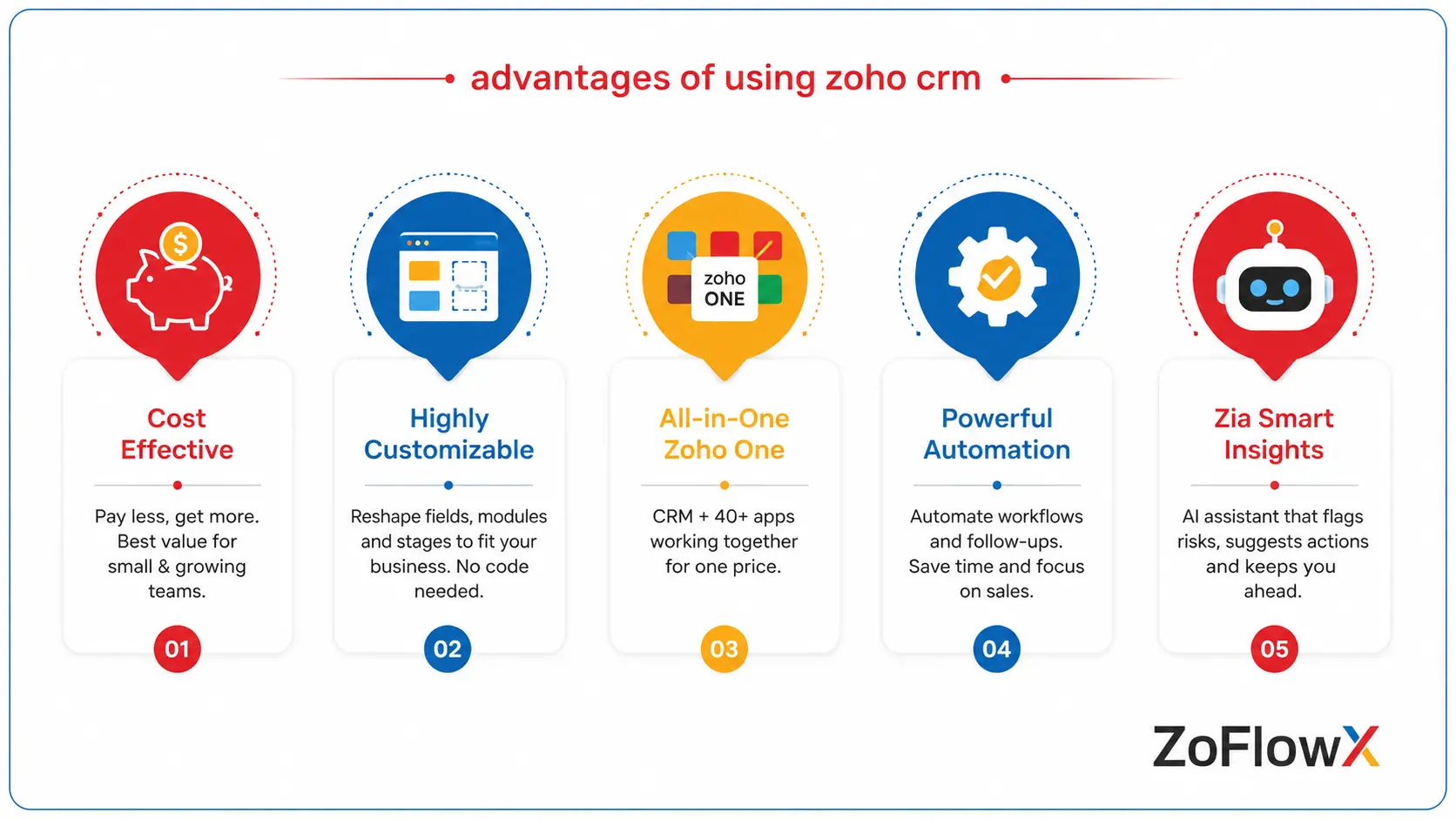
The Zoho CRM advantages and disadvantages are not evenly weighted. The benefits are wide and short-term. The drawbacks are more likely to emerge when it is put into practice.
It Costs a Fraction of What Rivals Charge
This is the primary reason why most businesses consider Zoho. A 20-person sales team can operate a full CRM for about two or three seats on some other platforms.
There is also a free version for up to 3 users. That's a real usable starting point, not a crippled demo, for a founder and two salespeople.
You Can Reshape Almost Everything Without Code
Custom fields, custom modules, renamed stages, conditional layouts, approval steps. It's mostly drag and drop.
A wedding photography studio can change the name of Deals to Bookings, add fields for event date and venue, and remove all the irrelevant information from the form. This flexibility is typically not offered for free elsewhere.
The Wider Zoho One Bundle Is Hard to Beat
With Zoho One, you'll have the CRM, accounting, helpdesk, HR, e-signature, forms, projects and more, all for one per user price.
For a business currently paying separately for four or five disconnected tools, the maths often works out dramatically in Zoho's favour. Everything also talks to everything else without paying for connectors.
Automation That Saves Real Hours
Workflow rules, blueprints and assignment rules take care of the mundane tasks. A New enquiry is received, it is assigned to the correct rep by territory, a welcome email is sent, a follow up task is created 3 days later.
None of that needs a developer. A capable operations person can build it in an afternoon.
Zia Adds Useful Nudges
Zoho's AI assistant is Zia. It alerts you to deals that are cooling off, recommends when to reach out to a contact, and identifies odd lulls in activity.
It's not magic, it's more data, but it does catch things a busy sales manager would miss.
Where Does Zoho CRM Fall Short in Real Projects?
Now the honest half. These are the Zoho CRM benefits and drawbacks that rarely make it into a demo call.
Quick answer: The main drawbacks of Zoho CRM are a steep configuration learning curve, support that varies by plan tier, native reporting that struggles with very large datasets, and an interface that feels slightly different across Zoho apps. Most of these are manageable with proper setup, but they are real.
The Learning Curve Is Steeper Than Advertised
Using Zoho CRM is easy. Configuring it well is not.
Once you start using blueprints, custom functions, multi step approvals or Deluge scripting, you need someone who knows the platform. Many companies purchase licenses, explore for a month, and then go back to spreadsheets.
Support Quality Depends on What You Pay
Basic support is via email and may be slow. Priority and enterprise support is definitely improved, but it is paid.
If you are on a lower plan and hit an urgent issue on quarter end, that response time will feel painful. This is one of the more common complaints in any honest Zoho CRM review.
Native Reporting Hits a Ceiling
Basic reports and dashboards are covered well. It gets stuck when it comes to cross module analysis, cohort views and blended data from CRM plus Books plus Desk.
You end up having to purchase Zoho Analytics as an additional subscription. If it is important to your leadership team, budget for it.
Performance Slows With Very Large Data Volumes
With less than a hundred thousand records, it's fast. List views and reports begin to lag as you push into millions of rows with heavy custom functions and mass updates.
This will be felt by a distributor who has eight years of order history and wants to migrate everything at once. Most of it is solved by proper archiving of old data.
The Interface Is Not Always Consistent
There are many apps in Zoho, created by many teams, over many years. The design language changes slightly when moving from CRM to Books to Creator.
It is a small irritation rather than a blocker, but new users notice it in the first week.
Some Features Are Locked Behind Higher Editions
There are specific tiers for blueprints, inventory modules, multi user portals and territory management. What appears to be a reasonable plan can turn into a different number when you add up what you need.
Don't sign until you have mapped out your must-have features to editions.
Is Zoho CRM Worth It for a Growing Business?
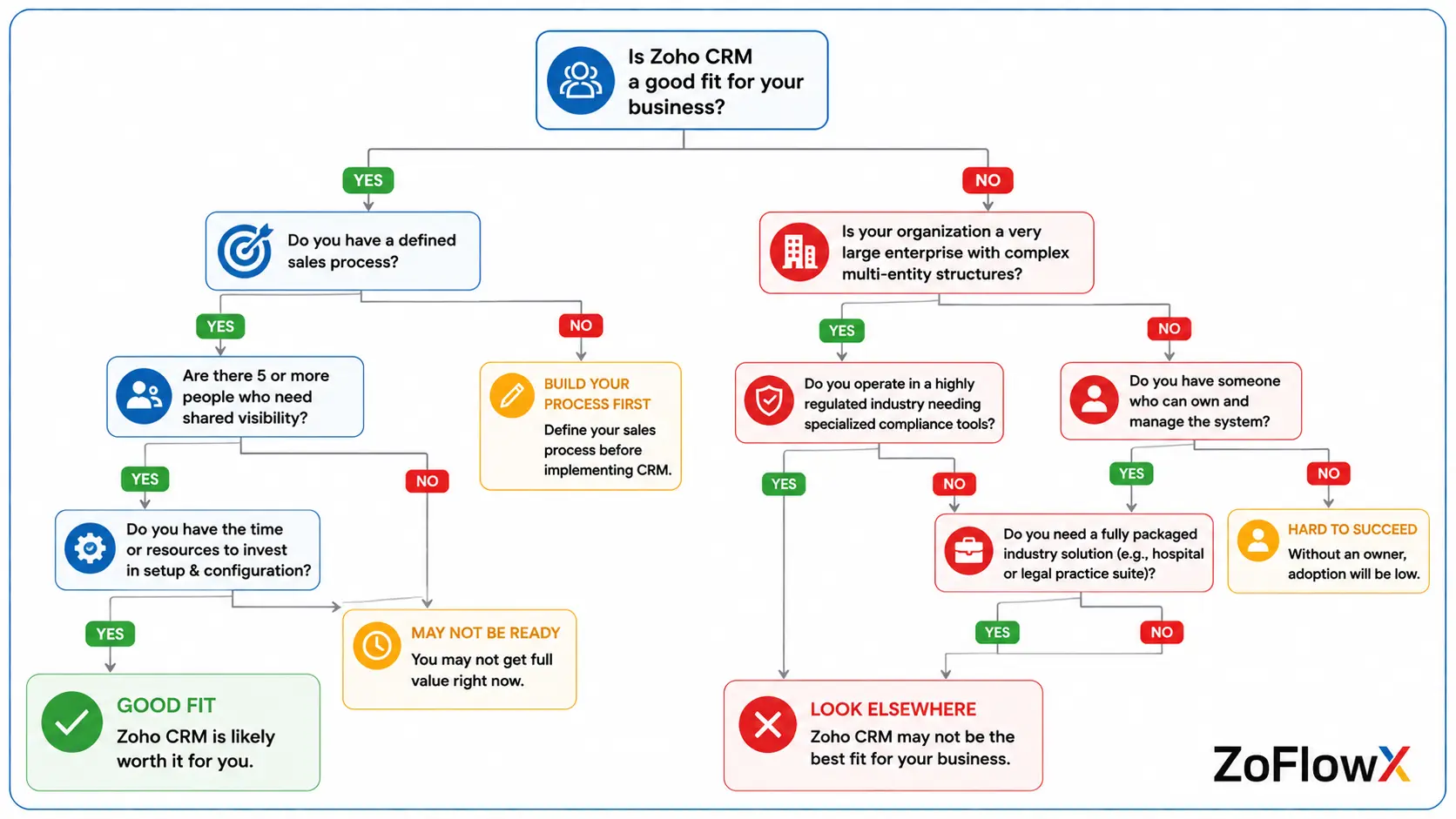
For most growing businesses, yes. Is Zoho CRM worth it usually depends less on the software and more on whether you commit to setting it up properly.
Quick answer: Zoho CRM is worth it if you have a defined sales process, five or more people who need shared visibility, and a willingness to invest in configuration. It is not worth it if you expect a perfect system out of the box or need heavily specialised industry software.
Picture two companies buying the same licences on the same day. The first cleans the data for three weeks, maps the stages and trains the team. The second brings in a chaotic spreadsheet and instructs everyone to work it out.
After six months, the first company conducts its weekly review from a dashboard. The latter has returned to WhatsApp. The same product, different result.
Which Businesses Should Think Twice Before Choosing It?
Not all businesses are suitable and it does no one any favors to pretend otherwise.
- Very large enterprises with thousands of users and complex multi-entity structures usually need something heavier.
- Highly regulated industries needing niche compliance tooling may find gaps.
- Teams with nobody to own the system will struggle, regardless of platform.
- Companies wanting a fully packaged industry solution, like a specialised hospital or legal practice suite, may prefer purpose built software.
According to ZoFlowX, roughly one in five enquiries is better served by a different tool, and saying so early saves everyone a wasted quarter.
What Hidden Costs Should You Budget For?
The licence fee is the start, not the end. This is where the Zoho CRM limitations and benefits meet your actual budget.
Additional features include extra file storage, increased API call limits, Zoho Analytics for advanced reporting, telephony credits for click to call, and premium support.
Then there is implementation. Data migration, workflow design, integrations and training take real time, whether your team does it or you bring in help. A realistic budget is licences plus a one time setup cost plus a small ongoing allowance for changes.
How Do You Avoid Common Problems?
Most Zoho complaints trace back to setup, not software. A few habits prevent nearly all of them.
- Clean your data first. Duplicate contacts and half filled records destroy trust in the system faster than any bug.
- Start with fewer fields. Twelve well used fields beat sixty that nobody fills in.
- Pick one owner. There has to be someone inside who is responsible for the CRM, even if it's part-time.
- Train on your process, not the product. Show your team how to log their deals, not how Zoho works in general.
- Automate after going live, not before. Watch how people actually work for a month, then build rules around reality.
- Review quarterly. Retire what nobody uses. CRMs get cluttered the way garages do.
If your team does not have the bandwidth, it is worth working with experienced Zoho consultants who have seen the same problems across dozens of rollouts.
What Does a Realistic Rollout Actually Look Like?
Consider a medium-sized furniture company that has three sales locations and an order book that is still maintained on Excel. This is a typical sequence.
Weeks one and two go to discovery and data cleanup. Weeks three and four cover configuration, custom fields, pipeline stages and user roles. Week five handles data migration and testing.
Weeks six and seven are training and a soft launch with one branch. Week eight rolls out to everyone with a support window for questions.
Nothing about that is dramatic, and that is the point. Rollouts that fail are almost always the ones compressed into a weekend. Teams that want it done properly the first time usually bring in Zoho CRM implementation experts rather than learning on their own live data.
So, Should You Buy Zoho CRM?
If you want an honest summary of the Zoho CRM pros and cons, it is this. You are buying enormous flexibility and outstanding value, and paying for it with setup effort rather than licence fees.
For small and mid sized businesses with a clear sales process and someone willing to own the system, it is one of the strongest choices available today. For businesses expecting it to work perfectly with no configuration, it will disappoint, just as any CRM would.
The choice isn't about the quality of Zoho, it's about whether you're ready to operate a CRM effectively. If you get that part right, the software doesn't let you down.
If you want a straight opinion on whether Zoho fits your business, talk to our team on +91 8190009222 or write to info@zoflowx.com. We will tell you honestly if it is the wrong fit, because a bad implementation helps nobody.
Frequently Asked Questions
Is Zoho CRM good for small businesses?
Yes, Zoho CRM is one of the best CRM solutions for small businesses as entry pricing is low and the free version supports up to three users. A ten-person sales team can operate pipelines, quotes and follow ups for less than the cost of one seat on some competing platforms. The downside is that very little is preconfigured for your business.
What are the main disadvantages of Zoho CRM?
The main disadvantages are a steep configuration learning curve, support quality that varies by plan tier, and native reporting that strains with very large datasets. Some useful features are also locked behind higher editions, so a cheap looking plan can get costlier once you add what you need. None of these are deal breakers, but they do mean budgeting time for proper setup and training.
Is Zoho CRM worth the money?
For most small and mid sized businesses, yes. You get pipeline management, automation, quotes, email and reporting for a fraction of what larger platforms charge for comparable depth. The value increases further with Zoho One, which bundles accounting, helpdesk, projects and dozens of other apps. It stops being worth it if you need very heavy custom development or highly specialised industry software that Zoho simply does not cover.
How long does a Zoho CRM setup take?
A basic setup takes a few days. A proper rollout with custom fields, pipelines, automation, data migration and team training usually runs four to eight weeks, depending on how messy your existing data is. Companies that rush this stage are almost always the ones who later say the CRM does not work. Clean data and a clear sales process matter more than the software itself.
Can Zoho CRM replace Salesforce?
For many mid-sized companies, yes. Zoho CRM covers the core sales features most teams genuinely use, including pipelines, forecasting, workflows, quotes and dashboards. Salesforce still leads on very large enterprise deployments, deep app ecosystems and complex multi entity structures. If your team has under two hundred users and reasonably standard sales processes, Zoho handles the job comfortably at a much lower total cost.
Does Zoho CRM have hidden costs?
Not hidden exactly, but easy to overlook. Extra file storage, higher API limits, Zoho Analytics, telephony credits and premium support all sit outside the headline price. Implementation is another real cost, since most businesses need help configuring it correctly. Budget for licences plus setup plus training, and you avoid the unpleasant surprise that catches a lot of first time buyers three months in.
Is Zoho CRM difficult to learn?
It is not difficult, but it is broad. Adding leads, moving deals and logging calls takes an afternoon to pick up. The harder parts are workflows, blueprints, custom functions and advanced reports, which is where most teams get stuck without guidance. A short training session at go live plus a simple one page internal guide clears up the vast majority of everyday confusion.
Which Zoho CRM edition should I start with?
Professional suits most growing teams because it adds blueprints, inventory and stronger automation over Standard. Enterprise makes sense once you need advanced customisation, territory management or multi user portals. Start one edition below what you think you need, run it for a full quarter, then upgrade when a specific missing feature actually blocks your team. Upgrading later is simple, while downgrading is a genuine headache.