Transform Your Hiring Strategy with Zoho CRM for Recruitment
- Zoho CRM for recruitment turns a sales-focused CRM into a hiring system that tracks candidates, job openings, and follow-ups in one place.
- You can rename modules, add custom fields, and build hiring stages without writing a single line of code.
- Zoho CRM recruitment automation handles follow-up emails, interview reminders, and status updates so nobody slips through the cracks.
- Agencies get extra value because they can manage client companies and candidates side by side.
- It has limits — heavy resume parsing and job board posting are better handled by Zoho Recruit or a smart integration.
- When planned correctly from the start, a proper setup takes weeks, not months.
Zoho CRM for recruitment is the practice of using Zoho CRM as your hiring system - storing candidate details, tracking every applicant through your hiring stages, and automating the follow-ups that usually get forgotten. Instead of buying separate recruitment CRM software, you shape Zoho CRM around how you actually hire. It works because recruiting and selling follow the same shape: a pipeline, a database of people, and constant follow-up.
Most hiring teams already know their process is leaking. The question is whether Zoho CRM can plug it. Let's walk through that honestly.
What Is Zoho CRM for Recruitment?
Zoho CRM recruitment setups use Zoho's customisation tools to convert sales modules into hiring modules. Leads become Candidates, Deals become Job Openings, and Contacts become Hiring Managers. You then add fields like notice period, expected salary, and skill tags. The result is a candidate database and recruitment pipeline built on software you may already own.
Nothing is hidden or hacked here. Zoho CRM was built to be reshaped, and hiring is one of the most natural things to reshape it into.
Think of it like buying an empty shop and fitting the shelves yourself. The building is solid — you decide what goes where.
A quick example: Priya is the owner of a 25-person IT services firm in Chennai. She was tracking 60 open applications across WhatsApp, email, and a spreadsheet her HR executive updated on Fridays.
After moving to Zoho CRM for hiring, every applicant sat in one module with a clear stage. Her Friday spreadsheet disappeared, and so did the "who was that candidate again?" phone calls.
Why Does Hiring Break Down Without a Central System?
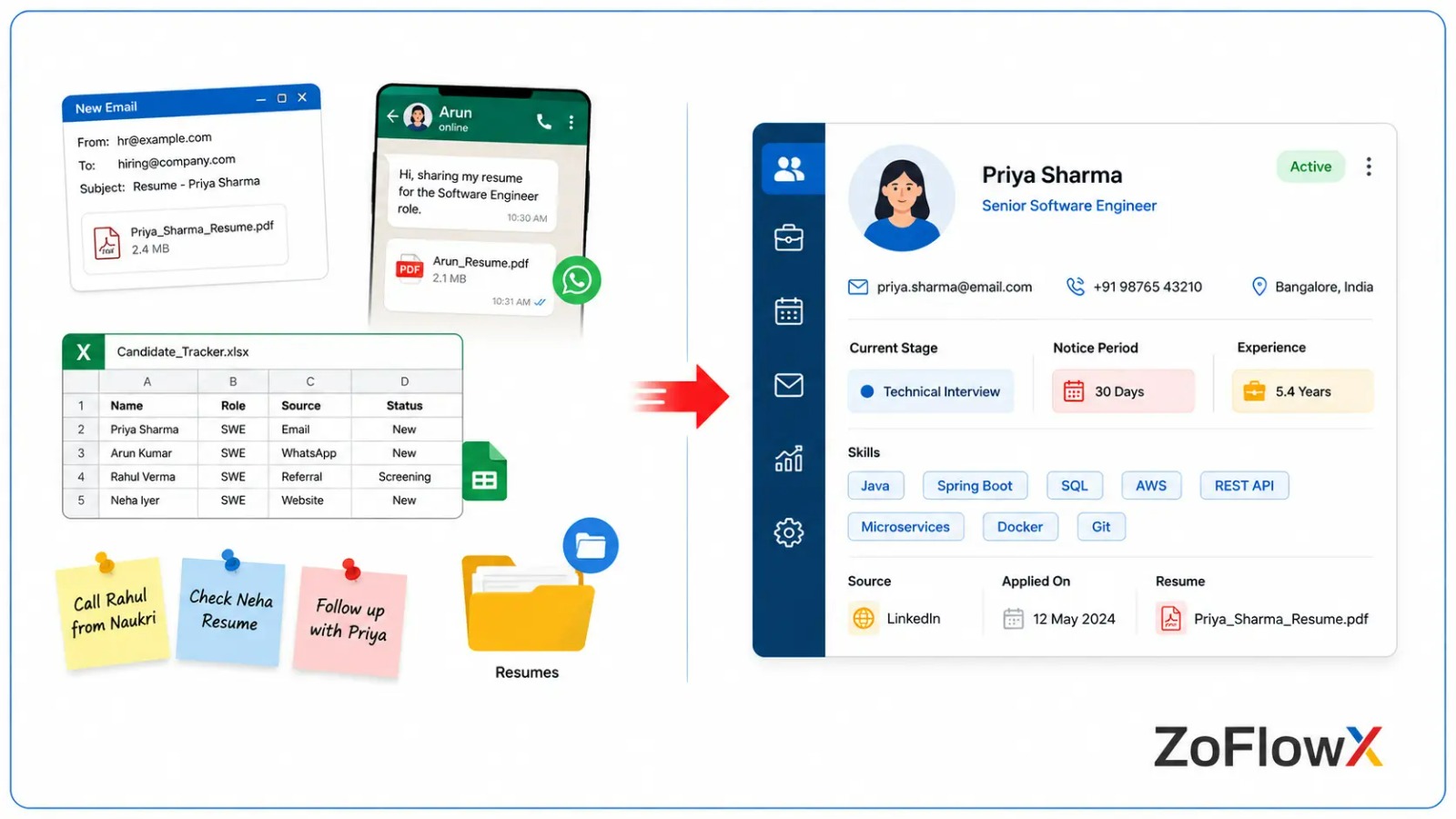
Hiring breaks down for one boring reason: information lives in too many places. A resume is in email, feedback is in a WhatsApp group, and the interview date is in someone's head.
By the time you go back to a promising candidate, they have already accepted another offer. That is not a talent problem. That is a tracking problem.
Here is what usually goes wrong:
- Good candidates are contacted once and never again
- Two recruiters call the same person about the same role
- Interview feedback is verbal, so nobody can compare candidates fairly
- Nobody knows how long a role has been open
- Rejected-but-good candidates are lost forever instead of being reused
Applicant management fixes all five at once, because everything finally sits in one shared place.
How Does Zoho CRM Manage Your Candidate Database?
Zoho CRM candidate management stores every applicant as a record with their resume attached, their skills tagged, and their full communication history visible. In seconds, you can filter your candidate database by skill, location, notice period, or salary expectation, and transform past applicants into a talent pool you can use again for future roles.
Every applicant in one searchable place
You create custom fields for the things that actually matter to you: years of experience, current CTC, expected CTC, notice period, preferred location, and skill tags.
Then you can search. A filter like "Java + Bangalore + notice period under 30 days" returns a shortlist instantly.
Most companies have hundreds of good candidates that they have already turned down for other positions. That pile comes in handy when you use Zoho CRM recruiting software.
A full history of every conversation
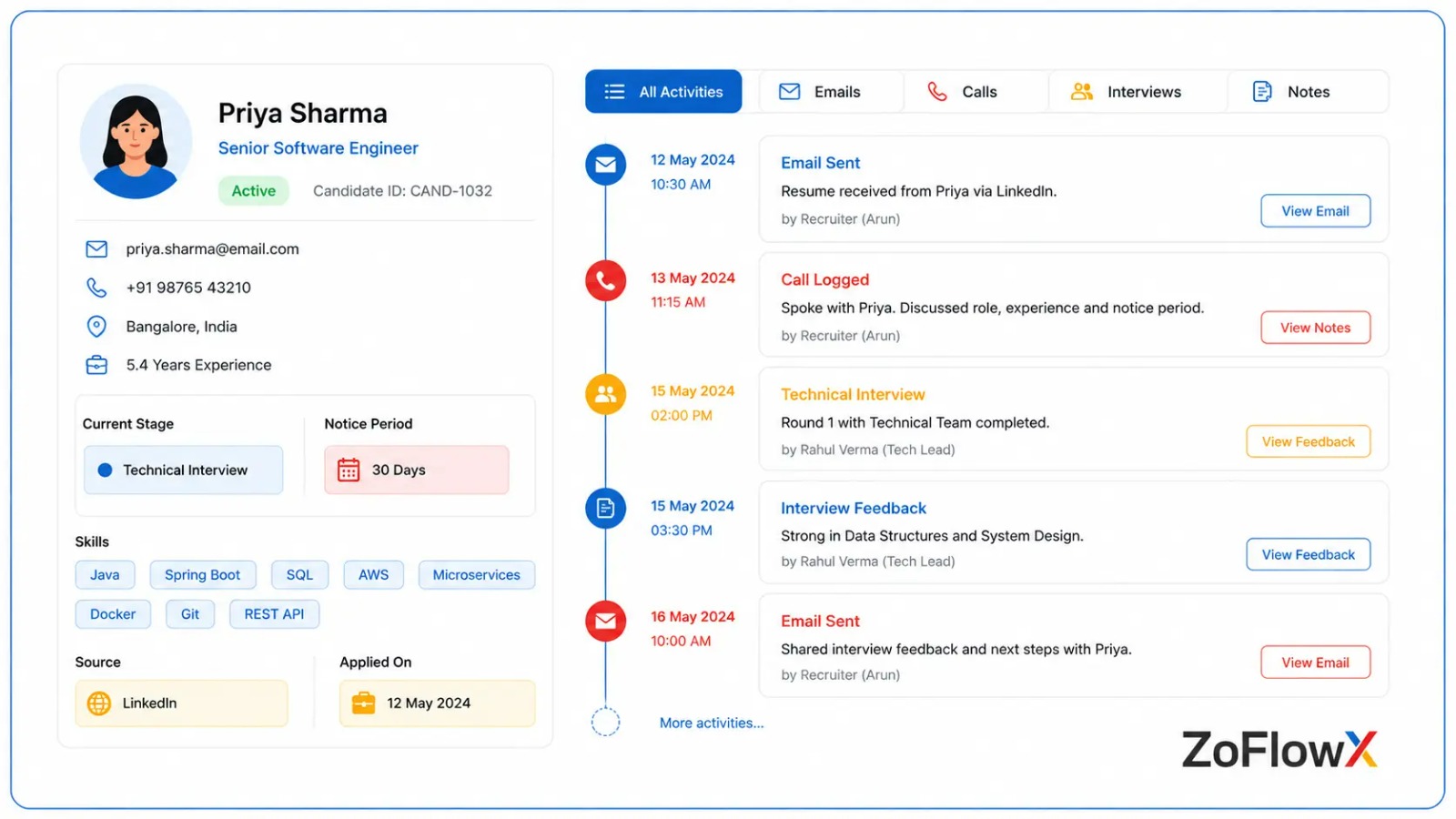
Every email, call log, and note attaches to the candidate record. When a recruiter is on leave, anyone can open that record and know exactly what was said and when.
According to ZoFlowX, This one change eliminates most of the embarrassing duplicate outreach that hiring teams face in front of good candidates.
Can You Track Your Entire Recruitment Pipeline in Zoho CRM?
Yes and this is where most teams feel the greatest relief.Your recruitment pipeline turns into a visual board with each candidate in a stage you've created.
A typical set of stages looks like this:
- Applied resume received
- Screened - basic fit confirmed
- Phone Interview - first conversation done
- Technical Round - skills assessed
- Manager Round - final decision maker involved
- Offer Sent - negotiation stage
- Joined or Dropped - closed either way
You drag a candidate from one column to the next. Anyone can look at the board and see the state of hiring in about ten seconds.
Where the bottleneck shows itself
If 40 candidates are stuck in "Technical Round," you don't have a sourcing problem. You have an interviewer availability issue.
That kind of insight is nearly impossible to spot in a spreadsheet, and obvious on a pipeline board.
Which Hiring Tasks Can You Put on Autopilot?
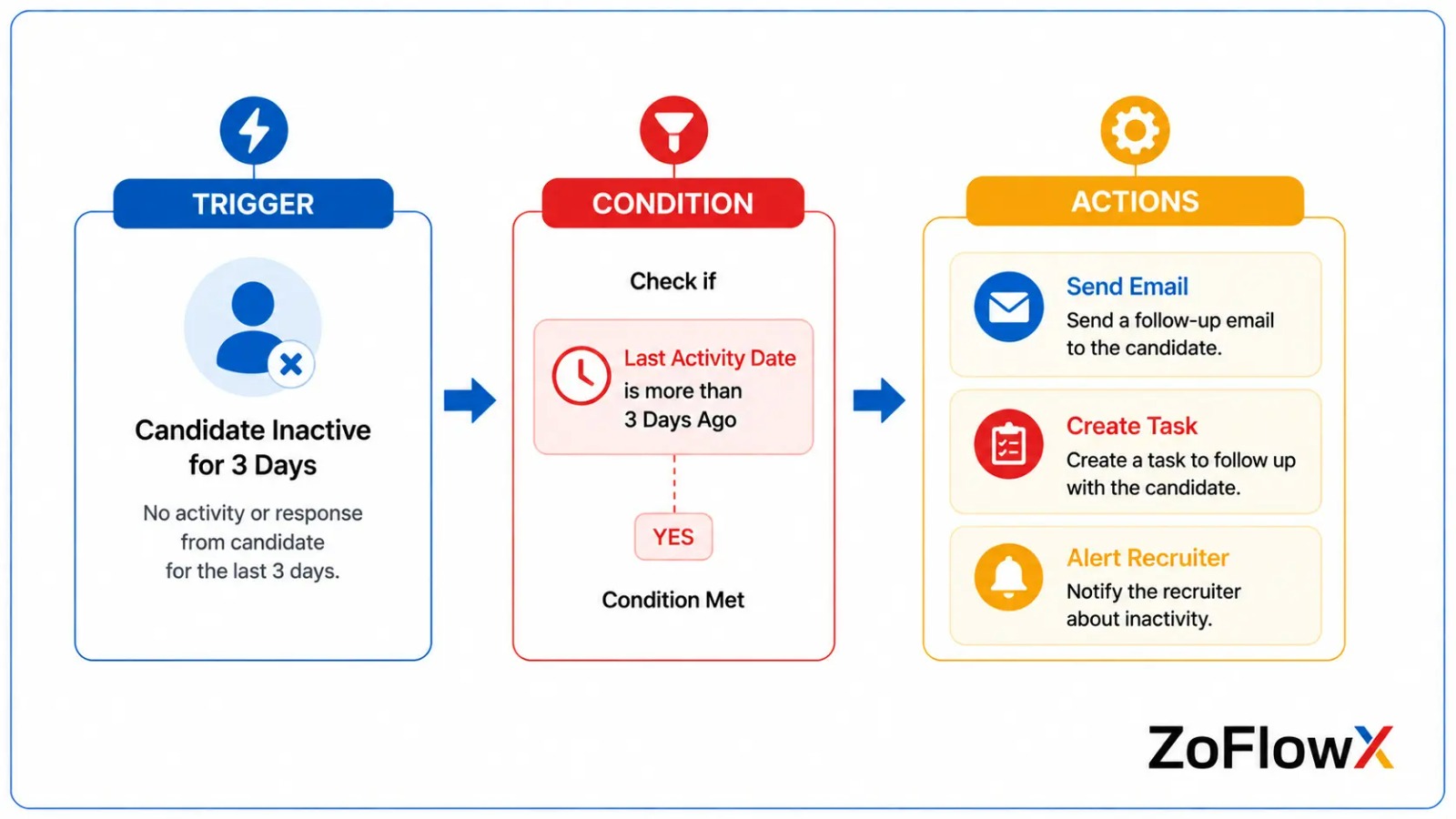
Zoho CRM recruitment automation can send application acknowledgements, schedule follow-up reminders, alert recruiters when a candidate goes quiet, notify hiring managers when someone reaches the final round, and move records between stages based on rules. This eliminates about the administrative burden that consumes an e-recruiter's morning each day.
Follow-ups that never get forgotten
You set a rule: if a candidate sits in "Phone Interview" for more than three days with no activity, create a task for the recruiter.
Simple. But it is the difference between a warm candidate and a cold one.
Interview scheduling and reminders
When a candidate moves to an interview stage, Zoho CRM can email the candidate with the details and send a reminder the day before.
Fewer no-shows, fewer awkward "did we confirm the time?" messages.
Instant alerts when things need attention
A hiring manager gets a notification the moment a candidate reaches the final round. A recruiter gets alerted when an offer has been pending for a week.
Nothing waits for someone to remember.
A real-world scenario
A logistics firm hiring 30 warehouse staff in two months set up one automation: every new applicant received a WhatsApp-style acknowledgement and a screening questionnaire within two minutes.
Their recruiters stopped spending mornings on first-contact messages and used that time for interviews instead. Same team, roughly double the throughput.
How Does This Improve Day-to-Day Recruiter Productivity?
Recruiter productivity improves mainly because the small, repeated tasks disappear. No one is duplicating data across tools or re-writing the same email 20 times.
Recruiters using Zoho CRM for recruiters typically get back time in three areas:
- Data entry - resumes and forms populate records automatically
- Status updates - dashboards replace the weekly update meeting
- Reporting - time-to-hire, source effectiveness, and offer-drop rates are always live
You also get honest numbers. When you can see that 40% of your hires come from referrals and 5% from a paid job board you renew every year, budget decisions become easy.
What Should You Connect Zoho CRM To?
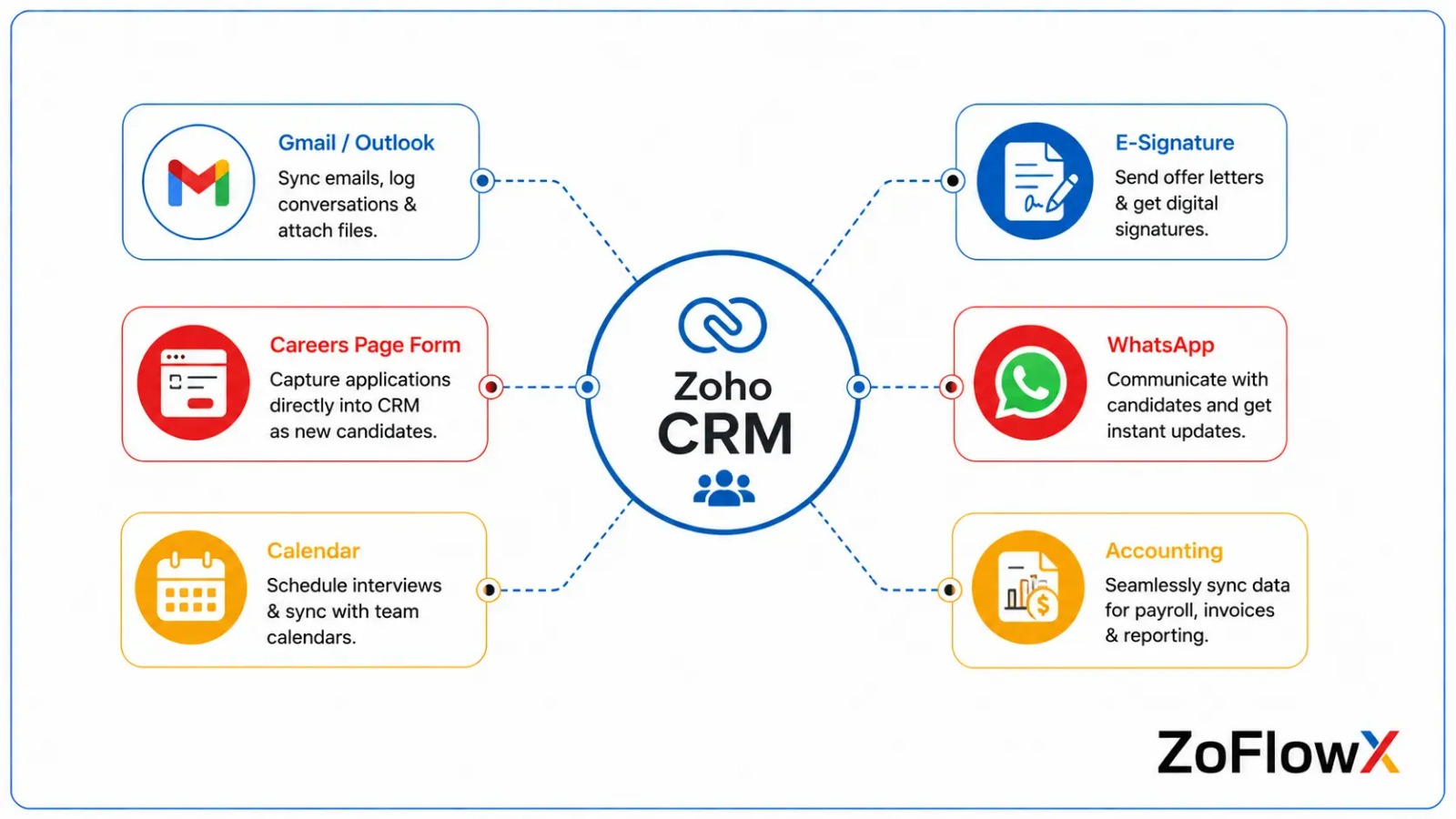
A hiring system only works if it sits inside your real workflow. The connections that matter most:
- Email (Gmail or Outlook) - every candidate conversation logs automatically
- Your careers page - web forms push applicants straight into the CRM
- Zoho Sign or DocuSign - offer letters sent and tracked from the record
- Zoho Books or Payroll - for agencies billing placements
- WhatsApp or SMS tools - because candidates answer these far more than email
- Calendar tools - interview slots without the back-and-forth
According to ZoFlowX, the careers-page form connection is the one most companies skip and later regret, because manual applicant entry is where the majority of data errors begin.
Where Does Zoho CRM Have Limits for Hiring Teams?
Being straight with you: recruitment CRM software built on Zoho CRM is not perfect for everything.
- Resume parsing is not native. You need an add-on or an integration to auto-extract details from a CV.
- Job board posting to Naukri, LinkedIn, or Indeed is not built in.
- Candidate self-service portals need Zoho Creator or a custom build.
- Very high volume hiring — think 500+ applications a week — needs careful design to stay fast.
None of these are deal breakers. They are not things to plan after you begin, but before.
Should You Use Zoho CRM or Zoho Recruit?
Choose Zoho Recruit if hiring is your core business and you need resume parsing and job board posting out of the box. Choose Zoho CRM recruitment management if you already use Zoho CRM, want candidates and clients in one system, or need deep customisation your process demands. Many agencies run both and sync them.
Here is the shortcut most teams use:
- Hiring 5–50 people a year internally? Zoho CRM handles it comfortably.
- A staffing agency managing clients and candidates? Zoho CRM shines, because client relationships are genuinely sales relationships.
- Processing hundreds of resumes weekly? Zoho Recruit, possibly with a CRM sync.
There is no wrong answer, only a wrong setup. Our Zoho CRM experts usually make this call in a single discovery call by looking at your monthly application volume.
How Do You Set It Up Without Wasting Months?
A realistic build runs in this order:
- Map your actual hiring process - on paper, before touching software
- Rename and restructure modules - Candidates, Job Openings, Hiring Managers
- Add custom fields - only the ones you will genuinely use
- Build the pipeline stages - keep it to seven or fewer
- Connect email and your careers form - stop manual entry early
- Add automation one rule at a time - start with follow-up reminders
- Build three dashboards - open roles, pipeline health, time-to-hire
- Train the team properly - a system nobody uses is worse than a spreadsheet
Most small and mid-sized teams get to a working system in 3 to 6 weeks.
The mistake to avoid is adding 80 custom fields on day one. Start lean, then add what your recruiters actually ask for after a month of real use.
Final Thoughts on Building a Smarter Hiring System
Zoho CRM for recruitment is not magic. It is simply a place where your candidates, conversations, and hiring stages live together instead of scattered across inboxes and spreadsheets.
Get it right and you stop losing good people to slow follow-ups. Your recruiters spend their days talking to candidates instead of updating files, and you finally have honest numbers about how your hiring actually performs.
The build matters more than the tool. A thoughtless setup gives you an expensive spreadsheet, while a well-planned one gives you a hiring engine.
If you want that planned properly the first time, consult a trusted Zoho consulting team . Call us on +91 8190009222 or send a email to info@zoflowx.com, and we will walk through your hiring process before suggesting a single feature.
Every Day You Wait, Another Great Candidate Accepts Someone Else's Offer
Let's map your hiring process and build a Zoho CRM for hiring system that actually gets used — starting this week.
Book Your Free Recruitment CRM ConsultationFrequently Asked Questions
Is Zoho CRM good for recruitment agencies?
Yes. Zoho CRM for recruitment agencies works well because agencies manage two relationships deal with: client companies and candidates. You can track job orders from clients, match candidates to those roles, and follow placements to invoicing in one system. Since every module is customisable, you can restructure it around your agency's workflow without any coding. Larger agencies often pair it with Zoho Recruit for resume parsing.
How much does it cost to use Zoho CRM for hiring?
Zoho CRM pricing starts at a per-user, per-month rate, with the Professional and Enterprise plans being most common for hiring teams. Enterprise is usually the practical choice because it unlocks deeper automation and custom modules. Budget separately for implementation, which is a one-time cost depending on complexity. The software is typically cheaper than a single job board subscription for a small team.
Can Zoho CRM store resumes and CVs?
Yes. You can attach resumes directly to each candidate record, and there is no practical limit for normal hiring volumes. What Zoho CRM does not do natively is read the resume and fill in fields automatically. For that, you need a parsing integration or Zoho Recruit. Most teams handle this with a careers-page form that captures key details alongside the file upload.
Does Zoho CRM send automatic emails to candidates?
Yes. Zoho CRM recruitment automation can send application acknowledgements, interview confirmations, reminder emails, and rejection notes based on rules you set. Templates are created once and then activated when a candidate transitions between stages. All correspondence sent is recorded on the candidate record. Many teams also integrate WhatsApp or SMS tools, as candidates are more likely to respond to these than email.
Can two recruiters work on the same job opening?
Absolutely. Owners are assigned at the candidate and job-opening level, allowing multiple recruiters to share a role without stepping on toes. All notes, call logs and stage history are visible in real time to everyone. For salary data, permission settings determine who can see what. This common visibility is the reason why two people do not call the same candidate twice.
How long does a recruitment CRM setup take?
Most small to mid-sized teams go live in three to six weeks. The first week is mapping your hiring process, followed by module customisation, automation, and dashboards. Training and adjustment usually take another week after go-live. Larger builds that include resume parsing, portals, or multi-country hiring take longer. The most significant delay is rarely the technology, it's the internal process.
Can Zoho CRM report on time-to-hire?
Yes. After you configure your pipeline stages, Zoho CRM automatically calculates the time-to-hire for each candidate and tracks the time spent in each stage. You can break it down by role, recruiter, department, or sourcing channel. Dashboards highlight bottlenecks, such as the fact that technical interviews take an average of 12 days. That one number is frequently the key to the quickest hiring turnaround.
Do I need a Zoho partner to customise Zoho CRM for hiring?
Not exactly, but it saves a lot of time and rework. Simple field and module modifications can be done in-house. Where partners can help is in process design, automation logic, integrations, and in avoiding structural errors that are costly to correct later. A partner also knows what not to build, which is just as important. Most teams see the implementation return its value in a couple of hires.