Zoho Creator vs AppSheet: An In-Depth Low-Code Platform Comparison
- Zoho Creator vs AppSheet comes down to one simple question: do you need a full business application, or a smart mobile app sitting on top of your spreadsheets?
- Zoho Creator is stronger for multi-department apps, deep customisation, portals, and businesses already using Zoho products.
- AppSheet is stronger for quick, mobile-first apps built directly from Google Sheets or Excel, especially for field teams.
- Pricing looks similar on paper, but the long-term cost changes a lot once your user count and feature needs grow.
- Both are genuine low-code platforms, so neither one requires you to hire a full software development team.
If you want the short answer to the Zoho Creator vs AppSheet debate: choose Zoho Creator when you are building a real business system with many users, complex rules, and customer-facing portals. Choose AppSheet when your data already lives in Google Sheets and you need a simple mobile app fast. Both are low-code platforms, meaning you build working software using drag-and-drop screens and small snippets of logic instead of writing thousands of lines of code.
That is the headline. Now let us look at what actually happens once you start building.
What Exactly Are These Two Low-Code Platforms?
Low-code platforms allow you to create apps by dragging fields onto a form and defining rules in natural language. You have an app that works in days, not months. The Zoho Creator and AppSheet comparison begins here, as the two tools go about achieving the same end in very different ways.
How does Zoho Creator work?
Zoho Creator gives you its own database, its own form builder, its own report engine, and a scripting language called Deluge. You create the data structure first, then the screens, then the automation. Think of it as building a small custom software product that lives entirely inside Zoho.
A furniture manufacturer in Coimbatore, for example, could build one Creator app that handles dealer orders, production tracking, dispatch, and warranty claims, all in the same place.
How does AppSheet work?
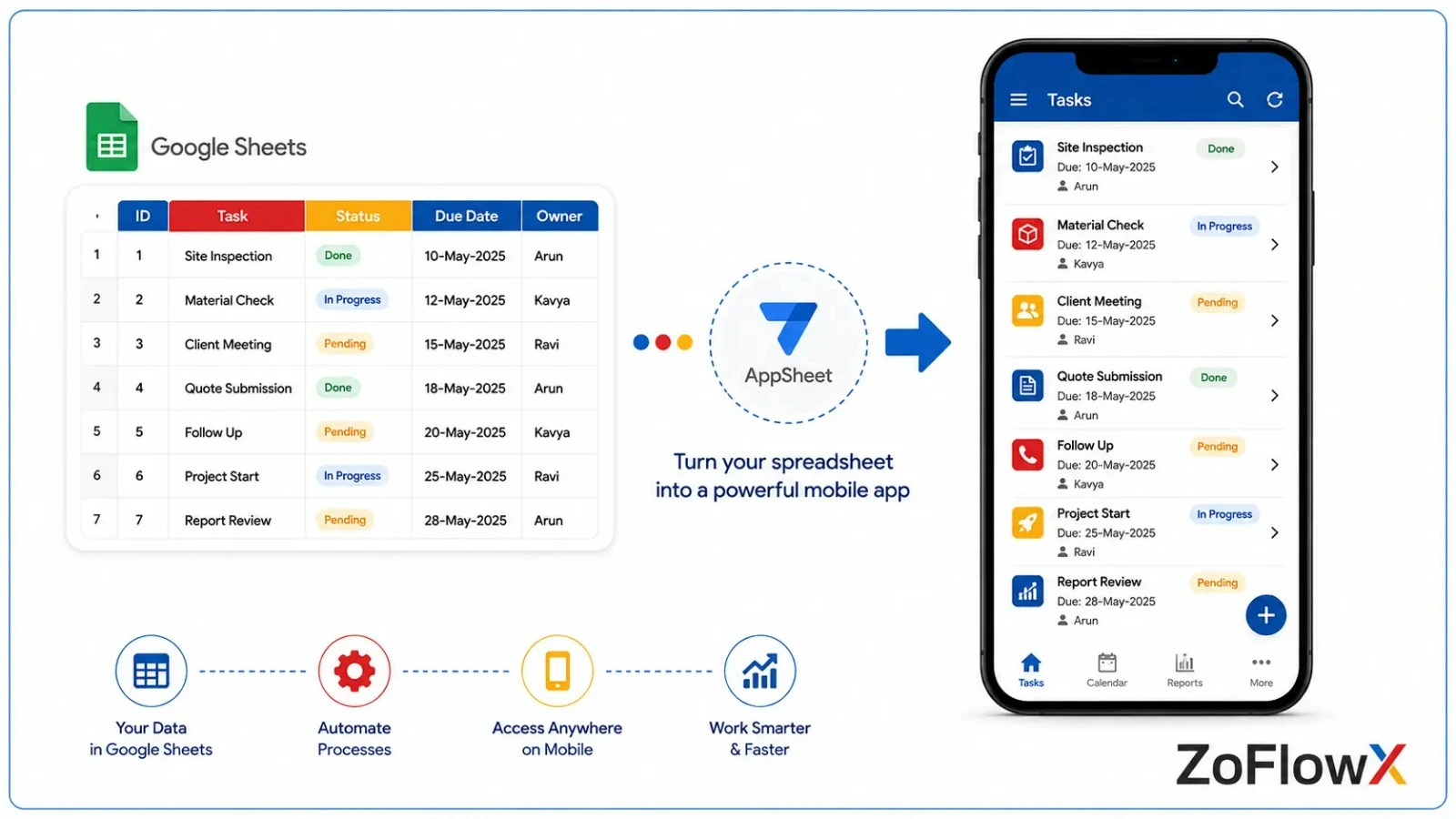
AppSheet works the other way around. You point it at a data source you already have, usually a Google Sheet, Excel file, or cloud database, and it reads your columns and instantly generates a mobile app. Your spreadsheet stays the source of truth.
A pest control company with 15 technicians could connect a Google Sheet of daily service visits and have a working mobile app for their team by the afternoon.
Zoho Creator vs AppSheet: How Do They Compare Feature By Feature?
The truthful comparison side by side. This table lists the differences between Zoho Creator and AppSheet that actually impact real projects.
Area | Zoho Creator | AppSheet |
Data source | Its own built-in database | Google Sheets, Excel, cloud databases, APIs |
Best for | Full business systems | Mobile-first apps and field data capture |
Custom logic | Deluge scripting, very flexible | Expressions and formula-style logic |
we app qaulity | Strong, purpose-built web screens | Basic, mobile layout carried onto desktop |
Customer portals | Yes, external user portals available | Limited, public apps need a separate plan |
Offline use | Supported | Very strong, a core strength |
Ecosystem fit | Zoho CRM, Books, Inventory, Desk, People | Google Workspace, Drive, Sheets, Gmail |
Learning curve | Moderate | Easy at first, harder as apps grow |
Starting price | Free plan, paid from around $8 per user monthly | Build and test for free, pay $5 per user per month. |
The biggest error that businesses make is comparing features rather than comparing where their data is already stored, ZoFlowX says. That one thing is the most important factor in determining the winner.
Which Platform Is Easier To Learn If You Have Never Built An App?
AppSheet is easier to learn in the first week because it builds an app automatically from your existing spreadsheet.Zoho Creator is a bit more time consuming to learn, but once you have your app beyond a few screens and users, it's much easier to manage.
AppSheet feels magical on day one. You connect a sheet, and an app appears. Very little set-up and almost no theory to understand.
Zoho Creator requires a little thought. You decide what a Customer is, what an Order is, and how they connect. That extra thinking pays you back later.
Imagine a small logistics company. By lunchtime, the owner had a working delivery tracker in AppSheet. After six months, the same spreadsheet was slow and cluttered with 40 drivers and three branches. The growth would have been better managed from the beginning by Creator.
Who Wins On Customisation And Design Freedom?
Zoho Creator wins here, and it is not particularly close.
Using Creator you set which page layouts, custom HTML dashboards, if/then behaviour of your fields, multi-step forms, and detailed permission rules should apply for each role. Deluge allows you to write real logic when the drag and drop possibilities fail.
AppSheet is definitely more focused. You have a clean and consistent interface and you can't do a lot of bending to the design. This can be constraining when a team wants a streamlined web presence for their employees.
If you can only judge by the visual control, the freedom anyone is looking for often is provided by Creator. But when you're looking for that flexibility and you want it in a well-handled way, it's best to hire Zoho Creator developers who already know the shortcuts and the traps.
What Happens When You Need Serious Automation?
Zoho Creator excels with complex automation as it supports scheduled jobs, multi-condition approvals and deep integration with other Zoho apps, which Deluge scripting does not. AppSheet automation can handle notifications, bots and simple logic, but it becomes difficult to keep track of the expression logic if you have a lot of branching rules in your process.
Say you run a services business. If the amount crosses two lakh rupees, then a new job request is received, it has to be approved by a manager, an invoice should be raised, the finance team should be notified and a reminder should be sent after seven days if the payment is pending.
Creator handles that chain comfortably because it connects natively to Zoho Books, Zoho CRM, and Zoho Desk. AppSheet can send the alerts and update rows, but the accounting side needs extra integration work through third-party connectors.
This is the point in the Zoho Creator vs AppSheet discussion where growing businesses usually change their mind. Simple apps rarely stay simple.
How Well Does Each Platform Handle Your Data And Other Software?
For companies using Google Workspace, AppSheet is the obvious solution. Sheets, Drive, Gmail, and Calendar integrate effortlessly, keeping your team in their familiar environment.
If you are already in use with Zoho CRM, Zoho Books, Zoho Inventory, Zoho People or Zoho Desk, you will naturally want to use Zoho Creator. They communicate with each other without custom bridges.
If you're not using either system, check out what you're going to purchase next. The broader software direction should determine your direction for Zoho Creator or AppSheet, not the other way around.
One warning worth repeating. While spreadsheets are a great beginning point, they were never written to be a database. After a few thousand rows and a few users at any given time, the spreadsheet-based applications begin to take a hit in terms of performance and record locking.
Which One Costs Less As Your Team Grows?
AppSheet's pricing is more reasonable for small teams, ranging in the region of $5 per user per month, and offers a free version for creating and testing up to 10 users. Zoho Creator is available starting at $8 per user per month, but may prove more cost-effective for businesses where Creator is included in their Zoho One subscription.
Here is the part most comparison articles skip. Both tools charge per user, per month, forever. So the real question is not the sticker price, it is how many people will eventually log in.
A 10-person team pays very little either way. A 100-person team is making a serious long-term commitment.
If you already pay for Zoho One, Creator is effectively included, which changes the maths completely. Similarly, if you already pay for higher Google Workspace tiers, AppSheet Core may already be sitting in your account unused.
Check what you already own before you buy anything new. A certified Zoho partner can audit your existing licences in a single call and tell you whether you are paying twice for the same feature.
Where Does Each Platform Let You Down?
There is no perfect tool and you deserve the whole story before you commit.
Zoho Creator limitations:
- For absolute beginners, the interface is a bit tricky to get used to.
- If the app is very heavy, it requires someone who is familiar with Deluge.
- You are committing to the Zoho ecosystem for the long run.
AppSheet limitations:
- The design and layout control is really restricted.
- The web and desktop experience is like a stretched mobile screen.
- Spreadsheet-based apps are not very effective at large data sets.
- To build public apps that customers can use, you need to have a paid plan.
Looking at Zoho Creator compared to AppSheet, the pattern is clear. AppSheet trades flexibility for speed. Creator sacrifices speed for durability.
Which Businesses Should Pick Which Platform?
Let us make this practical with three quick scenarios.
A 12-person field service team already on Google Workspace. Technicians need to capture job photos, collect signatures, and work without signal in rural areas. AppSheet is the sensible pick. Fast to launch, excellent offline support, low cost.
A 60-person distribution company running Zoho CRM and Zoho Books. They want dealer ordering, credit limit checks, dispatch tracking, and a partner login portal. Zoho Creator is the clear winner. The integrations alone save months.
A growing consultancy with no strong ecosystem yet. They want project intake, resource allocation, timesheets, and client reporting. Creator gives them room to grow without a rebuild in year two.
Notice that in every case, the answer came from the business situation, not from a feature checklist. That is how the AppSheet vs Zoho Creator decision should always be made.
How Do You Make The Final Decision Without Regret?
If your data is stored in Google Sheets, your users are primarily mobile, and your process is simple, then choose AppSheet. If you require custom logic, customer portals, multiple connected departments, or integration with CRM and accounting software, then you should choose Zoho Creator. If you're not sure, choose the one that will still fit you in three years
Be honest with yourself and ask these five questions:
- Where does my data live today, and where will it live in two years?
- Will office staff need proper web screens, or is mobile enough?
- Do outside users such as customers, dealers, or vendors need access?
- How many people will eventually use this app?
- Do I need this app to talk to my CRM, accounting, or inventory system?
If three or more of your answers point towards complexity, growth, or integration, Creator is the safer investment. If your needs are contained and mobile-first, AppSheet will serve you well and cost less.
According to ZoFlowX, the most expensive decision is not choosing the "wrong" platform. It is choosing a platform that fits today and forces a complete rebuild in eighteen months.
Ready To Build Your App On The Right Platform?
Every month you delay is another month your team wastes on spreadsheets and manual follow-ups.
Book Your Free Platform Consultation NowFinal Thoughts On Choosing Between These Two Low-Code Platforms
Now you have all the information you need to make your own decision about Zoho Creator vs AppSheet for your business. AppSheet gives you speed and simplicity for mobile teams working off spreadsheets. Zoho Creator gives you depth, control, and a platform that keeps up as your business grows.
For most growing companies in India that already use a CRM or accounting system, Creator is the decision they do not regret in year three. It scales, it connects, and it does not force a painful rebuild the moment your requirements expand.
The right platform, set up properly the first time, quietly saves you lakhs in wasted licences, rework, and lost productivity. The wrong one costs you all of that and your team's patience along with it.
If you would like a straight, no-pressure opinion on which platform fits your process, talk to our team. Call +91 8190009222 or email info@zoflowx.com, and we will walk through your requirements, your existing licences, and a realistic build plan. ZoFlowX is a certified Zoho partner with over 13 years of enterprise implementation experience, and we have built these systems for manufacturers, service firms, travel companies, and distributors across India and overseas.
Stop guessing, stop stalling, and start building on the platform that will still fit you in five years. Make the call today and turn your idea into a working application.
Frequently Asked Questions
Is Zoho Creator better than AppSheet for small businesses?
It depends on complexity, not company size. AppSheet suits small businesses that need a quick mobile app from an existing spreadsheet, with minimal setup and low monthly cost. Zoho Creator suits small businesses building something more permanent, such as an order management or service tracking system with customer portals and connected accounting. Many small firms start with AppSheet and later move to Creator as their processes mature and user numbers grow.
Can I migrate from AppSheet to Zoho Creator later?
Yes, it is possible to migrate, but it is a rebuild, not an export. Your data flows easily across because AppSheet typically stores it in spreadsheets or databases. The app logic, screens and automation should be re-created in Creator using Deluge and its form builder. Most migrations are completed in a few weeks, depending on the complexity. If the data structure is planned correctly from the beginning of the new build, a lot of time will be saved.
Which platform works better without an internet connection?
AppSheet is the more powerful of the two in terms of offline functionality. It was created for field workers who lose signal, allowing them to record data, take photos and make readings without signal, and sync up when they get back online. Zoho Creator also has offline mobile capabilities, and it works well with most field scenarios, but AppSheet is the more refined solution for teams that are in the field, in low coverage areas, every day.
Do I need coding knowledge to use either platform?
No, both platforms are truly low code and you can create functional apps using drag and drop tools. Zoho Creator has a simple scripting language called Deluge, which is similar to plain English, and is only required for advanced logic. AppSheet's expressions are similar to spreadsheet formulas, so they are easy to understand if you are familiar with Excel formulas. However, for more complex business applications, hiring an experienced developer will save you a lot of time and rework.
Does Zoho Creator integrate with non-Zoho software?
Yes, Zoho Creator connects to external software through REST APIs, webhooks, and prebuilt connectors. You can link it to payment gateways, WhatsApp services, shipping providers, and third-party CRMs. Integration with other Zoho products is the smoothest path, but Creator is not a closed system. Businesses regularly connect it to tools like Razorpay, Shopify, and Tally, though custom integrations usually need someone comfortable with Deluge and API authentication.
Is AppSheet free to use permanently?
AppSheet is free to build and test, but not free to run in production. You can create apps and test them with up to 10 users for free, without any time limit. Once deployed to real business users, a paid plan is needed, which begins at approximately $5 per user per month. Zoho Creator also has a free plan that has restrictions on the number of apps, users, and records, which is great for testing but not for everyday use.
Which platform is better for building customer-facing portals?
For customer-facing portals, Zoho Creator is much better. It provides external user portals with custom domains, so that your customers, dealers or vendors can log in and only view their data. Public apps are available in AppSheet with a separate Publisher Pro plan, which is paid per app, and is suitable for simple public forms, but not for secure, personalised portals. For businesses that rely on portals, Creator is the practical option.
How long does it take to build an app on either platform?
A basic app takes a day or two on AppSheet and a few days on Zoho Creator. A production-ready business application with appropriate workflows, permissions and integrations is usually 3-8 weeks on either platform. The timeline is more dependent on the documentation of your process than the tool itself. Companies that plan their workflow before construction always complete projects quicker and with fewer revisions.