Zoho Creator for Real Estate: Build a Custom Property Management Solution
- Zoho Creator for Real Estate lets you build property software shaped around your process, without hiring a development team.
- Listings, owners, tenants, rent, site visits and maintenance live in one place instead of scattered spreadsheets.
- Real estate workflow automation handles rent reminders, renewals and follow-ups without anyone remembering to do it.
- Every app works on mobile, so brokers update site visits from the property itself.
- It connects with Zoho CRM, Books and Sign, keeping sales, billing and agreements in sync.
- A working first version usually goes live in weeks, not months, at a fraction of custom-coded software cost.
Zoho Creator for Real Estate is a low code platform that enables property businesses to create their very own administration program without creating numerous lines of code, listings, rent, tenants, brokers or even maintenance. You create the app based on your current working style, rather than imposing your working style on the team. In a low-code approach, businesses can create and deploy their own applications quicker than with conventional development techniques.
If you've ever had to track one rent payment down an A4 notebook, WhatsApp message and two Excel spreadsheets, you know the issue this addresses.
What Is Zoho Creator for Real Estate?
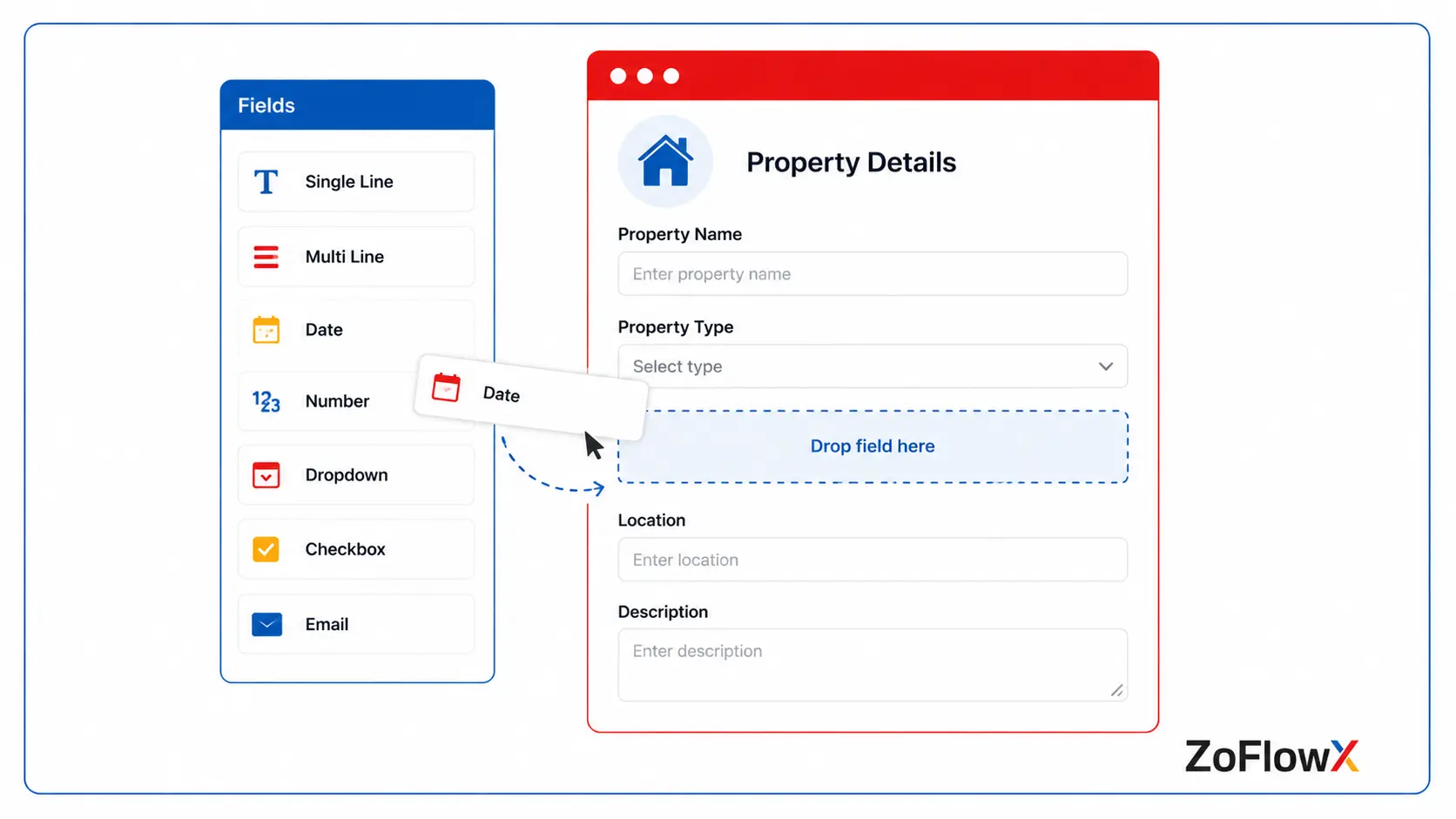
Zoho Creator is an application builder by Zoho that lets you build apps using drag and drop. You create forms, reports and dashboards visually and add your own rules, and then publish them to the web and mobile devices at once. It turns to custom property management software for your precise property listings, leases, payments and site visits.
Think of it as building with blocks instead of ordering furniture that almost fits.
You decide what a "property" record contains. You decide what happens when a tenant signs, a booking cancels or a maintenance ticket stays open too long.
Why Do Real Estate Businesses Choose It Over Ready-Made Tools?
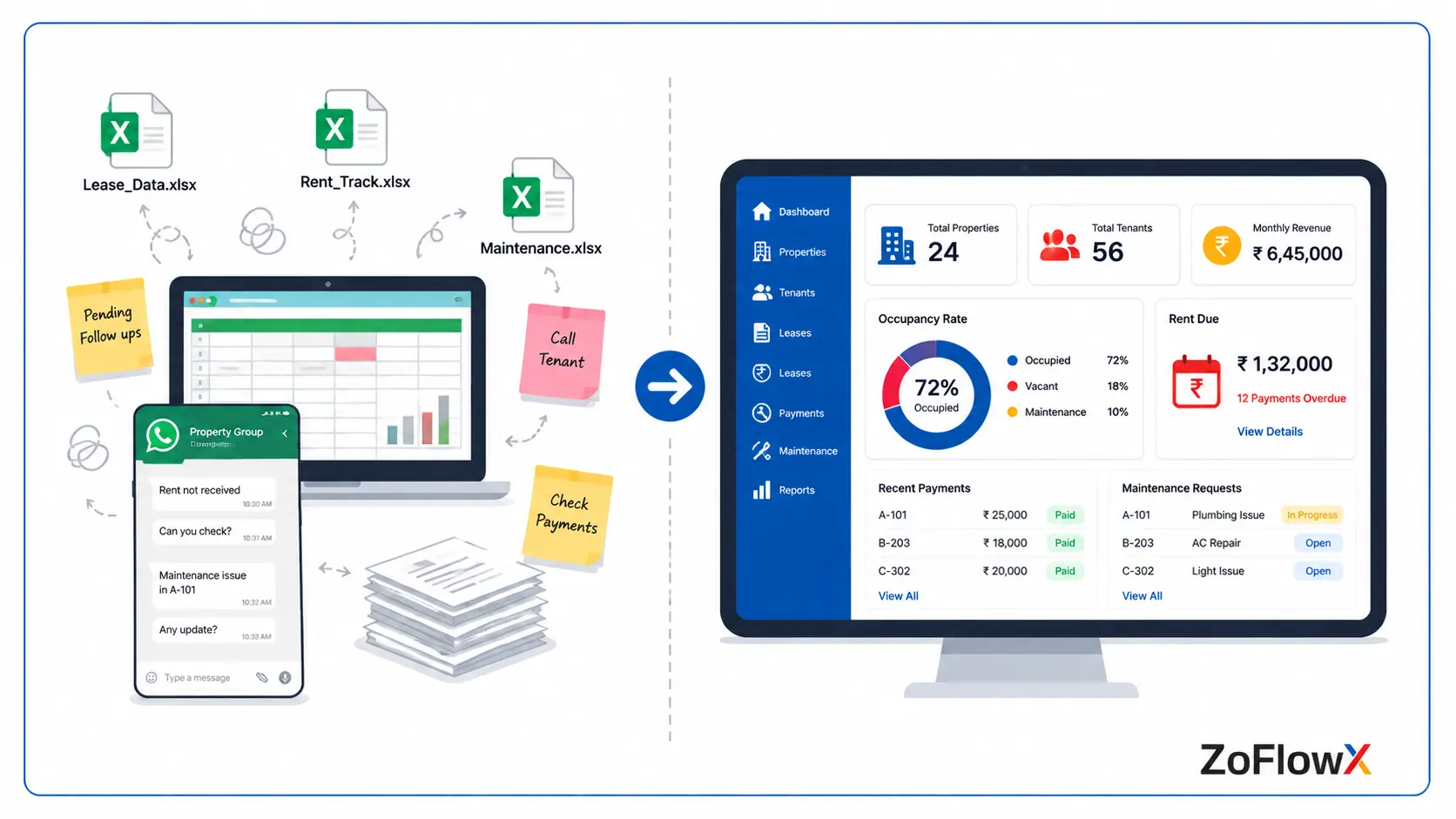
Most off-the-shelf property tools assume every business runs the same way. Real estate rarely does.
A rental agency worries about deposits and renewals. A plotted-development builder worries about booking stages and instalment schedules. Same industry, completely different screens.
According to ZoFlowX, the property teams that gain the most from Zoho Creator Property Management are the ones drowning in follow-ups, not necessarily the ones with the biggest portfolios.
The second reason is cost. Enterprise property software often charges lakhs a year for modules you'll never open.
What Can You Actually Build With It?
Property teams typically start with one app and grow from there:
- A listing and inventory tracker with photos, pricing and live availability
- A tenant and lease register holding agreements, deposits and renewal dates
- A collection system where rent and instalments can be collected, with automatic due-date reminders.
- A maintenance desk where complaints get logged, assigned and closed
- A broker portal showing only the leads and units each agent should see
- An owner portal where property owners check their own payouts
Each one is small. Together they replace an entire filing cabinet.
Which Real Estate Processes Can You Automate First?
Begin with what repeats every month. Rent reminders, lease expiry alerts, maintenance assignment, site-visit follow-ups and commission calculations pay back fastest. Most teams get back most of the hours back in a week after they implement property management automation, just because no one has to run around and chase information around anymore.
High-value automations include:
- Email, SMS or WhatsApp rent reminders before rent's due date.
- Lease renewal alerts at 90, 60 and 30 days
- Maintenance tickets that are directly assigned to the correct vendor.
- Site visits assigned to the nearest available broker
- Commission calculated using your own slab rules
- Document expiry warnings for agreements, NOCs and insurance
What Features Should a Custom Real Estate Management Solution Include?
A Single Property Record
No need to search for units, unit owner, unit rent history, tenant history, photos or documents
Role-Based Access
Your broker sees assigned leads. Your accountant sees payments. Nobody sees everything unless you want them to.
Live Dashboards
Occupancy, dues pending, complaints open, visits scheduled this week — visible at a glance instead of buried in a monthly report.
Mobile Field Access
Photos, notes and status updates captured at the site, not typed up two days later from memory.
Where Does This Work Best in Real Life?
Meera has 60 rental apartments in two cities. She has an excel spreadsheet for her rent tracker, with three people editing that, and forgot to update two of her rent renewals last year.
Her Custom Real Estate Management Solution now counts down the days to due date, notifies her 60 days before the due date and keeps a record of any complaints made against the right flat.
A builder selling 180 apartments is able to monitor the stages in which the apartments are booked, instalment schedules and broker payouts, all on one screen using Real Estate Automation in Zoho Creator.
An office that leases buildings uses it to supervise escalations and lock-in periods that were on paper
Factor | Generic property software | Built on Zoho Creator |
Fit to your process | You adapt to it | It adapts to you |
Changes later | Make a request and wait, | Edit it yourself |
Cost model | Pay for unused modules | Pay for what you build |
Integration | Limited | Connects across Zoho and beyond |
The trade-off is honest: ready-made tools start faster on day one. Zoho Creator Real Estate Solutions win from month two onward, when your actual process starts showing its edges.
How Does a Custom Build Come Together?
A typical zoho creator implementation follows five steps:
- Map your process - how a unit moves from listing to booking to renewal
- Design the data - properties, owners, tenants, payments and how they relate
- Build and automate - screens, reminders, approvals and calculations
- Migrate and test - import records and test one month
- Train and go live - with someone available when questions come up
Most projects take three to eight weeks depending on complexity.
Why Choose a Zoho Creator Development Partner?
You can absolutely build a simple tracker yourself. The builder is genuinely friendly.
Where teams get stuck is data structure — and that only shows up after two years of records sit inside a badly planned app. Fixing it later costs more than building it right.
A Certified Zoho Partner brings patterns already proven across dozens of builds: how to model leases, how to handle part payments, how to keep broker data separate.
That's experience that you don't need to purchase twice.
Getting Your Custom Property Solution Off the Ground
The cost of waiting is quiet but real — missed renewals, delayed rent, brokers working from stale lists, and owners who quietly move to an agency that responds faster.
Zoho Creator for Real Estate removes that drag without forcing you into software that fights your process. Start with one workflow, prove the value, then expand.
Call +91 8190009222 or email info@zoflowx.com for a straight conversation about what your property business actually needs. After one call, you'll know if Zoho Creator implementation services are right for you.
Don't rely on a spreadsheet that anyone can edit and change the value of your crores of property. Build the system your business deserves.
Frequently Asked Questions
Is Zoho Creator suitable for small property agencies?
Yes, small agencies are often the best fit. Pricing works comfortably for teams of three to ten people, and you can start with a single module like listings or rent tracking. Because you build only what you need, there's no spend wasted on enterprise features you'll never open. Many agencies begin with one app and expand steadily as their portfolio grows.
How long does it take to build a real estate app?
A basic app takes one to two weeks; a full system with payments, maintenance and broker modules usually takes four to eight weeks. The biggest factor is clarity — teams that already know their rent rules, approval stages and commission slabs move much faster. Documenting your process before the build starts can easily save two weeks of back-and-forth later.
Can it handle rent collection and payment tracking?
Yes, rent tracking is one of the most common uses. Record due dates, part payments, late fees and deposits for each tenant and view outstanding amounts on a real-time dashboard. Reminders are sent automatically before the due date and escalation alerts are sent to your team when payment slips are sent. All entries remain associated with the appropriate unit and lease.
Does it work on mobile for brokers in the field?
Yes, all apps you develop are available on Android and iOS for free. Brokers can verify availability, log a site visit, record client information and upload photos directly from the property. Offline mode saves entries when the network is weak and syncs later. This eliminates the daily routine of taking notes and not updating the office system.
Can it connect with Zoho CRM and Zoho Books?
Yes, integration between Zoho apps is simple and well supported. A deal closed in CRM can generate a booking in Books and an agreement in Zoho Sign. Payment gateways, WhatsApp and property portals can also be integrated via APIs. Sales, operations and accounts share the same information, rather than information silos.
Is tenant and property data secure?
Yes, Zoho provides role-based access, encryption, audit trails and data centre options including India. You control precisely who sees what — a broker can view assigned leads without seeing owner payouts or company revenue. Access can be revoked the moment someone leaves. For most property businesses this is considerably safer than shared spreadsheets sitting on personal laptops.
Do I need coding knowledge to use it?
No, basic apps are built by dragging fields onto a screen. Simple rules like reminders and status changes are set through guided options rather than code. More advanced logic — instalment schedules, commission slabs, portal integrations — benefits from a developer's help. Most owners handle small edits themselves and call their partner only for the complex pieces.
Can the app be changed after it goes live?
Yes, and that flexibility is the main reason property firms choose low-code. You can add fields, adjust reports and tweak simple rules without touching code. Bigger changes such as payout formulas or new integrations are better handled by your implementation partner. This balance keeps everyday updates in your hands while the critical logic stays stable and properly tested.