What is Zoho MCP? Model Context Protocol Explained
- Zoho MCP is Zoho's implementation of the Model Context Protocol, an open standard that lets AI assistants read data and perform real actions inside Zoho applications.
- MCP stands for Model Context Protocol. It is not an AI model itself. It is the connection layer that gives AI the context it needs.
- Zoho MCP is model agnostic. Claude, ChatGPT, Gemini, Cursor, VS Code, and custom agents can all connect to the same server.
- You create an MCP server, add tools from the apps you want, and connect it to your AI client using a generated server URL.
- Zoho MCP works with 300+ MCP-ready Zoho and third-party applications, and the platform advertises 500+ integrations overall.
- Security runs on OAuth 2.1 with two authorization modes, plus 30 days of access logs.
- Both developers and non-technical business users can use it. Pre-configured servers exist for people who do not want to build from scratch.
Zoho MCP is a Zoho service that enables you to create MCP servers that serve as a secure connection between AI assistants and your Zoho applications. MCP is an open standard, first published by Anthropic, that specifies how AI models communicate with business software. In simple terms, Zoho MCP is the reason an AI assistant can look into your Zoho CRM, generate an invoice in Zoho Books, or retrieve a document from WorkDrive when you ask it to in a sentence.
That is the short answer. The longer answer is more interesting, because Zoho MCP quietly changes what "automation" means in the Zoho ecosystem.
I have been working on the MCP servers for client orgs for the past few months in CRM, Books, Inventory, and Recruit. The following is documented. Some of it is what you only discover after your third server does something you didn't expect.
What Does Zoho MCP Stand For?
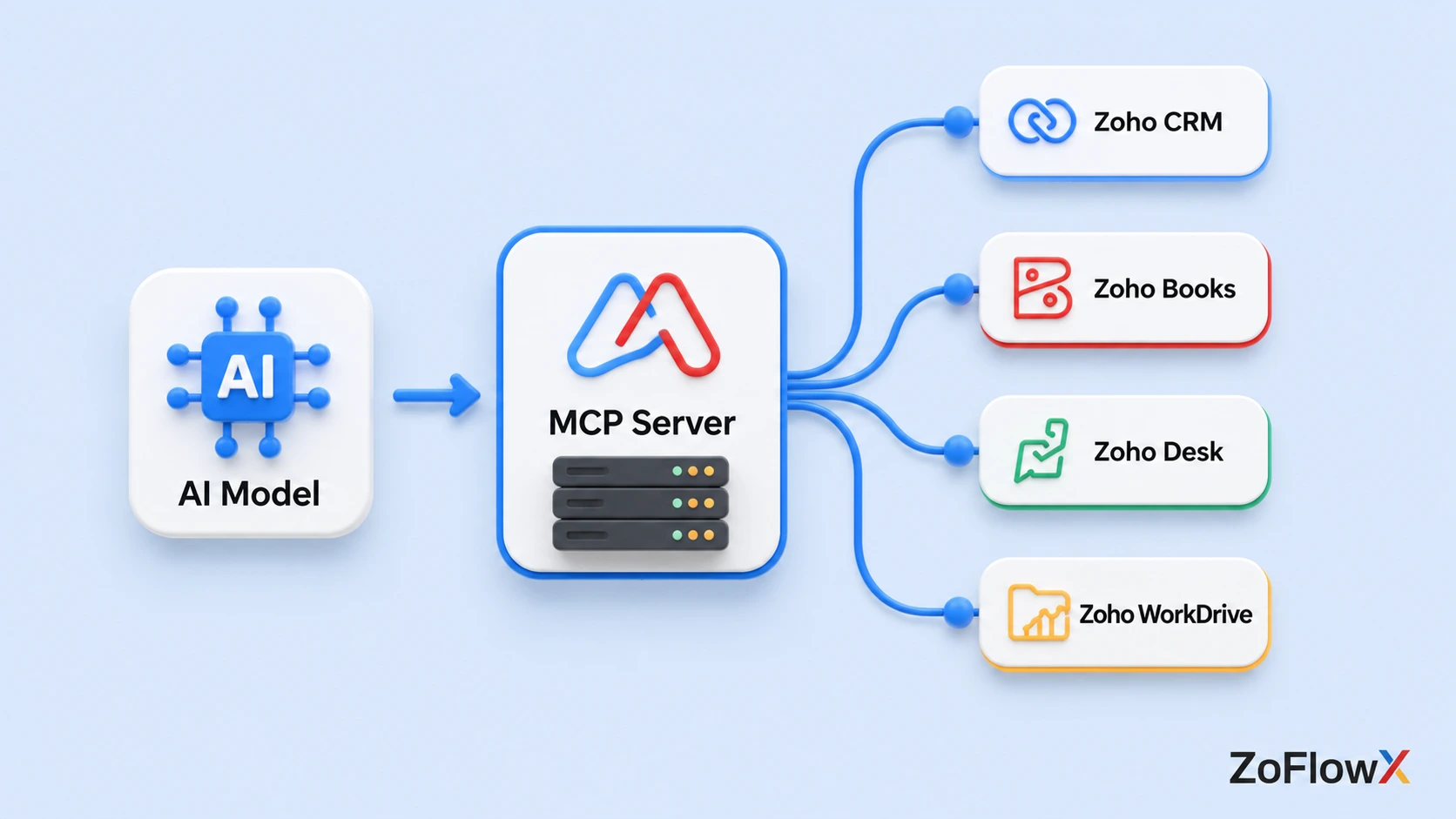
Zoho MCP stands for Zoho Model Context Protocol. MCP is an open protocol that unifies the interaction between large language models and external applications. Zoho MCP is Zoho's offering on that protocol, providing you with infrastructure, configuration interface, authentication, and a library of pre-built tools in Zoho and third-party services.
There are two separate things people conflate, and getting them apart makes everything else easier to follow. The question "what does Zoho MCP stand for" comes up constantly, and the honest answer has two halves.
The Model Context Protocol is the standard. Consider it a common language. It was designed to ensure that no AI tool requires a custom integration for each software application.
Zoho MCP is the product. It provides you with the servers, the security model, the tool catalogue, and the console that makes that standard into something you can configure in an afternoon rather than coding for a month.
A useful analogy that has stuck in the industry: MCP is a USB-C port for AI applications. One shape of connector, many devices on either end.
Zoho's official MCP product page describes it as the infrastructure that makes Zoho apps executable by AI agents, which is about as precise a summary as you will get.
Why Did Zoho Introduce MCP?
Because the old model of AI inside business software had a ceiling, and everyone hit it at roughly the same time.
CRM-integrated chatbots can respond to standard queries. They were unable to tell you which of your deals had gone quiet, and they certainly could not follow up on them. The intelligence was there. The access was not.
Zoho had two choices. Create a custom AI connector for each app and each model, and keep that matrix alive forever. Or adopt an open standard and expose everything through it once.
They chose the standard. That's why you can point Claude at Zoho CRM today and change to a different model next quarter without rebuilding anything.
The timing was not accidental either. According to Gartner's generative AI predictions, by 2028 around 33% of enterprise software applications will include agentic AI capabilities, up from less than 1% in 2024, and agentic AI will make at least 15% of day-to-day work decisions on its own.
Zoho MCP is the plumbing that lets Zoho apps sit on the right side of that shift.
How Zoho MCP Works: What Actually Happens After You Type a Prompt
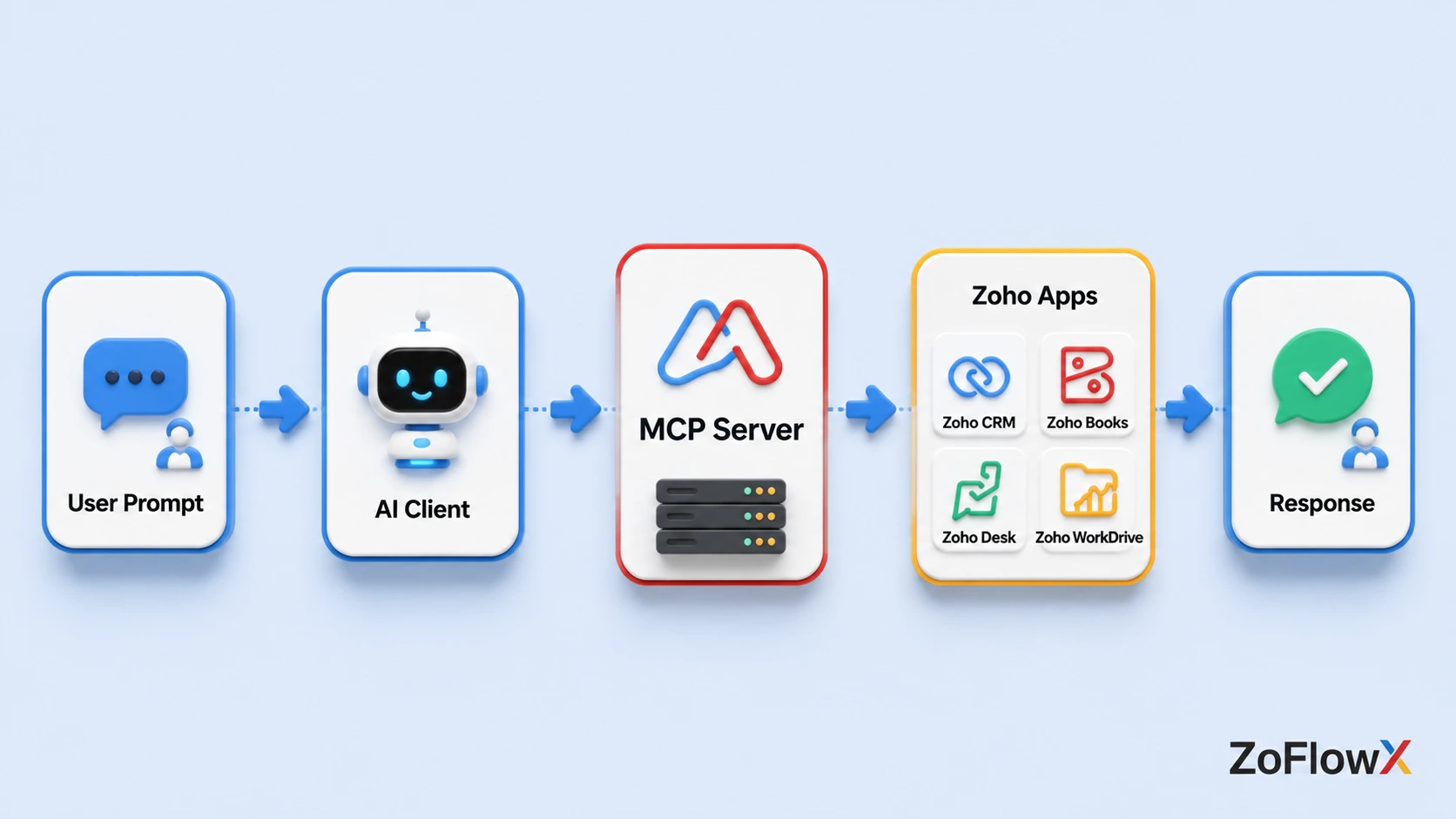
Zoho MCP works by exposing app actions as MCP tools on a server. Your AI client reads the prompt, identifies the intent, matches it to the tools it has available, and calls them in order. All calls are made via OAuth access, meaning the AI only works within the permissions the connected account already has.
There are four parts that move. When you know their names, troubleshooting becomes a game of no guesses.
The Four Components
- The MCP Client. Your AI application. You can use Claude, ChatGPT, Cursor, VS Code, or a custom agent you've created. Here is where intelligence resides.
- The MCP Server. The endpoint you create in Zoho MCP. It stores your set up tools.
- The MCP Tools. Individual actions, each one wrapping a specific API operation. send Email, search Records, create Invoice, and so on.
- The Services. Zoho CRM, Books, Desk, Projects, Inventory, WorkDrive, and third-party apps.
The Execution Flow, Step by Step
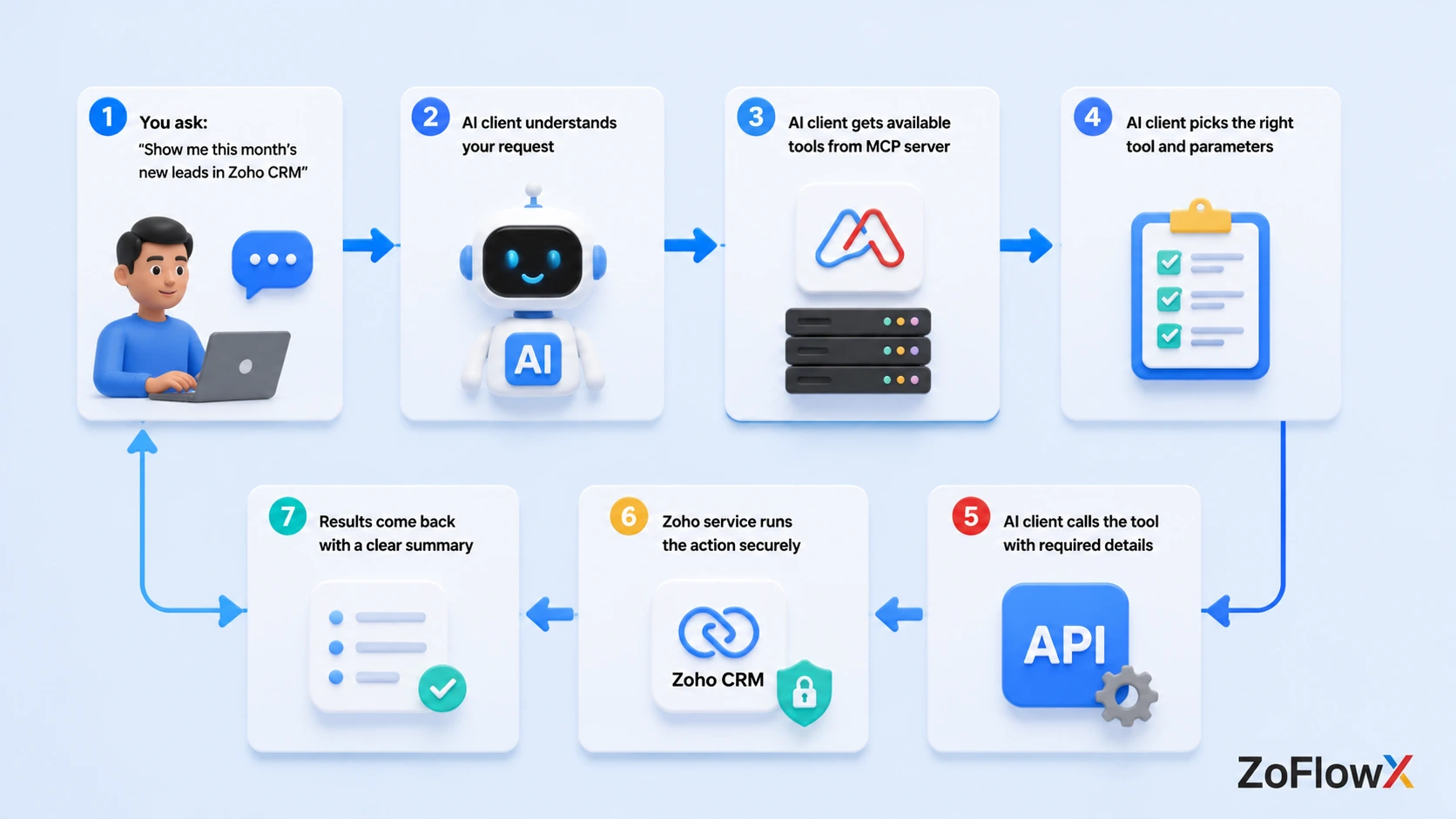
- You enter a natural language query into your AI client.
- The client reads the meaning and context from your words.
- It asks the connected Zoho MCP server for the list of tools and their parameters.
- It matches your intent to one or more of those tools.
- It calls each tool with the parameters it inferred, in the order the task requires.
- Each service executes the action under the OAuth scope you authorized.
- The results are returned to the client, summarizing what the client did.
Here is a real example of the kind of chain this makes possible. A deal closes. You prompt once: send the welcome email with the Master Services Agreement attached from WorkDrive, generate the invoice in Books, CC the accounts lead, and mark the deal Closed Won in CRM.
Four applications. One sentence. No custom code.
The most important point to remember is #5. The AI decides which tools to call. The sequence is not scripted. That's why it's not a workflow builder, and that's why tool names and server scoping are more important than they think.
What Problems Does Zoho MCP Solve?
Six that come up constantly in client conversations.
- Context blindness. AI that doesn't see your data provides you with plausible answers rather than correct ones.
- Integration sprawl. Each AI-to-app integration was a separate project and had its own maintenance costs.
- Manual handoffs. The five-click workflows between apps that no one documents and everyone forgets a step in.
- Model lock-in. When a better model came along, they had to rebuild against the other vendor's AI.
- Shadow access. Employees copying and pasting customer information into public AI tools when the approved route was too cumbersome.
- Reporting lag. Pulling a number used to mean opening a module, filtering, exporting. Now you ask.
That fifth one deserves more attention than it gets. Providing a controlled, documented route to AI is a security enhancement, not a security threat.
If your Zoho setup is not clean underneath, none of this helps much. Working with Zoho CRM implementation experts to get your data model and permissions right first will save you from teaching an AI to query a mess.
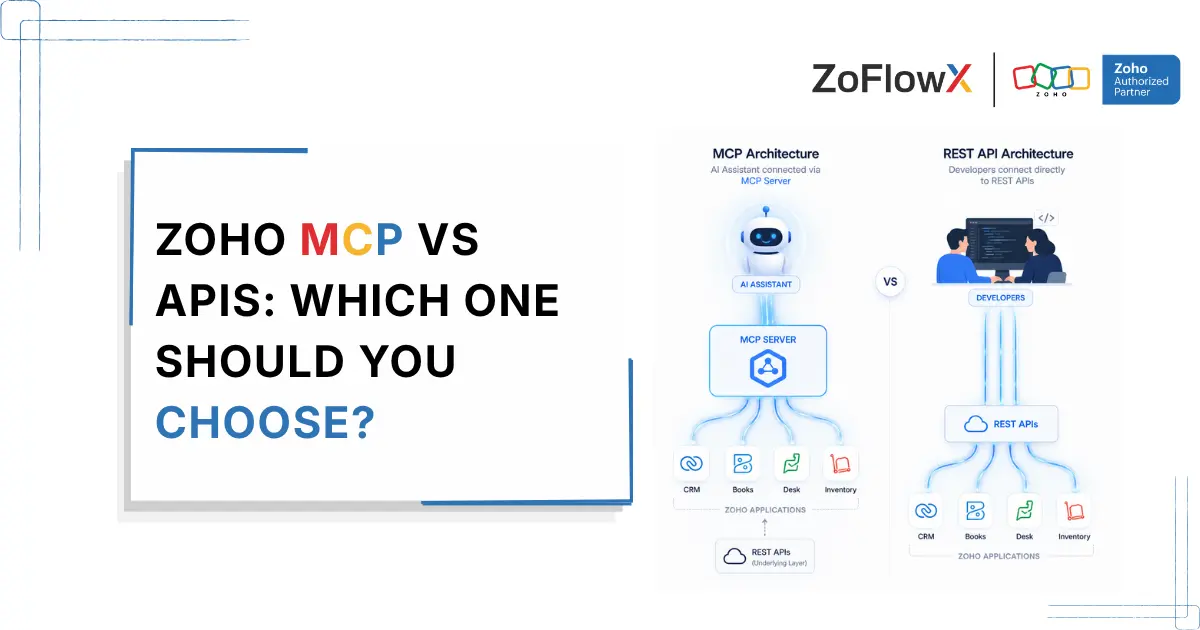
How Is Zoho MCP Different From Traditional APIs?
This is the most common question I get from developers and the answer is not "it replaces them.
MCP tools are wrappers around API endpoints. The API is still working in the background. Who determines the changes is what is figured out.
Aspect | Zoho MCP | Traditional API |
Discovery | The AI reads available tools and their parameters automatically | You read documentation and write the call |
Setup | One-time server configuration | Per-integration build and maintenance |
Context | Retained across the whole workflow | Every call is independent |
Error handling | The client interprets failures and retries contextually | You code every failure path |
Multi-app chains | Native, handled by the client | You orchestrate manually |
Authorization | OAuth 2.1 with two built-in modes | Configured individually per integration |
The practical difference: with an API you tell the system exactly what to do. With Zoho MCP you tell it what you want, and it works out the how.
That trade is excellent for exploratory and cross-app work. It is worse for anything that must execute identically every single time. For deterministic processes, a Deluge function or a Flow is still the right answer. Knowing which tool fits which job is where Custom Zoho integrations experience earns its keep.
Which Zoho Applications Support MCP?
Coverage is broad and expanding. The Zoho MCP help documentation puts the catalogue at 300+ MCP-ready Zoho and third-party applications available for building servers.
Support for MCP in Zoho is not limited to a handful of flagship products either. It reaches into the smaller apps most teams forget they are paying for.
Commonly used ones include:
- Zoho CRM for leads, deals, contacts, and metadata operations
- Zoho Books for invoices, expenses and bank reconciliation
- Zoho Desk for tickets and support context
- Zoho Projects for tasks and milestones
- Zoho Inventory for stock, sales orders and purchase orders
- Zoho Mail and WorkDrive for communication and documents
- Zoho Creator, Campaigns, Analytics, Assist, People and more
The part people underestimate is third party services, which are also in the catalogue. A single server can store tools from Zoho CRM and a non-Zoho system together, and the AI will link them together.
One tough lesson learned. Don't place all applications on one server. A client with forty tools is more likely to choose the wrong one. Instead, use scope servers by function: finance, sales, support.
Is Zoho MCP Tied to One AI Model?
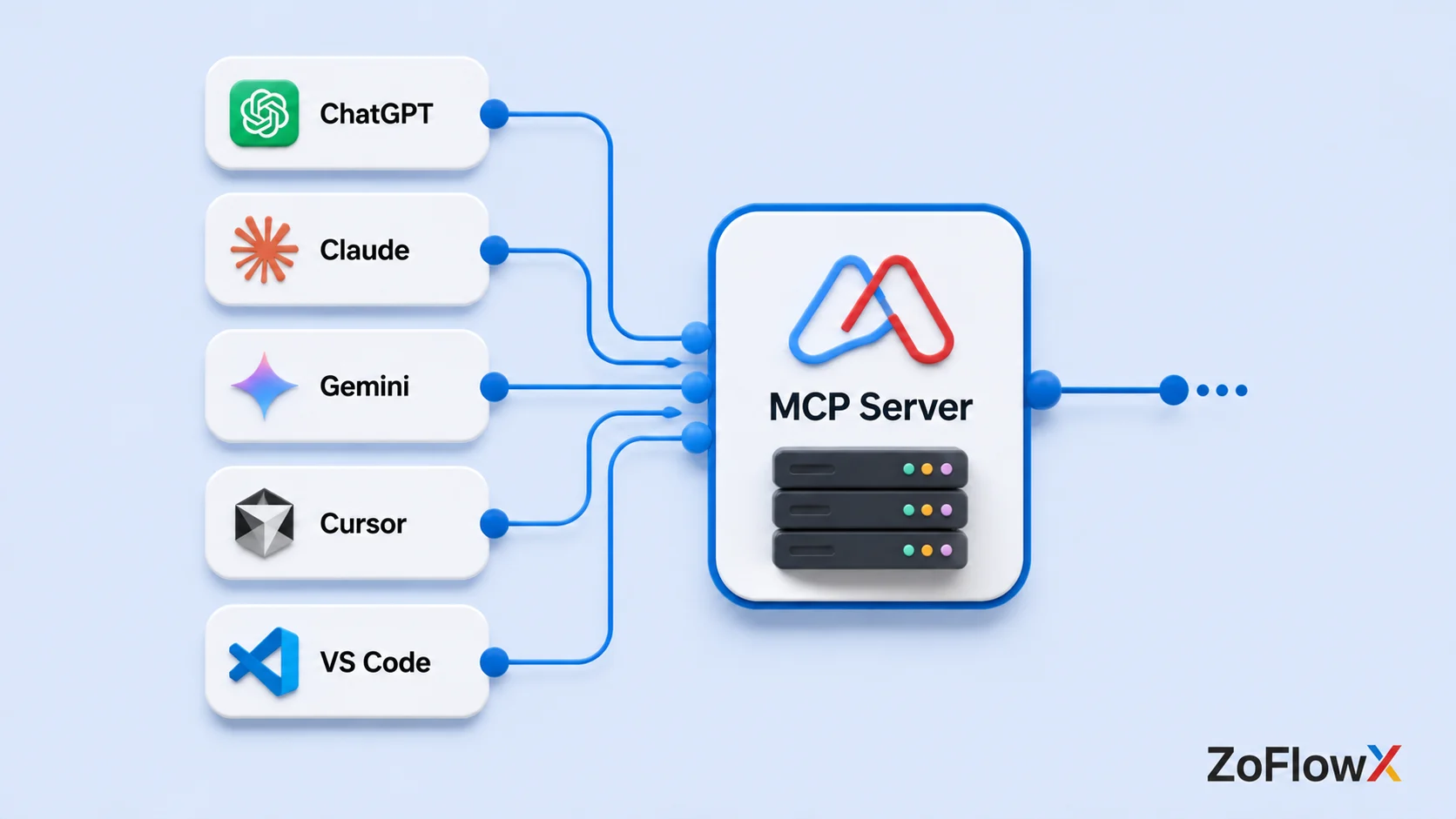
No, and this is the design decision that matters most for anyone worried about betting wrong.
Zoho MCP is model independent. It uses an open protocol, so any client that supports the MCP protocol can connect. That includes Claude, ChatGPT, Gemini, Cursor, VS Code with an MCP extension, and agents you create yourself.
All of them use the same server URL. Your configuration and models are not changed.
For developers this also means your Zoho MCP work is portable knowledge. The AI Model Context Protocol you learn here applies to every other MCP server you ever connect to.
How Do You Connect an AI Client to Zoho MCP?
To connect an AI client to Zoho MCP, log in to the Zoho MCP console, create a server, add the tools required, authorize them using OAuth, copy the server URL and paste it into the MCP configuration of your AI client. The client then finds the available tools automatically.
The full walkthrough, in order:
- Sign in to the Zoho MCP console with your Zoho account. Browse the Zoho MCP knowledge base if you want the annotated version with screenshots.
- Set up a server, or select a pre-configured server. Common use cases such as CRM data and metadata operations are pre-configured, and additional and/or removal of tools can be done later.
- Add your tools. Search for services and then choose the actions you want to expose. Be deliberate here.
- Use OAuth 2.1 to authorize each addition. You will select between Authorization on Demand (each user logs in separately) and Authorization via Connections (Super Admin distributes tokens throughout the org).
- Copy the server URL. It is generated by Zoho with an embedded API key. Use it as a password, as anyone who has it can activate all the tools on that server. You can regenerate the key if it leaks.
- Copy it to your AI client where custom MCP connectors are set up.
- Test with a read-only prompt first. Ask it to fetch something before you let it write anything.
- Check the Logs tab. Every tool invocation is indexed with an HTTP status code and retained for 30 days.
Step 8 is the one people skip and later regret. Logs are the way to discover that your prompt caused the wrong tool to be used, and to audit what the AI actually did on your data.
If you are rolling this out across a team, the Collaborators feature lets you invite members as Admin or User so they share your servers without sharing credentials.
Is Zoho MCP Secure Enough for Real Business Data?
Yes, with the caveat that security here is a shared responsibility.
What Zoho offers: OAuth 2.1 authorization, permission scoping that aligns with your current Zoho roles, two different authorization models, re-generatable API keys, and 30 days of indexed access logs.
An AI connected via Zoho MCP will not be able to view anything that the authorizing account could not view. It does not override your permission structure, it inherits it.
What to put on you: Minimize the scope of tools, select the appropriate authorization mode, review logs, and protect the server URL. Under Authorization on Demand, auditing is much more specific, as actions are associated with individual ZUIDs instead of a common token.
For teams handling regulated data, Authorization on Demand with narrowly scoped servers is the setup I recommend without hesitation.
Who Is Zoho MCP Actually For?
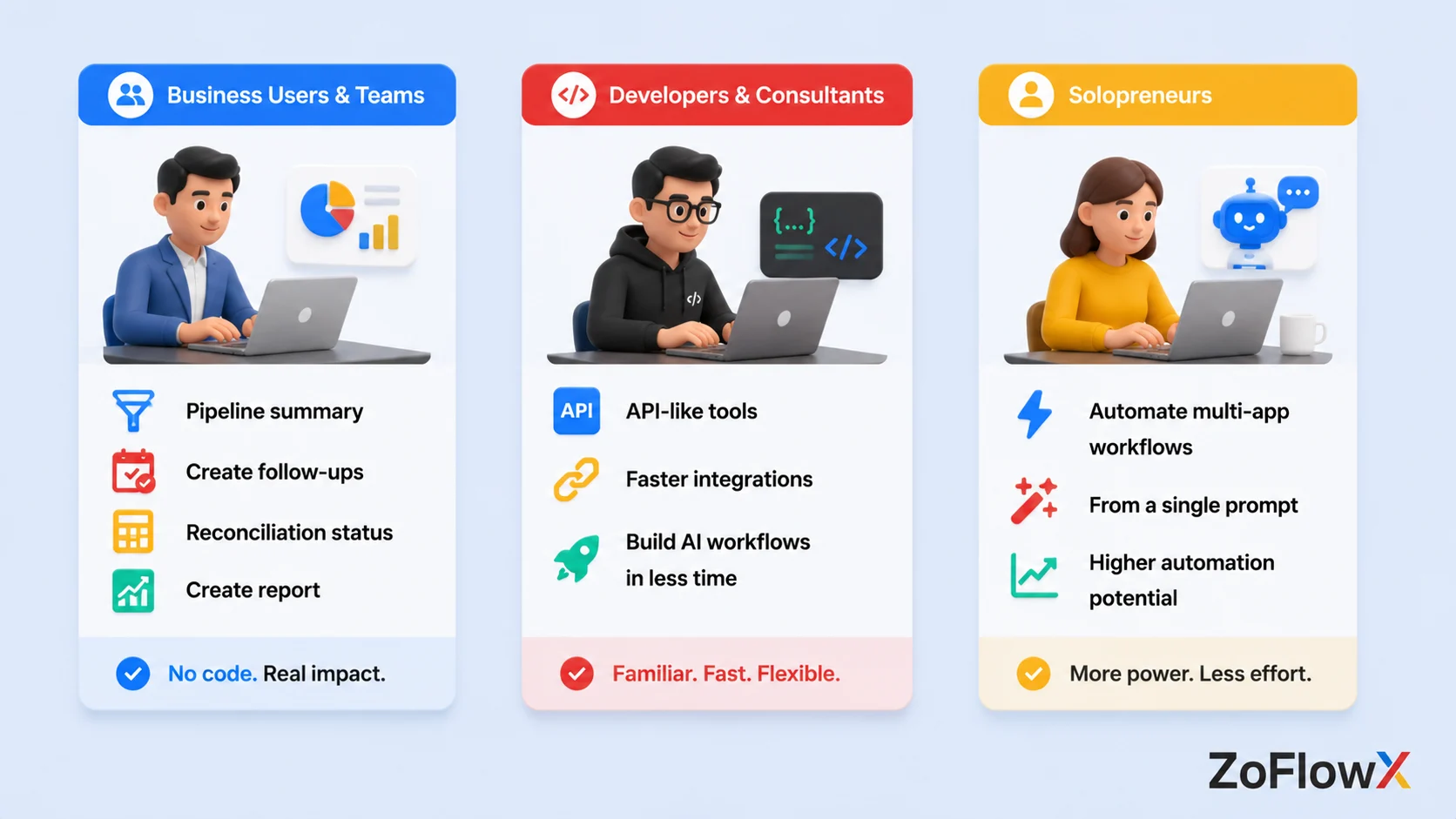
For business users and operations teams: pre-configured servers and the visual console allow you to have a working setup without coding. The value is reflected in everyday work. Request a pipeline summary, create follow-ups, request a reconciliation status, create a report.
For developers and consultants: it's a much quicker route to AI-powered workflows than creating custom integrations. The tools are mapped close to one-to-one with the API endpoints, so if you know the Zoho REST API, you know approximately what tools are available and how they work.
For solopreneurs: the automation ceiling rises considerably. Multi-app sequences that previously needed a paid orchestration tool now run from a prompt.
The one group I would advise to wait: organizations with truly disorganized Zoho data. AI magnifies what is below. The implementations that are most successful are those in which the data model was already good before MCP came along, according to ZoFlowX.
What Zoho MCP Cannot Do
It's worth saying clearly, the marketing doesn't.
Zoho MCP is not AI. It is a service to build MCP servers. All reasoning is from your MCP client.
Tools only exist where a service chose to expose them. Zoho Mail offers a tool to send email, but not one to download attachments. If the tool does not exist, no amount of prompting will conjure it. The Zoho MCP glossary is a useful reference when you are working out what a given term or capability covers.
When an AI client doesn't do what you want, it's almost always one of three reasons. The correct tool was not set up. The prompt was unclear. Or the service just doesn't have that action.
Wrapping Up: Should Zoho MCP Be on Your Roadmap?
If you are already using Zoho for your business, Zoho MCP is the most leveraged thing you can do this quarter. It requires years of data collection and can be integrated with any AI assistant your team already uses, across 300+ MCP-ready applications.
The benefits stack up fast. Real-time context instead of guesswork. Cross-app workflows triggered by a sentence. No model lock-in. Security that inherits your existing Zoho permissions.
Start small. One scoped server, read-only tools, one team. Prove the value, then widen the scope.
If you would rather have it built properly the first time, talk to us. Working with ZoFlowX - Your Trusted Zoho Partner means the setup is right before it ever touches production data.
Call +91 8190009222 or email info@zoflowx.com and we will map your first MCP server on the call. Your competitors are already teaching their AI to run their business. The only question left is how long yours waits.
Your AI Is Sitting Idle While Your Competitors Automate Everything
Stop relying on AI that only answers questions. Empower it to securely access your Zoho apps, automate workflows, and save your team hours every week.
Book Your Free Zoho MCP Consultation NowFrequently Asked Questions
What is Zoho MCP?
Zoho MCP (Model Context Protocol) is a standardized way to connect AI assistants with Zoho applications and business data. It allows AI tools to securely access information from Zoho apps like CRM, Books, Desk, and Projects, enabling them to answer questions, automate tasks, and assist users more effectively. Instead of relying on manual inputs, the AI can work with real-time business context.
How does Zoho MCP work?
Zoho MCP works by acting as a bridge between AI models and Zoho applications. It follows the Model Context Protocol, allowing AI assistants to request data, perform approved actions, and retrieve relevant information from connected Zoho apps. Since the communication is standardized, developers can integrate AI capabilities without creating separate custom connections for every application.
What are the benefits of using Zoho MCP?
The biggest benefit of Zoho MCP is that it gives AI access to accurate, real-time business data. This leads to smarter responses, better automation, faster workflows, and reduced manual work. Businesses can use AI to summarize customer information, retrieve records, generate reports, and complete repetitive tasks while maintaining secure access to organizational data.
Which Zoho applications support MCP?
Zoho MCP can connect AI with multiple Zoho applications, depending on the available integrations. Common use cases involve apps like Zoho CRM, Zoho Desk, Zoho Books, Zoho Projects, Zoho Inventory, and other services within the Zoho ecosystem. The exact applications and capabilities may expand over time as Zoho continues developing MCP support.
Is Zoho MCP secure?
Yes, Zoho MCP is designed with security as a priority. It uses controlled authentication and permission-based access so AI assistants only retrieve data users are authorized to access. Organizations maintain control over what information is shared, reducing security risks while allowing AI to perform useful business tasks within approved boundaries.
Do I need coding knowledge to use Zoho MCP?
Not always. Whether coding is required depends on your use case. Business users may use prebuilt AI integrations that require little or no programming, while developers can use Zoho MCP to build advanced AI applications and custom workflows. The protocol simplifies development compared to creating separate integrations from scratch.
What is the difference between Zoho MCP and APIs?
Zoho MCP is designed specifically for AI interactions, while APIs are general-purpose integration tools. Traditional APIs require developers to define each request and response manually. MCP provides a standardized communication layer that helps AI models understand available tools, retrieve relevant context, and interact with Zoho applications more efficiently.
Why should businesses use Zoho MCP?
Businesses should use Zoho MCP to make AI more useful, accurate, and context-aware. Instead of answering generic questions, AI can access approved business data to provide personalized insights, automate workflows, assist employees, and improve customer support. This helps organizations increase productivity while making better use of their existing Zoho applications.