How to Migrate from Hubspot to Zoho CRM: A Complete Step-by-Step Guide
Introduction
Questions of how to move out of HubSpot to Zoho CRM without affecting your business? You're not alone. Every year, thousands of SMBs switch to it, and when properly done, it is not as time-consuming and insecure as most people might assume. This step-by-step guide on HubSpot to Zoho CRM includes all the steps, such as data preparation, data export, data import, field mapping, and post-migration verification, with ideas on how to transfer CRM data without losing data.
Why Switch from HubSpot to Zoho CRM?
Cost and flexibility are usually the determinants of the choices between switching HubSpot to Zoho CRM. HubSpot has paid plans which are costly when the list of contacts increases whereas Zoho CRM provides similar or better automation at a considerably lower cost. When comparing HubSpot and Zoho CRM, Zoho always dominates in terms of the cost of ownership of small and middle-sized businesses. Being one of the most popular HubSpot alternatives to SMBs, Zoho CRM offers AI-based sales forecasting, workflow automation, and multi-channel communication as the options included in each of the plans. Change HubSpot and cut your 70% on your CRM costs. Zoho CRM provides an enterprise-level feature of AI, automation, analytics, at a price the SMBs can afford.Lower Total Cost
Zoho CRM and HubSpot pricing in case of small business demonstrates up to 70 percent saving in the same sets of features.
Deeper Automation
The Blueprint and workflow tools in Zoho allow automating complicated sales processes as a default feature.
Broader Ecosystem
Built-in connections with 50+ Zoho applications Books, Desk, Campaigns - single-user.
Customisation
Premium add-ons and developer help are not available on custom modules, layouts, and fields.
Pre-Migration Checklist: Clean HubSpot Data Before Migration
An effective CRM data transfer that does not result in data loss begins way before you open a CSV file. The quality of data out of HubSpot is the quality of data in Zoho CRM so invest time here first. That can be considered CRM data cleaning prior to import: you are eliminating the noise that will only leave behind clean, structured records.- Before making the switch to CRM, back up HubSpot data first. Be sure to export a complete copy of all contacts, companies, deals, and activities in CSV format before making any changes.
- Pre-migration: Clean HubSpot data by removing invalid emails, incorrect phone numbers, and outdated lifecycle stages with missing information.
- Eliminate duplicate records – Use HubSpot’s built-in Merge Duplicates tool or a third-party deduplication tool to remove duplicates before exporting. Duplicate records are a common issue after migration.
- Normalise CRM data formats in Zoho – Ensure date fields are in DD/MM/YYYY format, phone numbers include international codes, and picklist values match those created in Zoho.
- Determine all custom properties in HubSpot before migration and map them to corresponding custom fields in Zoho CRM.
- Inform your team about the migration date and expected downtime (typically a few hours during CSV import).
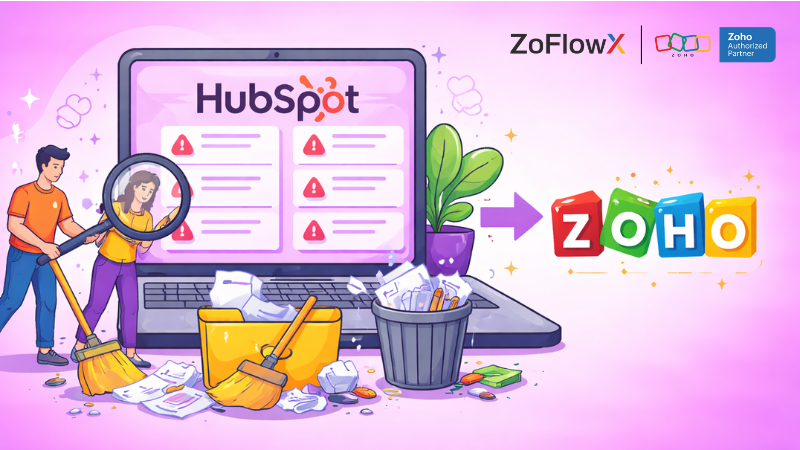
HubSpot to Zoho CRM Step-by-Step Guide
In this section, you will be taken through the entire procedure to migrate information in HubSpot to Zoho CRM, starting with the initial audit, to workflow configuration. Do not skip steps as it would result in mistakes and reworking.
These six steps are applicable whether you have 500 contacts or have 50,000 contacts. The only option is the use of the CSV method, an automated tool, or the API, which are discussed in the tools section below.
Step 1 · Audit & Clean HubSpot Data
Login into HubSpot and check your Contacts, Companies and Deals modules. Determine records that have no email address, lifecycle that is old-fashioned, or unfinished fields.
The first and the most important step towards data transfer without the loss of information in CRM is to use the inbuilt Merge Duplicates tool in HubSpot to eliminate the duplicate entries.
You should also add all of the custom properties that you have created in HubSpot to the list of those since each will require a corresponding custom field in Zoho CRM prior to import day.
Step 2 · Backup & Export CSV
Make a complete copy then touch anything. Select HubSpot, Contacts, Actions, Export all contacts and select CSV format. Export all the custom and standard properties.
The same thing with Companies and Deals. Name and date each file distinctly and uniquely e.g. hubspot contacts june2025.csv. This is the backup that you have on hand: should things go wrong at any stage of the import, you can always begin again with these files onboard without the slightest loss of any record.
Step 3. Map Fields: HubSpot → Zoho
Export your CSV to Excel or Google Sheets and open it there in combination with the Setups/Fields section of Zoho CRM. Check each column one by one and find the corresponding Zoho field of each HubSpot property - the company name of HubSpot will correspond to the account name of Zoho, the lifecycle stage to the lead status.
In the case of custom properties, you will need to make the corresponding custom field in Zoho CRM and then the data will not be imported at all. Record this mapping in a basic spreadsheet to allow your team to access it in the process of and after the migration.
Step 4 · Import via Zoho Wizard
In Zoho CRM, please, go to Setup Data Administration Import. Choose what you are importing - it is Contacts, Companies, and then Deals. Use the Zoho CRM Import Wizard to upload your cleaned CSV file and the column names will be automatically identified and field matches will be proposed.
Check all the mapping attentively prior to confirmation - be keen on the date formats, picklist value and phone number fields. Select the “Check for duplicates option to the email address so that Zoho automatically ignores or combines any existing record. Bringing in records in batches of 500-1000 records instead of at once, and therefore, any mistakes can be readily separated and corrected.
Step 5 · Validate & Test Records
After the import is done, counts of records should be cross-checked - the number of contacts in HubSpot must be the same as the number of contacts imported in Zoho. Then randomize 5-10 percent of records in Contacts, Deals and Companies and open up individual records to ensure that all fields including the custom ones have got the appropriate values.
Finally, the Deduplicate Records tool (Setup → Deduplicate Records) is built-in in Run Zoho. Test any web forms, email integrations, or third-party app connections feeding data into Zoho to ensure that they are routing properly after the migration.
When something appears wrong, the Undo Import feature of Zoho allows you to revert to a complete batch without any other records being changed.
Step 6 · Set Up Workflows & Train Team
The information is in Zoho - make it work. Re-create your HubSpot sequences and automations in Zoho CRM Workflow Rules and Blueprint modules. Begin with the most significant automations initially: lead assignment rules, deal stage triggers, and follow-up email sequences.
When automation is operational, conduct two brief training sessions with your team, one on navigation and record management, and the other on deals, reports, and automation. Send your team to the free training academy of Zoho to learn at their own pace and any internal SOPs that you have developed.
The process of Zoho CRM onboarding following a switch to HubSpot is not painful when your team is aware of where to locate what they require on the first day.
HubSpot to Zoho CRM Field Mapping
Most of the migrations slow down at HubSpot to Zoho CRM field mapping. HubSpot has its own naming scheme of standard properties and Zoho is structured differently - therefore a direct import without mapping will either place data in the wrong place or leave fields blank. The table below indicates the most frequent field mappings. In the case of custom fields, you will have to map custom fields HubSpot Zoho CRM manually in the import wizard and then complete the import. Zoho has official documentation on migration that offers further information on the types of fields, picklist values, and data validation rules when importing. Read it here: Zoho CRM - Migrating from HubSpot: Check for Data Accuracy → 📌 Zoho's official migration documentation provides additional guidance on field types, picklist values, and data validation rules during import. Read it here: Zoho CRM - Migrating from HubSpot: Check for Data Accuracy →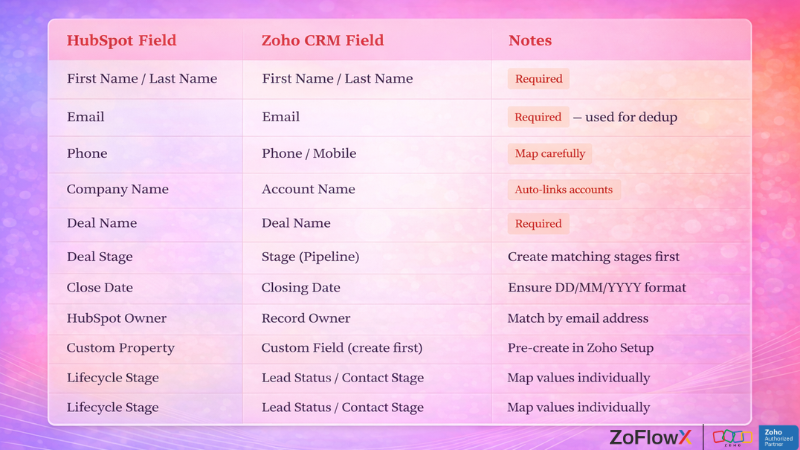
HubSpot to Zoho CRM Migration Tools - Which Method Is Right for You?
There are three main ways to transfer data from HubSpot to Zoho CRM: manual CSV import, an automated migration tool, or the API. They both have trade-offs based on your data volume, technical expertise, and budget. The CSV method is effective in most small businesses that have less than 20,000 records. In case of bigger or more complicated data, it is worth considering an automated tool or HubSpot API migration to Zoho CRM.CSV Import (Manual)
Export from HubSpot, clean in Excel or Google Sheets, import via Zoho's Import Wizard. Free, no technical skills needed.
Best for: <10k recordsAutomated Migration Tool
A HubSpot to Zoho CRM automated migration tool like Import2, Trujay, or Data2CRM handles the mapping, transfer, and validation automatically.
Best for: 10k–100k recordsHubSpot API to Zoho CRM
HubSpot API migration to Zoho CRM is the most flexible method - ideal for custom objects, activity logs, and real-time sync during transition.
Best for: Complex / large dataZoho CRM Data Migration Best Practices
Following Zoho CRM data migration best practices reduces risk and cuts down the time you spend fixing errors after go-live. The biggest mistakes happen when teams skip validation or try to import everything in one batch. These Zoho CRM data migration best practices apply whether you're importing 500 or 500,000 records - the process scales, but the principles stay the same.- Import in small batches (500–1,000 records) to isolate errors quickly.
- Always do a test import of 50–100 records prior to the actual migration.
- Roll back a batch with the Undo Import option of Zoho CRM in case something goes wrong.
- All custom fields, picklist values, and pipelines in Zoho should be created prior to data importation, not afterwards.
- Cross-reference record counts – the number of contacts in HubSpot must be the same as the number of contacts imported in Zoho.
Post-Migration: Validate, Configure, and Train Your Team
When your team is working comfortably within Zoho CRM, then the migration is complete. The post-migration Zoho CRM validation and workflow configuration are equally significant as the actual data transfer, and they should not be overlooked in the hurry to go live.
Allow yourself one week of post-migration testing before decommissioning your HubSpot account.
Post-Migration Validation Checklist
- Post-migration Zoho CRM validation: Spot-check 5–10% of imported records across contacts, companies, and deals for field accuracy.
- Confirm that deal stages, pipelines, and custom field values match your original HubSpot setup.
- Test email integrations, web forms, and any connected third-party apps.
- Run a duplicate check inside Zoho CRM (Setup → Deduplicate Records).
Zoho CRM Workflow Setup After Migration
The last step is rebuilding automation. Zoho CRM post-migration workflow configuration requires re-creating your HubSpot sequences, lead assignment rules, and deal stage automations within the Zoho Workflow Rules and Blueprint modules. Begin with your most voluminous automations first - lead assignment and follow-up sequences - and then proceed to edge cases.
Team Training for Zoho CRM After HubSpot
Budget at least two sessions for team training for Zoho CRM after HubSpot - one for navigation and record management, and one for deals, reports, and automation. The process of switching to Zoho CRM after HubSpot is easy when your team has access to the free training academy of Zoho and internal SOPs that are specific to your workflow.
Conclusion
In need of a reliable Zoho implementation partner, ZoFlowX focuses on end-to-end HubSpot to Zoho CRM migration services - including pre-migration audit and post-go-live support. We will draw a customised migration plan with a definite schedule, approximate cost, and risk management plan to ensure that you change without fear and no data loss. Not yet quite certain where to begin-- or what stage you are in? When you are interested in the specific step-by-step process of your case, when you can migrate, how much it will cost, and how long it will take, then we should discuss it. Schedule a free strategy call with our ZoFlowX migration team and receive a no-fluff plan in 30 minutes. Send us an email at info@zoflowx.com. We reply to every inquiry in a couple of hours. Give us your needs and we will get back to you with a clear migration plan - no jargon, no pressure.Final Thoughts
The ability to move out of HubSpot to Zoho CRM with confidence is reduced to a single factor: preparation. Clean your data, map your fields, test your import, validate your records, and train your team - and your HubSpot to Zoho CRM data migration will be seamless, quick, and complete.
Frequently Asked Questions
How do I migrate from HubSpot to Zoho CRM?
Export HubSpot contacts, companies, and deals in CSV files. Clean and de-duplicate the data and then import it into Zoho CRM through the Import Wizard under Setup Data Administration. Map every field and verify records post import.
Will I lose data when switching from HubSpot to Zoho CRM?
Not when you make the right preparations. Pre-import Back up all HubSpot data, delete duplicates, standardise formats, and enable the duplicate-check option in Zoho when importing. These steps will guarantee a clean transfer of data without loss of data.
How long does a HubSpot to Zoho CRM migration take?
A typical migration of less than 20,000 records can be completed in 1-3 days with preparation, importation, and validation. Bigger or more complicated datasets with custom fields and workflows can require 1-2 weeks.
What data can be migrated from HubSpot to Zoho CRM?
You are able to migrate contacts, companies, deals, notes, calls, emails, custom properties, and pipeline stages. HubSpot-native analytics and marketing email history cannot be directly ported but all core CRM records can be transferred cleanly.
Do I need technical skills to migrate from HubSpot to Zoho CRM?
No. The CSV import tool does not need any coding or technical skills. The Import Wizard of Zoho takes you through each step. But in the case of large databases or complicated custom objects, it is time and risk-saving to hire a migration specialist.
How do I map fields from HubSpot to Zoho CRM?
In the Zoho CRM Import Wizard, the tool automatically proposes field matches based on your CSV columns. Check them all by hand - particularly custom fields, picklist values and date formats. Before importing, create any custom fields that are missing in Zoho Setup to ensure that no data is missed.
How much does a HubSpot to Zoho CRM migration cost?
CSV migration is free of charge. Automated systems such as Import2 or Trujay are priced at $100-500 based on the volume of records. The cost of a professional migration service is usually between 500 and 3000 dollars depending on the complexity, volume of data and the location of the agency.
Is Zoho CRM better than HubSpot for small businesses?
Yes, to the majority of small businesses. Zoho CRM provides similar automation, AI capabilities, and reporting at a maximum of 70% of the price of HubSpot. It is also natively integrated with the broader Zoho ecosystem Books, Desk, Campaigns, without any extra charges.
Can I migrate HubSpot workflows to Zoho CRM?
HubSpot workflows are not directly importable to Zoho. You will have to re-create them manually with the help of Zoho Workflow Rules and Blueprint modules. Rebuild edge cases after you have your largest volume automations, lead assignment and follow-up sequences.
What should I do after completing the HubSpot to Zoho CRM migration?
Conduct a complete post-migration verification - verify record counts, sample 5-10 percent of records, and verify all integrations. Next, restructure your processes in Zoho, establish pipelines, and conduct two onboarding sessions with your team before completely decommissioning HubSpot.