Zoho CRM Integration with Mailchimp : Automating Email Marketing From CRM Data
- Zoho CRM integration with Mailchimp connects your sales database to your email marketing tool so contacts, tags, and campaign results move between both apps automatically, without anyone copying spreadsheets.
- You can integrate Zoho CRM with Mailchimp in three ways: the ready-made Mailchimp extension inside Zoho CRM, Zoho Flow for rule-based automation, or a custom API build for complex setups.
- The sync can run one-way or both ways, and you decide exactly which fields, modules, and contacts travel across.
- Once connected, opens, clicks, and unsubscribes flow back into CRM records, so your sales team knows who is actually paying attention.
- A clean Zoho Mailchimp integration removes duplicate contacts, protects opt-out preferences, and keeps your sender reputation safe.
- Most setup problems come from poor field mapping and unclear sync direction, not from the software itself.
Zoho CRM integration with Mailchimp is a connection between your CRM database and your Mailchimp account that keeps contact details, audience lists, and campaign engagement data in sync automatically. Instead of exporting a CSV every Monday morning, Your leads and customers are added to the correct Mailchimp audience automatically, and the results of each campaign are added back to the CRM record where your sales team can view them.
That single change fixes a problem almost every growing business runs into. Sales lives in one tool. Marketing lives in another. No one knows which list is the current one.
Let's walk through how the whole thing works, what it takes to set it up, and what you should watch out for along the way.
What Is Zoho CRM And Mailchimp Integration, And Why Does It Matter?
Zoho CRM and Mailchimp integration is a bi-directional data flow between Zoho CRM and Mailchimp. It syncs leads, contacts, and custom fields into Mailchimp audiences, then pushes campaign results such as opens, clicks, bounces, and unsubscribes back into CRM records so sales and marketing work from one shared, always-current view of every customer.
Think of your CRM as the memory of your business. It knows who asked for a quote, who bought last March, and who went quiet after a demo.
Mailchimp is the voice. It's how you actually speak to those people at scale.
Without a connection between them, the voice has no memory. You end up emailing a "new subscriber" welcome sequence to a customer who has been with you for three years.
Example:
Priya runs a furniture studio in Coimbatore. She has 4,200 contacts in Zoho CRM but only 2,600 in Mailchimp, because the last export happened in February. Every new enquiry since then has never received a single email. That gap is quietly costing her enquiries she already paid for.
According to ZoFlowX, this exact gap between "leads captured" and "leads actually contacted" is the most common revenue leak we find during Zoho CRM email marketing audits.
How Does The Zoho CRM Integration With Mailchimp Actually Work?
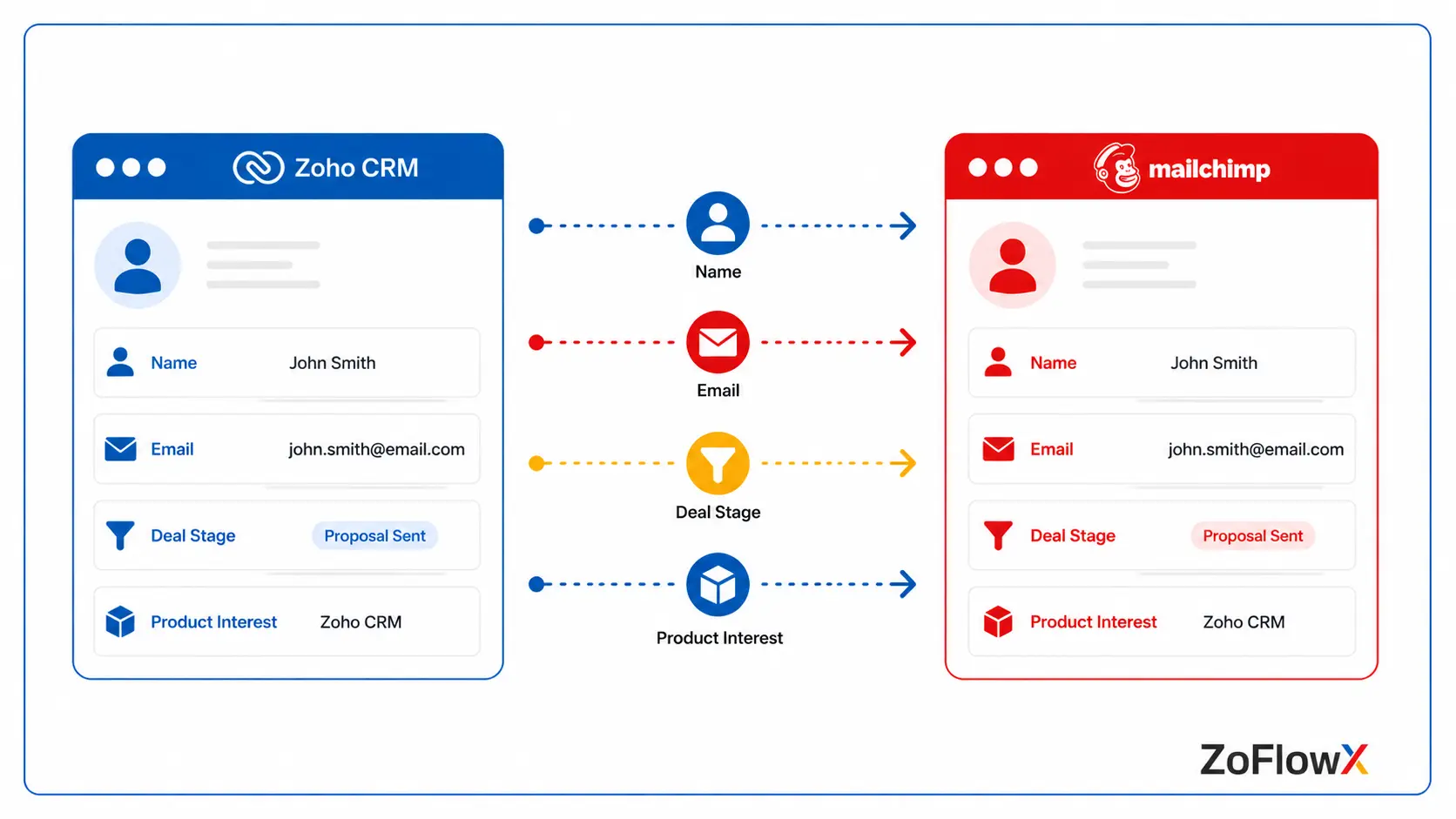
The connection works through an authorised link between your two accounts. You log into both, approve access once, and then decide what should travel and in which direction.
After that, the system does the repetitive work in the background.
What data moves between the two apps?
Most businesses sync these pieces:
- Contact and lead details - name, email address, phone, company, city
- Custom CRM fields - deal stage, product interest, plan type, last purchase date
- Audience membership - which Mailchimp audience or tag a person belongs to
- Subscription status - subscribed, unsubscribed, cleaned, pending, transactional
- Campaign engagement - opens, clicks, bounces, and unsubscribes coming back into CRM
- Campaign records - so you can see which email a lead received before they replied
Which direction should your data flow?
You get three practical choices, and picking the right one early saves a lot of cleanup later.
One-way, CRM to Mailchimp. Your CRM is the master record. New leads and contacts flow out to Mailchimp audiences. This suits most sales-led businesses.
One-way, Mailchimp to CRM. Your newsletter and signup forms feed Mailchimp first, and those subscribers become CRM leads. This is ideal for content-rich or ecommerce sites.
Two-way sync. Both systems are updated. It is the most comprehensive, but requires careful rules to ensure that a change in one location does not affect good data in the other.
What happens when someone unsubscribes?
This is the part people forget. When a contact hits "unsubscribe" in a Mailchimp email, that status can flow straight back into Zoho CRM and tick the email opt-out field on their record.
Your sales team then sees it instantly, and you stay on the right side of consent rules.
What Are The Different Ways To Connect Both Platforms?
There isn't one single method, and the right choice depends on how complicated your data is.
The ready-made Mailchimp extension in Zoho Marketplace
Zoho offers a Mailchimp extension you install directly from the Marketplace inside your CRM. Once installed and authorised, it adds dedicated modules to your CRM for Mailchimp audiences, segments, and tags.
From there you choose your sync direction, decide whether to sync everything or only selected contacts, and map your fields.
A few practical notes before you start:
- Please verify your Zoho CRM edition first, as some Marketplace extensions are available only for Enterprise and above.
- If you have regional data rules, then it matters that Mailchimp stores data in its US data centre.
- Some list data and custom fields are permanently deleted if you ever remove the extension, so please export a backup first.
Zoho Flow for rule-based automation
Zoho Flow is Zoho's no-code automation builder, and it handles the "if this, then that" logic the standard extension doesn't cover.
You can build flows such as:
- If a deal is Closed Won in CRM, remove them from the prospect audience from CRM and include them in the Customer audience.
- If a person clicks on a specific link in a Mailchimp campaign, generate a follow-up task for the salesperson assigned to the task
- If the Mailchimp email is opened 3 times, update a lead score field in the CRM.
This is where you truly begin to automate email marketing with Zoho CRM versus copy contacts across.
A custom API build for complex data models
When you have multiple CRM instances, multiple mailchimp accounts, or some weird custom modules, a custom-built solution with both APIs provides complete control.
It is a path that we typically recommend when the business has multiple lines of products or operates in multiple countries and is also a part of our service - Zoho integration.
How Do You Set Up The Connection Step By Step?
Connect Zoho CRM to Mailchimp by installing the Mailchimp extension from Zoho Marketplace, authorising both accounts, configuring the direction of sync, choosing the CRM modules and views that you want to synch, mapping CRM fields to Mailchimp merge fields, running a test batch and then enabling the sync and checking the audit log.
Here's the practical sequence most teams follow:
- Spend time in cleaning up your CRM data first. Add together duplicate records, correct any email formatting errors, and delete records without an email address. A messy database will only result in a messy audience.
- Decide your master system. Choose whether CRM or Mailchimp holds the truth for contact details. Write it down. Everyone on your team should know the answer.
- Install and authorise the extension. In Marketplace, search for Mailchimp, install it, and log in to your Mailchimp account to accept the permissions.
- Select your modules and views. Select Leads, Contacts or both, and use a custom view to narrow it down to just the records you want to sync.
- Map your fields carefully. Email, last name, and opt-out usually map by default. Add your own fields like city, product interest, or plan type, because these become your segmentation fuel later.
- Run a test with 20 records. Never start with 4,000. Check that names, tags, and opt-out flags landed correctly.
- Turn on the full sync and watch the logs. Review the sync audit for failures in the first week and fix any field mismatches.
For instance, a small SaaS enterprise has established their Mailchimp CRM assimilation but neglected the 5th step. The "Plan Type" field is not mapped across so all customers got the free-trial nurture sequence including the annual subscribers. The field mapping could have taken 10 minutes, instead of a week of apology e-mails.
How Do You Sync Contacts Without Creating Duplicates?
Duplicates are the number one complaint after a rushed setup, and they're avoidable.
Use email address as the unique identifier on both sides. That's the one field that reliably matches a person across two systems.
Then apply these habits:
- Deduplicate before you connect, not after. Zoho CRM's own duplicate check tools handle this well.
- Sync filtered views, not entire modules. A view like "Contacts with valid email and marketing consent = Yes" keeps junk out.
- Respect opt-out fields in both directions. If someone unsubscribed anywhere, they stay unsubscribed everywhere.
- Avoid two people editing the same record manually in both tools during the first sync window.
According to ZoFlowX, roughly three out of four "the integration is broken" complaints we investigate turn out to be duplicate records created by an unfiltered first sync, not a fault in the connection itself.
How Can You Segment Audiences Using Your CRM Data?
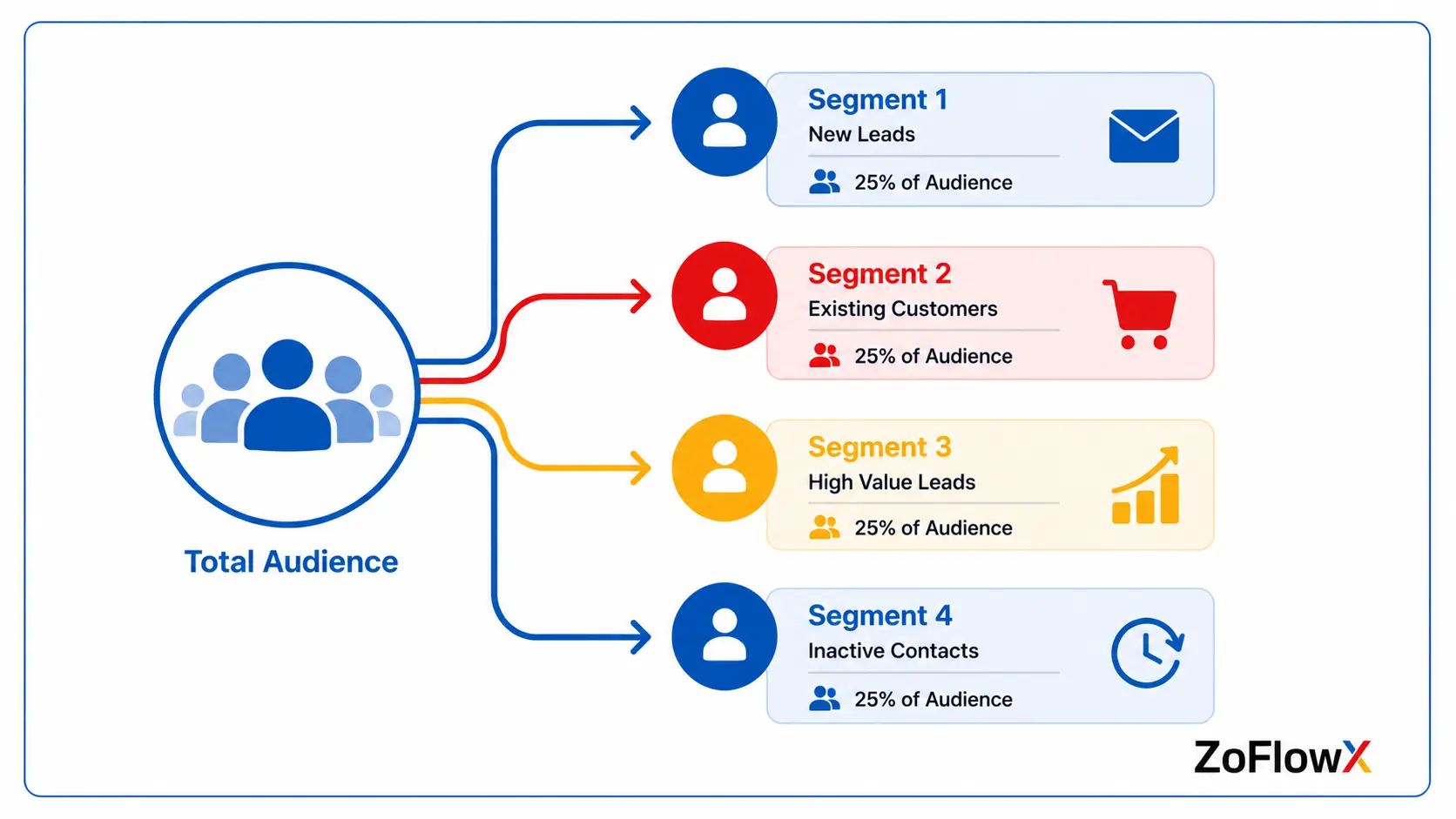
This is where the real value shows up, and it's the reason a proper Zoho CRM and Mailchimp integration pays for itself.
Mailchimp can only segment on the data it holds. Feed it richer CRM data, and your segments get sharper immediately.
Once your custom fields are flowing, you can build audiences like:
- Leads in the "Proposal Sent" stage who haven't replied in 14 days
- Customers who bought a specific product but never bought the accessory
- Contacts from a particular city, for a regional event invitation
- High-value accounts, for a separate premium newsletter
- Trial users approaching their expiry date
Example:
A gym chain syncs the "Membership Expiry Date" field from CRM into Mailchimp. Thirty days before expiry, a renewal sequence starts automatically. Nobody on the team touches a list. Renewals climb because the message arrives at exactly the right moment.
That's a small tweak that has a direct link to the bottom line.
What Email Marketing Tasks Can You Automate Once Everything Is Connected?
Here's what stops being manual work:
- Adding new leads to the right audience the moment they enter CRM
- Moving contacts between audiences when their deal stage changes
- Triggering a welcome sequence for new customers automatically
- Updating lead scores based on email opens and clicks
- Creating follow-up tasks for sales when a hot lead clicks a pricing link
- Suppressing existing customers from prospecting campaigns
- Pulling campaign results into CRM dashboards so you can see which emails influenced closed deals
The last one changes conversations internally. Instead of arguing about whether marketing emails "work," you can point at the deals they touched.
What Business Benefits Should You Realistically Expect?
A properly configured Zoho Mailchimp integration removes manual list exports, cuts duplicate records, improves segmentation accuracy, gives sales visibility into email engagement, protects deliverability by honouring opt-outs, and shortens follow-up time because reps are alerted the moment a lead engages with a campaign.
In plain terms, you get:
Time back. No more weekly exports, imports, and cross-checking.
Fewer embarrassing mistakes. Customers stop receiving prospect emails, and unsubscribed people stay unsubscribed.
Better targeting. Your emails feel relevant because they're built on real CRM context.
Faster follow-up. A rep who knows a lead just clicked the pricing page calls at the right moment.
Healthier deliverability. Clean lists and honoured opt-outs protect your sender reputation, which protects every campaign you send afterwards.
What Mistakes Do Businesses Usually Make During Setup?
We see the same handful repeatedly, and every one of them is preventable.
Syncing everything on day one. Start narrow. Expand once you trust the data.
Ignoring field mapping. If your CRM field names don't match Mailchimp merge fields, your personalisation tags break and your emails open with "Hi ,".
Choosing two-way sync without rules. Both systems then fight over which value is correct. Pick a master system.
Forgetting consent. Just because a contact is in your CRM doesn't mean they agreed to marketing emails. Filter for consent before syncing.
No monitoring after go-live. Check the sync logs weekly for the first month. Small failures compound quietly.
Example:
A distributor connected both systems, saw everything working on day one, and stopped checking. Three months later they discovered 900 new leads had never synced because of a single required field that was left blank on the web form. That's 900 people who never heard from them.
Who Should Handle Your Zoho And Mailchimp Setup?
If your data model is simple, a capable in-house admin can install the extension and map basic fields in an afternoon.
But if you have custom modules, multiple audiences, deal-stage-driven automation, or thousands of existing records that need deduplication first, bring in help.
Working with a certified Zoho partner means someone has done the migration, the field mapping, and the cleanup before, on other people's data, and knows exactly where the sharp edges are.
We build the connection, test it against your real records, document the rules, and hand you a system your team can actually run without calling anyone.
Bringing It All Together
Your CRM already knows who your best customers are, who's about to renew, and who went quiet last month. Leaving that knowledge locked away while you send the same email to everybody is the most expensive habit in modern marketing.
A well-built Zoho CRM integration with Mailchimp turns that stored knowledge into revenue. Your lists stay current on their own. Your segments reflect real buying behaviour. Your sales team finally sees which emails moved a deal forward. And you stop losing enquiries you already paid to generate.
The businesses that win here aren't the ones with the biggest lists. They're the ones whose data actually talks to itself.
If you'd rather not spend a fortnight learning field mapping, we'll set it up properly the first time. ZoFlowX has delivered Zoho implementations, migrations, and integrations for businesses across India, Australia, the USA, and Sri Lanka, and we build every connection to be tested, documented, and handed over clean.
Call us on +91 8190009222 or write to info@zoflowx.com, and our team will review your current setup and use our CRM integration expertise to recommend what your business needs before you spend a rupee.
Your competitors are already emailing your prospects with better timing than you are. Fix the gap now, and let your data start selling for you.
Ready To Stop Letting Good Leads Go Cold?
Every day your CRM and Mailchimp stay disconnected is another day of leads slipping quietly through the cracks.
Book Your Free Zoho Integration ReviewFrequently Asked Questions
Is Zoho CRM integration with Mailchimp free?
The extension itself is generally available through Zoho Marketplace, but access depends on your Zoho CRM edition, and several Marketplace extensions require Enterprise or higher. Your Mailchimp plan also matters, since advanced automation and larger audiences sit on paid tiers. Check both subscriptions before you begin. A short review of your current plans will tell you exactly what's included and whether an upgrade is genuinely necessary for your volume.
Can I sync data both ways between the two platforms?
Yes, two-way sync is supported, and it keeps both systems updated with each other's changes. That said, it needs clear rules about which system wins when the same field is edited in both places on the same day. Most businesses start with a one-way sync from CRM to Mailchimp, confirm the data is clean and accurate, then enable two-way sync once they trust the setup.
How long does it take to integrate Zoho CRM with Mailchimp?
A basic setup with clean data usually takes two to four hours, including installation, authorisation, field mapping, and a test batch. Larger projects involving duplicate cleanup, custom modules, historical campaign data, or multiple audiences typically run one to two weeks. The integration itself is quick. Preparing your existing database properly is what takes the real time, and skipping that step always costs more later.
Will the integration create duplicate contacts in Mailchimp?
Not if it is set up properly, as the email address is the unique identifier on both sides. Duplicates are almost always a result of a dirty CRM database that is synced without cleaning up or when the same contact is synced under two different email addresses. You will never have this problem if you run the duplicate check before your first sync, and if you sync a filtered custom view instead of an entire module.
Does campaign data come back into Zoho CRM?
Yes. Opens, clicks, bounces, unsubscribes, and campaign membership can flow back into CRM records so your sales team sees engagement without opening Mailchimp. This is one of the biggest wins from Zoho CRM email marketing automation, because a rep can look at a lead's record and immediately know which emails they received, which they opened, and what they clicked before picking up the phone.
What happens to unsubscribes and opt-out preferences?
Unsubscribe status syncs back to Zoho CRM and updates the email opt-out field on the contact record, so nobody accidentally emails someone who has opted out. This protects both your compliance position and your sender reputation. Always confirm this mapping during setup and test it with a real unsubscribe, because it's the single most important field in the entire integration.
Can I use Zoho Flow instead of the Mailchimp extension?
Yes, and many businesses use both together. The extension handles bulk contact and audience syncing well, while Zoho Flow handles conditional logic, such as moving a contact to a different audience when their deal stage changes. If your requirement is mostly "keep lists updated," the extension is enough. If it involves triggers and conditions, Zoho Flow gives you far more control.
Do I need a developer to set this up?
Not for a standard setup. The extension is installed and configured through the interface with no coding involved. You'll need developer or partner support if you're syncing custom modules, connecting multiple Mailchimp accounts, migrating historical campaign data, or building a custom API connection. Most businesses fall somewhere in between, where a few hours of expert guidance during setup prevents months of messy data.